
Sophos Fusion MCP Server (formerly Sophos Central)
Unofficial project, not from Sophos. This is a personal project by an individual. It is not an official Sophos product and it is not built, endorsed, supported, or warranted by Sophos. It calls the public Sophos APIs using credentials you supply. Use it at your own risk, and raise problems as issues on this repository rather than with Sophos support.
MCP (Model Context Protocol) server for the Sophos Fusion and Sophos Central APIs. Supports partner, organisation, and single-tenant credential types with automatic region routing. 360 tools covering 25 Sophos API namespaces: the Sophos Central REST APIs plus the Sophos Fusion GraphQL APIs (sophos_fusion_*). Install it as a Claude Desktop extension (.mcpb), run it with npx, or host it yourself over streamable HTTP.
The npm package, the .mcpb bundle and the binaries keep the sophos-central-mcp-server name so existing installs update in place.
Prerequisites
You need these before any of the install options below.
Sophos Central API credentials
Every install method needs a Client ID and Client Secret. The same credential authorises both the Sophos Central REST tools and the Sophos Fusion GraphQL tools; there is no second credential. The credential type decides what the server can see:
- Tenant-level: In Sophos Central, go to Settings > API Credentials Management and create a new credential. The server operates on that one tenant.
- Partner-level: In the Sophos Partner Dashboard, create API credentials under Settings > API Credentials. The server can query every tenant the partner manages.
- Organisation-level: In Sophos Central Enterprise, use Global Settings > API Credentials Management. Same cross-tenant behaviour as partner credentials.
Node.js 22 or later (npm and self-hosted installs only)
The .mcpb bundle for Claude Desktop does not need Node.js on your machine: Claude Desktop ships its own Node.js runtime and the bundle carries the server and all of its dependencies. Install Node.js 22+ only if you use the Claude Code or self-hosted options.
If you run the server in HTTP mode, use Node.js 22.23.4, 24.22.1, 26.12.1 or later, which fix the Brotli decoder bug CVE-2026-111497.
Install
Pick one:
| Option | Best for | Needs Node.js? |
|---|---|---|
| Claude Desktop extension (.mcpb) | Claude Desktop users who want a two-minute install | No |
| Claude Code | Terminal use with Claude Code | Yes |
| Self-hosted with npm | Running the server yourself for any MCP client, over streamable HTTP or stdio | Yes |
Option 1: Claude Desktop extension (.mcpb, recommended)
The .mcpb file is an MCP Bundle: a zip containing the built server, its production dependencies, and a manifest that tells Claude Desktop how to run it and which settings to ask for. No terminal and no config file edits.
- Download
sophos-central-mcp-server-<version>.mcpbfrom the latest GitHub release. - Open the file with Claude Desktop. Double-clicking it works on macOS and Windows. You can also go to Settings > Extensions > Advanced settings, find the Extension Developer section, click Install Extension... and pick the file.
- Claude Desktop shows the extension details and asks for your Sophos Central Client ID and Client Secret. Both fields are marked sensitive in the manifest, so Claude Desktop keeps them in the operating system's secure storage instead of a config file.
- Click Install, make sure the extension is enabled, then start a new chat. The
sophos_*tools are available straight away.
To update, download the newer .mcpb and install it the same way. To remove it, open Settings > Extensions and uninstall the extension.
To change the credentials later, open Settings > Extensions and click this extension. The Sophos Central Client ID and Client Secret fields are editable there. They are stored in the operating system's secure storage and show masked, so you replace a value rather than read the old one back. The server reads them at startup, so toggle the extension off and on, or restart Claude Desktop, if a change does not take effect.
The bundle runs the server in stdio mode and sets TRANSPORT=stdio for you. Which tools you get depends on the credential type, exactly as with the other install options: partner and organisation credentials unlock the cross-tenant tools, tenant credentials do not.
Option 2: Claude Code
Requires Node.js. Run this once in your terminal. The -e flags save the credentials permanently to Claude Code's MCP config so you don't need to re-export them each session:
macOS / Linux:
claude mcp add sophos-central \
  -e SOPHOS_CLIENT_ID="your-client-id" \
  -e SOPHOS_CLIENT_SECRET="your-client-secret" \
  -e TRANSPORT="stdio" \
  -- npx -y sophos-central-mcp-server
Windows (Command Prompt):
claude mcp add sophos-central ^
  -e SOPHOS_CLIENT_ID="your-client-id" ^
  -e SOPHOS_CLIENT_SECRET="your-client-secret" ^
  -e TRANSPORT="stdio" ^
  -- cmd /c npx -y sophos-central-mcp-server
Option 3: Self-hosted with npm (streamable HTTP or stdio)
Use this when you want to run the server yourself, on a workstation, a jump box, or in a container, for any MCP client that speaks streamable HTTP or can spawn a stdio process. Nothing here depends on the .mcpb bundle.
Install from npm:
npm install -g sophos-central-mcp-server
Or from source:
git clone https://github.com/Aaronjacobs000/sophos-mcp.git
cd sophos-mcp
npm install
npm run build
Configure. Either export the variables in your shell or put them in a .env file in the directory you start the server from. The full table is under Configuration.
SOPHOS_CLIENT_ID=your-client-id
SOPHOS_CLIENT_SECRET=your-client-secret
PORT=3100
TRANSPORT=http
Run:
sophos-central-mcp      # global npm install
npm start               # from a source checkout
With TRANSPORT=http (the default) the server listens on http://127.0.0.1:3100/mcp (MCP_HTTP_HOST and PORT change that) and answers GET /health with {"status":"ok","server":"sophos-central-mcp-server"}. The MCP endpoint is stateless: every request gets a fresh server and transport, so concurrent tool calls work. Point any streamable HTTP client at it, for example Claude Code:
claude mcp add --transport http sophos-central http://127.0.0.1:3100/mcp
With TRANSPORT=stdio the server speaks MCP over stdin/stdout and is meant to be spawned by the client, which is what Options 1 and 2 do for you.
By default the HTTP server binds to 127.0.0.1 and has no authentication. It refuses any request with a browser Origin other than localhost, 127.0.0.1, [::1] or one listed in MCP_ALLOWED_ORIGINS, so a web page cannot drive it by cross-site POST or DNS rebinding. MCP clients that are not browsers send no Origin, so this does not affect them, on this machine or another.
Using it from other machines
To let agents on other machines use the server:
-
Make a token, for example
openssl rand -hex 32. -
Start the server listening on the network, with the token:
MCP_HTTP_HOST=0.0.0.0 MCP_HTTP_TOKEN=<token> TRANSPORT=http npm start0.0.0.0listens on every interface. To listen on one only, use that interface's address, such as a LAN or Tailscale IP. -
Point each client at
http://<server>:3100/mcpand have it sendAuthorization: Bearer <token>. In Claude Code:claude mcp add --transport http sophos-central http://<server>:3100/mcp --header "Authorization: Bearer <token>"
Every /mcp request without the right token gets a 401. /health stays open. Without a token, anyone who can reach the port can use every tool with your Sophos credentials, and the server prints a warning at startup saying so.
Plain HTTP sends the token and tool results in clear text. On any network you don't fully trust, encrypt it: TLS through a reverse proxy (Caddy or nginx, say), or reach the server over Tailscale.
A browser based MCP client on another machine sends an Origin and is refused until you add that origin to MCP_ALLOWED_ORIGINS. Agents and CLI clients need nothing there.
Build the .mcpb yourself (maintainers)
The bundle is produced by scripts/build-mcpb.mjs using the mcpb CLI, which is a dev dependency. From a source checkout:
npm install
npm run build:mcpb
The script:
- Compiles TypeScript to
dist/(vianpm run build). - Rewrites
manifest.jsonso itsversionmatchespackage.jsonand itstoolslist matches everyregisterToolcall insrc/tools/. Commit the result. The manifest in git is always the one that was last built. - Validates the manifest with
mcpb validate. - Stages
dist/,package.json,LICENSE, andmanifest.jsoninbuild/mcpb/and runsnpm ci --omit=devthere, so only production dependencies are bundled..mcpbignoreadds a few exclusions on top of the CLI's defaults. - Packs the staging directory into
release/sophos-central-mcp-server-<version>.mcpb.
build/ and release/ are git-ignored. To inspect a bundle without installing it, npx mcpb info release/<file>.mcpb prints its size and signature state, and npx mcpb unpack release/<file>.mcpb <dir> extracts it. Signing is optional; npx mcpb sign --self-signed release/<file>.mcpb adds a self-signed signature if you want one.
Tests (maintainers)
npm test
Builds, then runs the node:test suites in test/ with fetch stubbed: the Fusion GraphQL transport (including the HTTP 200 with errors case), the QL builder, the reference-data cache, and the path-keyed retry for the intermittent case-write fault, the migration guard, the policy assignment and web profile writes (body shapes, refusals, target lookups and read-back) against an in-memory policy store, the no-retry rule for a POST or mutation after a 5xx, the read-modify-write and PATCH update tools, the request shapes of the tools checked against the published specs, the request shapes of the October 2026 bulk endpoint, S/MIME and Search tools, the item and page totals the REST list tools report, the endpoint inventory's reduction to the latest snapshot and its stale flag, the AI Defense tools (request shapes, the HTTP 200 with errors case, not-found and deleted policies, the stale version hint, and the input checks that refuse before any call), read-only mode (the tool classification, the request guard refusing writes with no network call, and the default off), a registration check that lists all 360 tools over an in-memory transport and checks the descriptions for the measured warnings, the SOPHOS_FUSION_GRAPHQL_URL check, and the HTTP transport (Origin guard, bearer token, listen address, concurrent calls) run against an in-memory Sophos. Nothing in npm test reaches Sophos.
To exercise the Fusion tools against a live tenant, put credentials in .env (or export them) and run:
node scripts/fusion-smoke.mjs                  # read-only, tenant credential
node scripts/fusion-smoke.mjs <tenant-id>      # read-only, partner or organisation credential
node scripts/fusion-smoke.mjs --write          # plus the Fusion write tools on one new case
node scripts/fusion-smoke.mjs --write-classic  # plus the Classic case tools on one new case
node scripts/fusion-smoke.mjs --write-ai-defense  # plus the AI Defense policy writes on test policies
node scripts/fusion-smoke.mjs --all            # everything
It spawns the built server over stdio and calls the tools through an MCP client, so what runs is what a host runs. Read-only mode covers the reference data, the case list with filter and cursor variants, the newest case by short ID, its evidence, summary, comments and files, the detection search, a small Data Lake search (start, poll, one page of results), the not-found and legacy-ID refusals, the AI Defense reads (policies, previews, templates, activities, inventories, settings), and the Classic side: on a migrated tenant the migration refusal, otherwise the six Classic read tools. --write creates one case titled MCP smoke test <timestamp> (managed_by CUSTOMER), exercises comment add, edit and delete with the mention read-back, link create, update and delete, tag merge and replace, evidence add and remove_all, file upload, list and soft delete, the verdict clear on reopen, the one way door on new and the closed-case freeze, then closes it with a verdict and archives it (Fusion has no delete). --write-ai-defense creates policies named ZZ Claude MCP test <timestamp> ..., scoped to a made-up user so they enforce on nobody, then updates, enables, disables, clones and moves them (and reorders them when they are the only reorderable policies on the tenant), reads each write back and deletes them; it never writes the tenant settings. --write-classic creates, updates and deletes one Classic case; the Cases API requires an assignee and a detection that still exists, so set SMOKE_CLASSIC_ASSIGNEE (a tenant admin email) and, if needed, SMOKE_CLASSIC_DETECTION_ID (a recent detection ID). Every write is listed at the end. Existing cases are never modified.
Cutting a release: bump version in package.json, run npm run build:mcpb, commit package.json, package-lock.json, and manifest.json, tag, and attach the .mcpb from release/ to the GitHub release. Publish to npm as before so the Claude Code and self-hosted options pick up the same version.
Features
- Universal caller support: Works with partner, organisation, and tenant-level API credentials
- Multi-tenant: Partner/org callers can query across all managed tenants
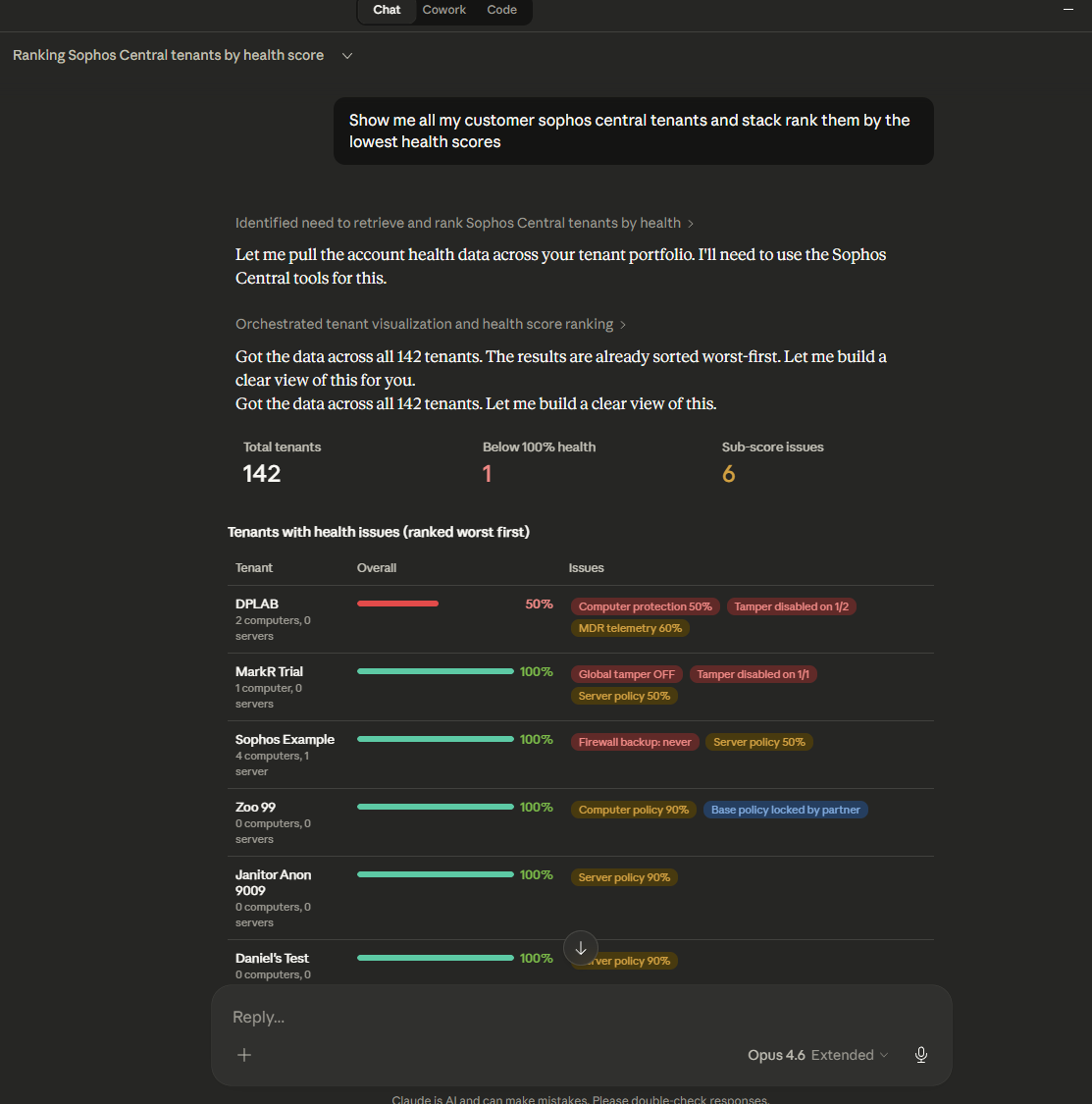
- Partner gap analysis: Single-call sales opportunity report across all managed tenants. Fetches health data in parallel and returns a compact ranked list of security gaps per customer
- Auto region routing: Discovers tenant data regions via
/whoami/v1and routes requests to the correct regional API host - Token lifecycle: Automatic OAuth2 token refresh before expiry
- Rate limit handling: Retry with backoff on 429 responses
- Dual transport: stdio (Claude Desktop, Claude Code, and the
.mcpbbundle) or streamable HTTP (self-hosted) - One-click install: Ships as a Claude Desktop extension (
.mcpb) with credentials held in the OS secure store - Two API generations: the Sophos Central REST APIs and the Sophos Fusion GraphQL APIs on one credential, with
sophos_fusion_*tools for the GraphQL side - Migration aware: the Classic case and detection tools refuse a tenant that has moved to Sophos Fusion and name the
sophos_fusion_*tool to use instead;sophos_fusion_list_case_reference_datareports the tenant type - Full API coverage: 360 tools across endpoints, alerts, policies, firewalls, web filtering, licensing, audit events, email (including S/MIME), mobile, XDR, Data Lake search, cases, AI Defense, SIEM, and more
Screenshots
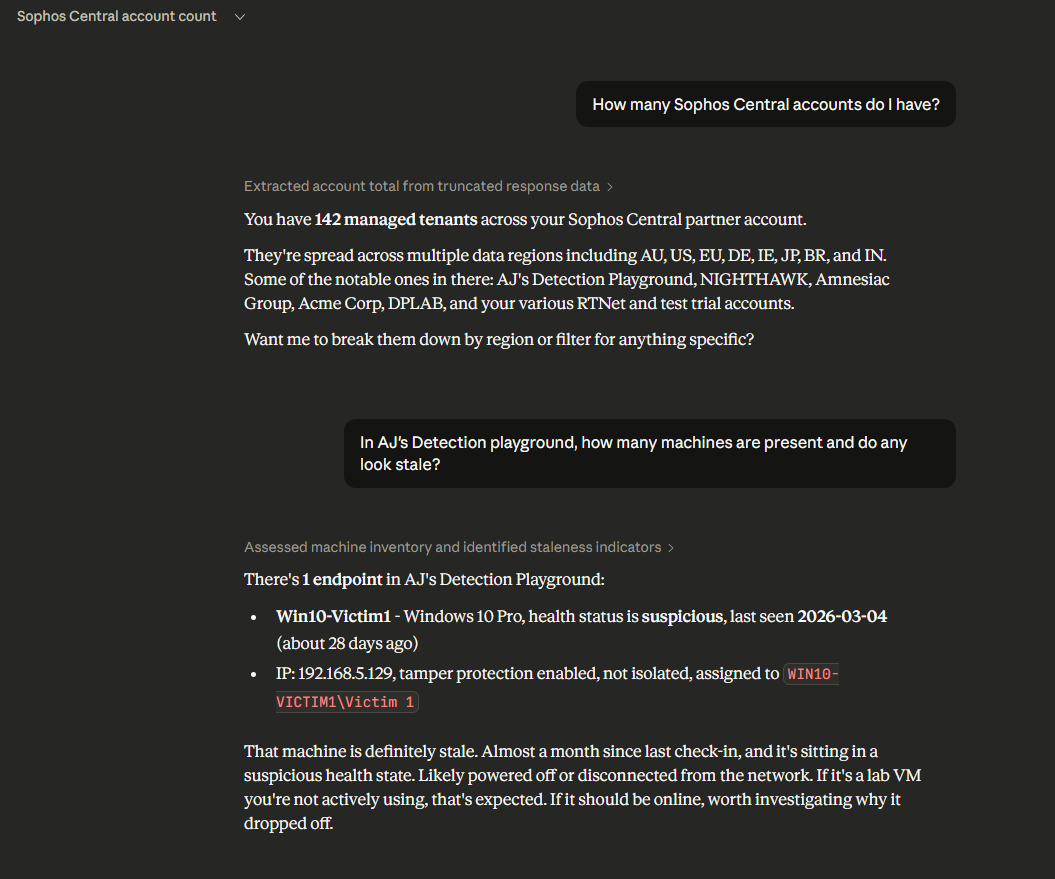
Querying tenants and drilling into endpoint status:
Tenant health audit with full category breakdown:
Configuration
Applies to the Claude Code and self-hosted options. The Claude Desktop extension asks for the credentials in its install dialog and sets TRANSPORT=stdio itself.
Copy .env.example to .env and set your credentials:
SOPHOS_CLIENT_ID=your-client-id
SOPHOS_CLIENT_SECRET=your-client-secret
PORT=3100
TRANSPORT=http
| Variable | Required | Default | Description |
|---|---|---|---|
SOPHOS_CLIENT_ID | Yes | - | OAuth2 client ID |
SOPHOS_CLIENT_SECRET | Yes | - | OAuth2 client secret |
PORT | No | 3100 | HTTP server port |
TRANSPORT | No | http | http for streamable HTTP, stdio for subprocess mode |
MCP_HTTP_HOST | No | 127.0.0.1 | Address the HTTP server binds to. 0.0.0.0 for every interface, or one interface's IP. See Using it from other machines |
MCP_HTTP_TOKEN | No | - | When set, every /mcp request needs Authorization: Bearer <token>. /health stays open. Set it whenever MCP_HTTP_HOST is not loopback |
MCP_ALLOWED_ORIGINS | No | - | Comma separated browser origins (https://host:port) allowed besides localhost ones. Only browser based clients need this |
CHARACTER_LIMIT | No | 50000 | Maximum characters per tool response before truncation (minimum 10000) |
SOPHOS_FUSION_GRAPHQL_URL | No | https://api.taegis.sophos.com/graphql | Sophos Fusion GraphQL endpoint. Override when the Fusion branded hostnames ship. Must be https on a sophos.com host, since the bearer token goes to it; the server refuses to start otherwise |
SOPHOS_CLASSIC_MIGRATION_CHECK | No | on | off skips the migration check on the Classic case and detection tools (they then run for every tenant) |
SOPHOS_READ_ONLY | No | off | true registers only the read tools and refuses any request that could write. See Read-only mode |
Read-only mode
Set SOPHOS_READ_ONLY=true when the server must not change anything in the tenants it can reach. It then has two guards, and either one stops a write by itself:
- It registers only the tools classified as reads in
src/read-only.ts(176 of the 360). Every write tool is left out, and so are 11 tools annotated read-only. Ten of them create something in the tenant or run on its devices: the detection, Data Lake, and Live Discover query runs, the Fusion Data Lake searches and the endpoint inventory built on them, the firewall config export, and the quarantine attachment downloads. The eleventh,sophos_get_ba_pricing, is a POST that might store something. A tool added later stays out until someone classifies it. - Every outgoing request passes a guard that refuses any method but GET and HEAD. The exceptions are the OAuth token request, Fusion GraphQL documents with no mutation or subscription, and four REST searches: alerts, quarantine, post-delivery quarantine, and firewall threat feed indicators. A refused call returns an error before a token is fetched or anything is sent.
true, 1, on, and yes turn it on. A value the server does not recognize stops it at startup.
Tools
Two API generations
The server speaks to two Sophos API generations on one credential:
- Sophos Central REST APIs (retained). Every tool without the
fusionprefix. Regional hosts, discovered from/whoami/v1. - Sophos Fusion GraphQL APIs (new, 18/09/2026). The
sophos_fusion_*tools. One endpoint,https://api.taegis.sophos.com/graphql, same token, sameX-Tenant-IDheader. Filters are written in Fusion Query Language (QL). Case types, statuses and verdicts are tenant reference data resolved to IDs at runtime, case severity is an integer (2 to 10), and assignees are Subject IDs, not email addresses. A GraphQL failure arrives as HTTP 200 with anerrorsarray; the client treats that as an error, and a partial response (data plus errors) is returned with awarningslist rather than as a clean result.
Sophos is moving tenants to Fusion over the coming months (the upgrade centre announces each account's slot). This is a point in time change, not a fallback: once a tenant has moved, the Classic Cases and Detections REST APIs reference the pre-migration Sophos Central objects, so their answers are wrong rather than stale. The Classic tools therefore check which world a tenant is in before every call, using the tenant record's xdrOwnership from the Fusion GraphQL endpoint (sophos means not yet upgraded, securityOperations means upgraded; case types don't decide it, because a tenant not yet upgraded can list them too; a tenant Fusion does not hold at all gets a 503 "not found or not accessible", which reads as not moved; each answer is held for 15 minutes, and when xdrOwnership can't be read, an empty case type list still means not moved and anything else runs the Classic tool with a warning), and refuse a migrated tenant with a message naming the sophos_fusion_* tool to use. For a tenant that has not moved they stay correct and carry no deprecation label. Fusion holds a separate case set (a UUID plus a short ID such as CSE00001 or E-01167) and neither ID form resolves in the other API. Live Discover and XDR Query are unaffected. Data Lake search over GraphQL shipped on 12/10/2026 as the Search GraphQL API (sophos_fusion_create_search and friends); the SQL XDR Query API stays available, and sophos_run_xdr_query stays on it. The AI Defense Policy and Activity GraphQL APIs shipped on 15/10/2026 and run on the same endpoint (sophos_fusion_ai_defense_*). Fusion tools for events, threat timeline and live endpoint search are planned.
Two Fusion case writes, createCase and addEvidenceToCase, fail 74% of the time with not allowed on partnerPreferences from investigations-v2. It is an intermittent downstream fault, not authorisation: the identical call succeeds on retry, and updateCase does not carry the fault at all. Measured on a live tenant 22/09/2026: 111 faults in 150 calls, drifting from 60% to 85% across four samples six minutes apart. The client retries a call whose first error path is partnerPreferences, and only that, up to 20 times with a short backoff, which leaves about 1 call in 410 failing at the measured rate and about 1 in 26 at the worst rate observed; an error naming the operation in its path is a real input or permission error and surfaces at once.
Partner & Organisation (17 tools)
These tools are only available with partner or organisation-level credentials. They operate across all managed tenants.
| Tool | Description |
|---|---|
sophos_list_tenants | List all managed tenants with IDs, names, and data regions (offset and limit page through them) |
sophos_create_tenant | Create a new managed tenant |
sophos_get_managed_tenant | Get managed tenant details |
sophos_list_partner_roles | List partner-level roles |
sophos_get_partner_role | Get partner role detail |
sophos_create_partner_role | Create a partner role |
sophos_delete_partner_role | Delete a partner role |
sophos_list_partner_permission_sets | List available partner permission sets, filtered by type, product or access |
sophos_list_partner_admins | List partner administrators |
sophos_get_partner_admin | Get partner admin detail |
sophos_create_partner_admin | Create a partner admin |
sophos_delete_partner_admin | Delete a partner admin |
sophos_list_partner_admin_role_assignments | List admin role assignments |
sophos_add_partner_admin_role_assignment | Add role assignment to admin |
sophos_delete_partner_admin_role_assignment | Remove role assignment |
sophos_get_billing_usage | Get billing usage for a specific month |
sophos_get_billing_summary | Billing usage for a month, totalled per customer |
Alerts (4 tools)
| Tool | Description |
|---|---|
sophos_list_alerts | List alerts with severity/category/product/date filters |
sophos_get_alert | Get full alert detail with allowed actions |
sophos_acknowledge_alert | Mark an alert as reviewed |
sophos_search_alerts | Advanced search with structured filters and sorting |
Endpoints (21 tools)
| Tool | Description |
|---|---|
sophos_list_endpoints | List endpoints with health/OS/hostname/isolation/last-seen filters (last_seen_before: "-P30D" with limit: 1 counts stale devices) |
sophos_get_endpoint | Get full endpoint detail |
sophos_scan_endpoint | Trigger an on-demand scan |
sophos_isolate_endpoint | Network-isolate a compromised endpoint |
sophos_release_endpoint | Release an endpoint from isolation |
sophos_delete_endpoint | Delete a specific endpoint |
sophos_bulk_delete_endpoints | Bulk delete multiple endpoints |
sophos_get_tamper_protection | Get tamper protection status and password |
sophos_toggle_tamper_protection | Enable/disable tamper protection |
sophos_get_adaptive_attack_protection | Get adaptive attack protection status |
sophos_toggle_adaptive_attack_protection | Enable/disable adaptive attack protection |
sophos_trigger_update_check | Trigger a software update check |
sophos_request_forensic_logs | Request forensic log upload |
sophos_get_forensic_log_status | Get forensic log request status |
sophos_request_memory_dump | Request memory dump from endpoint |
sophos_get_memory_dump_status | Get memory dump request status |
sophos_bulk_isolate_endpoints | Bulk isolate/release multiple endpoints |
sophos_get_endpoint_isolation_status | Get endpoint isolation status |
sophos_bulk_scan_endpoints | Scan up to 500 endpoints in one request |
sophos_bulk_reset_endpoint_health | Reset health to green and clear all alerts on up to 500 Windows and Linux endpoints |
sophos_bulk_update_tamper_protection | Turn tamper protection on or off, or generate a new password, on up to 200 endpoints |
Endpoint Settings (26 tools)
| Tool | Description |
|---|---|
sophos_list_installer_downloads | List available installer packages |
sophos_list_blocked_addresses | List blocked network addresses |
sophos_add_blocked_address | Add a blocked network address |
sophos_delete_blocked_address | Delete a blocked address |
sophos_list_local_sites | List web control local site definitions |
sophos_add_local_site | Add a local site for web control |
sophos_update_local_site | Update a local site |
sophos_delete_local_site | Delete a local site |
sophos_list_web_control_categories | List web control categories |
sophos_get_tls_decryption_settings | Get TLS decryption settings |
sophos_update_tls_decryption_settings | Update TLS decryption settings |
sophos_get_global_tamper_protection | Get global tamper protection settings |
sophos_list_detected_exploits | List detected exploits |
sophos_get_detected_exploit | Get exploit detail |
sophos_list_exploit_mitigation_categories | List exploit mitigation categories |
sophos_get_exploit_mitigation_category | Get category detail |
sophos_list_exploit_mitigation_apps | List exploit mitigation applications |
sophos_get_exploit_mitigation_app | Get application detail |
sophos_add_exploit_mitigation_app | Add application to exploit mitigation |
sophos_update_exploit_mitigation_app | Update exploit mitigation application |
sophos_list_ips_exclusions | List IPS exclusions |
sophos_add_ips_exclusion | Add IPS exclusion |
sophos_delete_ips_exclusion | Delete IPS exclusion |
sophos_list_isolation_exclusions | List isolation exclusions |
sophos_add_isolation_exclusion | Add isolation exclusion |
sophos_delete_isolation_exclusion | Delete isolation exclusion |
Endpoint Migrations (6 tools)
| Tool | Description |
|---|---|
sophos_list_migrations | List endpoint migration jobs |
sophos_get_migration | Get migration job details |
sophos_create_migration | Create a new migration job |
sophos_list_migration_endpoints | List endpoints in a migration |
sophos_list_recommended_packages | List recommended software packages |
sophos_list_static_packages | List static software packages |
Policies (7 tools)
| Tool | Description |
|---|---|
sophos_list_policies | List endpoint policies with optional type filter |
sophos_get_policy | Get full policy detail including all settings and assignments |
sophos_create_policy | Create a new endpoint policy, optionally assigned |
sophos_clone_policy | Clone an existing policy under a new name, optionally with a new assignment |
sophos_update_policy | Update policy name, enabled state, priority, settings, or the whole assignment |
sophos_set_policy_assignments | Replace, add or remove a policy's users, user groups, endpoints or endpoint groups |
sophos_delete_policy | Delete a policy |
Assignments take plain ID arrays. A policy applies either to users and user groups (a user policy) or to endpoints and endpoint groups (a device policy), never both; the kind follows which keys you send. Server policies take only server endpoints and groups, and computer policies only computer ones: the IDs are looked up first, because Sophos accepts a server on a computer policy without ever applying it. Endpoint groups are always sent with an endpoints key, because Sophos answers 500 to endpoint groups on their own. Every assignment write is read back by ID and the result shows what Sophos stored. A new policy can take up to about 25 seconds to show in sophos_list_policies; sophos_get_policy is current at once.
Web profiles: setting endpoint.web-control.web-profile-id also sends filter-by-web-profile.enabled true, without which Sophos keeps the old value, and turns on web-profile.enabled unless you set it. A new web control policy gets web-profile.enabled set explicitly (true with a profile, false for legacy settings) instead of the API's default of true. The settings are read back after the write. A profile is linked from the policy side; the profile tools do not send consumers, which Sophos ignores.
Endpoint Groups (7 tools)
| Tool | Description |
|---|---|
sophos_list_endpoint_groups | List endpoint groups |
sophos_get_endpoint_group | Get group detail with optional member list |
sophos_create_endpoint_group | Create a new endpoint group |
sophos_update_endpoint_group | Rename or update a group |
sophos_delete_endpoint_group | Delete an endpoint group |
sophos_add_endpoints_to_group | Add endpoints to a group |
sophos_remove_endpoint_from_group | Remove an endpoint from a group |
Exclusions & Allow/Block Lists (9 tools)
| Tool | Description |
|---|---|
sophos_list_exclusions | List global scanning exclusions |
sophos_add_exclusion | Add a scanning exclusion |
sophos_delete_exclusion | Delete a scanning exclusion |
sophos_list_allowed_items | List globally allowed items |
sophos_add_allowed_item | Allow an item by SHA256, path, or certificate |
sophos_delete_allowed_item | Remove an allowed item |
sophos_list_blocked_items | List globally blocked items |
sophos_add_blocked_item | Block an item by SHA256, path, or certificate |
sophos_delete_blocked_item | Remove a blocked item |
Account Health (3 tools)
| Tool | Description |
|---|---|
sophos_get_account_health | Get tenant health check scores |
sophos_list_account_health | Bulk health scores for all tenants (partner/org only) |
sophos_partner_gap_analysis | Gap analysis across all tenants (partner/org only) |
Directory Users & Groups (16 tools)
| Tool | Description |
|---|---|
sophos_list_users | List directory users |
sophos_get_user | Get user detail |
sophos_create_user | Create a directory user |
sophos_update_user | Update a user |
sophos_delete_user | Delete a user |
sophos_list_user_groups | List directory user groups |
sophos_get_user_group | Get user group detail |
sophos_create_user_group | Create a user group |
sophos_update_user_group | Update a user group |
sophos_delete_user_group | Delete a user group |
sophos_list_user_group_members | List members of a user group |
sophos_add_users_to_group | Add users to a group |
sophos_remove_user_from_group | Remove a user from a group |
sophos_list_user_group_policies | List policies assigned to a user group |
sophos_list_admins | List admin accounts and roles |
sophos_list_roles | List available admin roles |
Admin Management (12 tools)
| Tool | Description |
|---|---|
sophos_get_admin | Get admin detail |
sophos_create_admin | Create an admin account |
sophos_delete_admin | Delete an admin account |
sophos_list_admin_role_assignments | List admin's role assignments |
sophos_add_admin_role_assignment | Add role assignment to admin |
sophos_delete_admin_role_assignment | Remove role assignment |
sophos_get_admin_role_assignment | Get specific role assignment |
sophos_create_role | Create an admin role |
sophos_get_role | Get role detail |
sophos_update_role | Update a role |
sophos_delete_role | Delete a role |
sophos_list_permission_sets | List available permission sets, filtered by type, product or access |
Cases (9 tools)
Sophos Central Cases REST API. Correct for a tenant that has not moved to Fusion, and the only way to read its legacy cases (IDs like 1-598868). Refused for a tenant that has moved, with a pointer to the sophos_fusion_* tool to use (see "Two API generations").
| Tool | Description |
|---|---|
sophos_list_cases | List investigation cases |
sophos_get_case | Get full case details |
sophos_create_case | Create a new investigation case (the API requires an assignee and a detection that still exists) |
sophos_update_case | Update case status, severity, assignee |
sophos_delete_case | Delete a case |
sophos_list_case_detections | List detections linked to a case |
sophos_get_case_detection | Get specific detection detail |
sophos_list_case_impacted_entities | List impacted entities for a case |
sophos_get_case_mitre_summary | Get MITRE ATT&CK breakdown for a case |
Fusion Cases (21 tools)
Sophos Fusion Cases GraphQL API v2. Case IDs are UUIDs; short IDs (for example CSE00001 or E-01167) are accepted and resolved. Severity is 2 informational, 4 low, 6 medium, 8 high, 10 critical. Detection severity inside the case summary is a 0 to 1 float, a different scale from both the case severity and the Classic REST 0 to 10 detection severity; none of them convert. There is no delete: close the case (with a verdict when its type needs one), then archive it.
managed_by is required on create and split, and must be CUSTOMER (self managed). Sophos MDR cases (PROVIDER) can't be created through the API by design, so the tools refuse PROVIDER before any call; raise an MDR service request in Sophos Fusion instead. The same goes for a case type the tenant pins to PROVIDER, such as health_check. managed_by cannot be changed afterwards, and a case created without it is unclaimed, so the tool never omits it. Detection and event IDs on the evidence tools are six section resource names (alert://priv:event-filter:123456:1789526908712:<uuid>), which sophos_fusion_search_detections returns. Evidence writes are queued jobs that land category by category (an add showed after about 5 seconds, a three category removal took about 25 seconds), so read the evidence back with a poll; adding a detection also attaches its linked asset and events, and removing it does not retract them (remove_all does). Comment @mentions (@authorized_contacts, @customer, @sophos) fire wherever they appear, including in prose, and an unrecognised token is dropped silently, so the comment tools read the stored mentions back. Tags are merged on update unless replace_tags is set. A file sent as content_base64 travels inside the MCP message, which is capped at 10 MiB on stdio and HTTP, so it can be up to about 7.5 MiB. A larger message gets a JSON-RPC 413 over HTTP. Over stdio the MCP SDK closes the connection on it, and the server logs one line on stderr and exits. file_path reads the file on the server host and takes up to 50 MiB. File deletion is soft. Split and merge are irreversible and need a confirmation argument.
| Tool | Description |
|---|---|
sophos_fusion_list_cases | List cases with QL filters (type, status, verdict resolved to IDs), offset or cursor pagination |
sophos_fusion_get_case | Full case detail including key findings, verdict, links and processing status |
sophos_fusion_get_case_evidence | Detection, event, asset and saved-search source IDs attached to a case |
sophos_fusion_get_case_summary | Case plus its detections resolved in one batched call and a MITRE ATT&CK roll-up |
sophos_fusion_list_case_reference_data | The tenant type (tenant_type: upgraded, not_upgraded or unknown, from xdrOwnership) and the tenant's case types, primary statuses and verdicts (15 minute cache) |
sophos_fusion_create_case | Create a self-managed case: required managed_by (CUSTOMER; MDR cases need an MDR service request), type and status by name or ID, integer severity, Markdown key findings, genesis evidence |
sophos_fusion_update_case | Update fields, merge or replace tags, close with a verdict, reopen (verdict cleared), archive or unarchive; refuses frozen fields on a closed case rather than reopening it |
sophos_fusion_split_case | Move named evidence into a new self-managed case (irreversible, confirm_split) |
sophos_fusion_merge_cases | Merge source cases into a target and close them (asynchronous, irreversible, confirm_merge) |
sophos_fusion_list_case_comments | List comments (raw author IDs, resolved mentions, read state) |
sophos_fusion_add_case_comment | Add a comment and report which @mentions actually fired |
sophos_fusion_update_case_comment | Edit a comment or mark it read |
sophos_fusion_delete_case_comment | Delete a comment |
sophos_fusion_add_case_evidence | Attach detections, events, hosts or saved searches (asynchronous, RNs checked) |
sophos_fusion_remove_case_evidence | Detach evidence by source ID, or everything with remove_all (asynchronous) |
sophos_fusion_list_case_files | List a case's files (deleted hidden by default, download URLs on request) |
sophos_fusion_upload_case_file | Attach a file: register, PUT to the presigned URL, poll to UPLOADED |
sophos_fusion_delete_case_file | Soft delete a file |
sophos_fusion_create_case_link | Attach an external link (ServiceNow ticket, report) |
sophos_fusion_update_case_link | Change a link's URL, title, type or reference |
sophos_fusion_delete_case_link | Remove a link |
Fusion Detections (1 tool)
Sophos Fusion Detections GraphQL API v2. One QL search replaces the Classic run, poll, results triple. Source keyword alert; working example from alert severity >= 0.1 EARLIEST=-90d. Severity is a 0 to 1 float.
| Tool | Description |
|---|---|
sophos_fusion_search_detections | Search detections with QL; returns the resource-name IDs the case evidence tools take |
Fusion Search (4 tools)
Sophos Fusion Search GraphQL API v1 (12/10/2026): Data Lake searches in QL, the counterpart of the SQL XDR Query tools. Asynchronous: start a search, poll it by its URN until COMPLETE, check outcome.success (ALL, PARTIAL or NONE), then page the rows by cursor (up to 1000 per page). Working example from process earliest=-1h | fields host_id, image_path. Project with | fields: an unprojected search returns over 800 fields, so field metadata is off unless asked for. Results expire (30 days in testing). sophos_fusion_get_or_create_search reuses a matching search only when the query has absolute time bounds; a relative one (earliest=-1h) starts a new search each call. A search returns at most 10,000 rows, newest first, and its total then reads 10,000 however many rows matched (an aggregate counted 69,323 behind one), so a total of 10,000 means rows may be missing: count with | aggregate count, and narrow the query. A results page can take longer than 30 seconds (37 seconds measured), so the server waits up to 120 seconds for one.
Endpoint inventory: softwareinfo (installed applications), patchstate (installed OS patches, one row per KB) and inventoryinfo (device record). One snapshot per device per day, offline devices included, so check last seen with sophos_list_endpoints, or use sophos_fusion_endpoint_inventory below, which does that for you. Example from softwareinfo where product.name contains 'Chrome' earliest=-1d | fields host_id, device.hostname, product.name, product.version. inventoryinfo also holds device discovery events (metadata.event_code device_discovery, normalizer sophos-xdr-telemetry-normalizer): a device the endpoint saw on its network, filed under the reporting endpoint's host_id, with the seen device's IP and MAC and no hostname or OS. Drop them with where normalizer != 'sophos-xdr-telemetry-normalizer', as sophos_fusion_endpoint_inventory does.
| Tool | Description |
|---|---|
sophos_fusion_create_search | Start a QL search; returns its search URN and partitions |
sophos_fusion_get_or_create_search | Return a matching running or complete search, or start one |
sophos_fusion_get_search | Status, outcome, partition diagnostics and expiry of a search |
sophos_fusion_get_search_results | One page of rows from a search or partition, with totals and the next cursor |
Fusion Endpoint Inventory (1 tool)
Installed applications (softwareinfo), installed OS patches (patchstate) or the device record (inventoryinfo) from the Data Lake, reduced to each device's latest snapshot and flagged by when the device was last seen. The Data Lake keeps writing a daily snapshot for about 30 days after a device goes offline, so a snapshot dated today can describe a device that has been offline for weeks. Each device is matched on host_id (its endpoint ID) to lastSeenAt from the Endpoint API and marked stale (last seen more than stale_after_days ago, default 3), fresh, or unmatched (deleted, re-registered, or a third-party sensor). It shows what is installed, not what is missing: there is no CVE or missing-patch field.
Filter by endpoint_id, hostname, software_name (softwareinfo) or kb (patchstate), and return only stale, fresh or unmatched devices with status. The summary counts every device. For example, { schema: "softwareinfo", software_name: "Chrome" } lists each device's Chrome versions with its last seen. Calls with the same arguments in the same UTC hour reuse the same searches, so paging with offset is quick.
| Tool | Description |
|---|---|
sophos_fusion_endpoint_inventory | Latest inventory snapshot per device, with stale, fresh and unmatched counts |
AI Defense Policies (18 tools)
Sophos AI Defense Policy GraphQL API v1 (15/10/2026), on the Fusion GraphQL endpoint with the same credential. Policies run in priority order (rank 1 first) and rules run top to bottom within a policy; the first matching rule wins. One base policy (kind TENANT_BASE) sits last as the catch-all. Rules, sensors and the base rule keep the API's own field names, so you can read a policy with sophos_fusion_ai_defense_get_policy, edit it and send it back. A rule targets the app catalog with conditions such as { dimension: "risk_level", operator: "IN", values: ["critical"] }. A misspelled dimension matches nothing and raises no error, so preview a rule before you save it.
Measured on live tenants (07/11/2026): at least one sensor must be enabled. An empty Endpoint scope means everyone, which only the base policy may use, so enabling a policy with one is refused. Tag values must be strings. A new policy or clone lands at rank 1, disabled unless created enabled. Every write raises the policy's version, enable and disable included, and an update that sends a stale version is refused. On update, rules replaces the whole list and tags the whole map, but an empty tags map or null is ignored (08/11/2026), so tags can't be cleared through the API and the tool refuses an empty map. sophos_fusion_ai_defense_reorder_policies needs every reorderable policy ID. Deletion can't be undone. The base policy can't be disabled, deleted, cloned or moved, so creating one needs confirm_base_policy.
A policy write Sophos answers with no result (an enablePolicy once answered HTTP 200 with an empty body), or that fails with a 5xx, a timeout or a dropped connection, is not sent again: the tool reads the policy back and reports status: "unclear", took_effect (true, false, or null when the read can't tell), what it found and the state it read. The result is an error unless the change reads back in place. Create and clone have no ID to read, so their read-back looks for a policy with the expected name created since the request.
| Tool | Description |
|---|---|
sophos_fusion_ai_defense_list_policies | Policies in priority order with rules, sensors and scope; filter by state, origin, kind or name |
sophos_fusion_ai_defense_get_policy | One policy, optionally with the applications each rule matches |
sophos_fusion_ai_defense_get_app_sanctioning | Approved, blocked, warned or not covered, per app and per enforcement target |
sophos_fusion_ai_defense_preview_rule_target | The catalog apps one rule matches (up to 500) and the domains and apps it enforces |
sophos_fusion_ai_defense_preview_rule_targets | An ordered rule list, with what each rule acts on after the rules above it |
sophos_fusion_ai_defense_preview_impact | Blocked, warned and allowed counts for a rule list against the catalog |
sophos_fusion_ai_defense_list_templates | The starter templates Sophos ships, optionally with their impact |
sophos_fusion_ai_defense_get_template | One starter template with its impact |
sophos_fusion_ai_defense_list_mechanisms | The enforcement mechanisms (web control and app control) |
sophos_fusion_ai_defense_get_policy_activity | Which enabled policies matched activity in a window, and which blocked the most |
sophos_fusion_ai_defense_create_policy | Create a policy, optionally from a starter template |
sophos_fusion_ai_defense_update_policy | Change name, description, rules, base rule, sensors or tags (needs the current version) |
sophos_fusion_ai_defense_delete_policy | Delete a policy (no restore) |
sophos_fusion_ai_defense_enable_policy | Enable a policy and distribute it to its sensors |
sophos_fusion_ai_defense_disable_policy | Disable a policy and remove its enforcement |
sophos_fusion_ai_defense_move_policy | Move one policy to the top or straight after another |
sophos_fusion_ai_defense_reorder_policies | Set the whole priority order |
sophos_fusion_ai_defense_clone_policy | Copy a policy into a new disabled one |
AI Defense Activity (8 tools)
Sophos AI Defense Activity GraphQL API v1 (15/10/2026): the AI activity AI Defense observes, the app and user inventory built from it, and the tenant's AI Defense settings. The window defaults to since 00:00 UTC today. Set a relative time_range (such as SINCE_BEGINNING_OF_MONTH or LAST_MONTH) or start_time and end_time, not both. Activities page by cursor and the inventories by offset, up to 100 a page. A year of data took up to 22 seconds on a busy tenant, so the server waits up to 90 seconds for these reads.
The live API differs from the published reference in two places (07/11/2026). It does not serve the per-app training, compliance and category fields the reference lists on the app inventory, so the tool leaves them out; filter on them instead, or read them on an activity. The activities list returns additionalData as null where the reference says empty, and that fails the whole page, so source IP addresses come only from sophos_fusion_ai_defense_get_activity.
sophos_fusion_ai_defense_update_settings replaces the onboarding selections as a whole, and an update with no selections clears them as well, so the tool requires them. Read the settings first and send back what you keep. An update with no clear answer is read back the same way as a policy write: the settings must show the status and selections sent, and a base policy must exist when one was sent.
| Tool | Description |
|---|---|
sophos_fusion_ai_defense_list_activities | AI activity with action, policy, risk, user, app, model and device; filter by any of them |
sophos_fusion_ai_defense_get_activity | One activity with its source IP addresses |
sophos_fusion_ai_defense_list_app_inventory | AI apps seen, with risk, usage, users, last seen and unsanctioned use |
sophos_fusion_ai_defense_list_user_inventory | Users seen, with worst risk, apps used, violations and top app |
sophos_fusion_ai_defense_list_user_apps | The apps one user used |
sophos_fusion_ai_defense_inventory_summary | App and user counts by risk level |
sophos_fusion_ai_defense_get_settings | Onboarding status and selections, and the AI Defense license state |
sophos_fusion_ai_defense_update_settings | Set the onboarding status and selections |
Detections (6 tools)
Sophos Central Detections REST API, async: start a query, poll for completion, then fetch results. Refused for a tenant that has moved to Fusion, with a pointer to sophos_fusion_search_detections.
| Tool | Description |
|---|---|
sophos_run_detections_query | Start async query for individual detections |
sophos_get_detections_run | Poll detection query status |
sophos_get_detections_results | Fetch completed detection query results |
sophos_run_detection_groups_query | Start async query for grouped detections |
sophos_get_detection_groups_run | Poll detection groups query status |
sophos_get_detection_groups_results | Fetch completed detection groups results |
SIEM (2 tools)
| Tool | Description |
|---|---|
sophos_list_siem_events | Stream security events (cursor-based, last 24h default) |
sophos_list_siem_alerts | Stream security alerts (cursor-based, last 24h default) |
XDR Data Lake (9 tools)
Async API: submit SQL queries against historical telemetry.
| Tool | Description |
|---|---|
sophos_run_xdr_query | Start async SQL query against the Data Lake |
sophos_get_xdr_query_run | Poll XDR query run status |
sophos_get_xdr_query_results | Fetch completed XDR query results |
sophos_list_xdr_query_runs | List XDR query runs |
sophos_cancel_xdr_query_run | Cancel a running XDR query |
sophos_list_xdr_query_categories | List XDR query categories |
sophos_get_xdr_query_category | Get XDR query category detail |
sophos_list_xdr_queries | List saved XDR queries |
sophos_get_xdr_query | Get saved XDR query detail |
Live Discover (4 tools)
Async API: run OSquery SQL on live endpoints. Rate limited to 10 runs/minute, 500/day.
| Tool | Description |
|---|---|
sophos_list_live_discover_queries | List available saved OSquery queries |
sophos_run_live_discover_query | Run a saved or ad hoc query on live endpoints |
sophos_get_live_discover_run | Poll Live Discover run status |
sophos_get_live_discover_results | Fetch Live Discover results |
Firewall (21 tools)
| Tool | Description |
|---|---|
sophos_list_firewalls | List managed firewalls |
sophos_update_firewall | Update firewall properties |
sophos_delete_firewall | Delete a firewall |
sophos_firewall_action | Perform an action (approveManagement, the only documented action) |
sophos_check_firmware_upgrade | Check firmware upgrades for a set of firewalls |
sophos_start_firmware_upgrade | Start or schedule firmware upgrades |
sophos_cancel_firmware_upgrade | Cancel scheduled firmware upgrades |
sophos_list_firewall_groups | List firewall groups |
sophos_get_firewall_group | Get firewall group detail |
sophos_create_firewall_group | Create a firewall group |
sophos_update_firewall_group | Update a firewall group |
sophos_delete_firewall_group | Delete a firewall group |
sophos_get_firewall_sync_status | Get sync status of the firewalls in a group |
sophos_get_threat_feed_settings | Get a firewall's MDR threat feed |
sophos_update_threat_feed_settings | Update a firewall's MDR threat feed settings |
sophos_search_threat_feed_indicators | Search a firewall's MDR threat feed indicators |
sophos_get_firewall_transaction | Poll a per-firewall transaction (threat feed ops) |
sophos_export_firewall_config | Start a config export (backup) of a firewall |
sophos_get_firewall_import_export_transaction | Poll an export/import transaction |
sophos_download_firewall_backup | Download a finished backup archive to a local file |
sophos_import_firewall_config | Upload and import a config archive into firewalls |
Config import/export requires the firewall to run SFOS v22 MR2 or later, be
managed by Sophos Central, and hold an active license. On an HA pair, target
the primary node (the auxiliary rejects config operations). The exported
archive can appear in storage a couple of minutes after the transaction
reports finished; sophos_download_firewall_backup retries automatically
for about 3 minutes to cover that window.
Email Protection (29 tools)
| Tool | Description |
|---|---|
sophos_search_quarantine | Search quarantined emails |
sophos_preview_quarantine_message | Preview quarantined email content |
sophos_get_quarantine_urls | Get URLs in quarantined email |
sophos_get_quarantine_attachments | Get quarantined email attachment info |
sophos_release_quarantine_message | Release quarantined email to recipient |
sophos_delete_quarantine_message | Permanently delete quarantined email |
sophos_strip_quarantine_attachments | Strip attachments and release |
sophos_reattach_quarantine_attachments | Reattach stripped attachments |
sophos_download_quarantine_attachment | Download specific attachment |
sophos_search_post_delivery_quarantine | Search post-delivery quarantine |
sophos_preview_post_delivery_message | Preview post-delivery quarantined message |
sophos_get_post_delivery_attachments | Get post-delivery attachment info |
sophos_release_post_delivery_message | Release post-delivery message |
sophos_delete_post_delivery_message | Delete post-delivery message |
sophos_download_post_delivery_attachment | Download post-delivery attachment |
sophos_clawback_message | Clawback/recall a delivered message |
sophos_get_clawback_status | Get clawback action status |
sophos_list_mailboxes | List mailboxes |
sophos_create_mailbox | Create a mailbox |
sophos_bulk_create_mailboxes | Bulk create mailboxes |
sophos_get_mailbox | Get mailbox detail |
sophos_update_mailbox | Update a mailbox |
sophos_delete_mailbox | Delete a mailbox |
sophos_list_mailbox_aliases | List mailbox aliases |
sophos_add_mailbox_alias | Add a mailbox alias |
sophos_delete_mailbox_alias | Delete a mailbox alias |
sophos_list_mailbox_delegates | List mailbox delegates |
sophos_add_mailbox_delegate | Add a mailbox delegate |
sophos_delete_mailbox_delegate | Remove a mailbox delegate |
Email S/MIME (21 tools)
Sophos Email API S/MIME operations (01/10/2026). Certificates are identified by SHA-256 fingerprint; private keys are never returned, and downloads give the PEM public certificate. Usual order: create or upload the internal CA (which also creates a disabled configuration), turn S/MIME on, then add internal user certificates (the address must be a tenant mailbox), external user certificates and trusted CAs. The reset deletes every certificate and private key and needs the configuration's deleteToken. Errors carry Sophos's reason and code, for example SMIME_CUSTOMER_CA_NOT_PRESENT.
| Tool | Description |
|---|---|
sophos_get_smime_config | S/MIME on or off, certificate extraction, expiry notification addresses, deleteToken |
sophos_create_smime_config | Create the configuration (once per tenant) |
sophos_update_smime_config | Turn S/MIME on or off, change extraction or notification addresses |
sophos_reset_smime_config | Delete every certificate and private key and turn S/MIME off (irreversible) |
sophos_get_smime_internal_ca | Internal CA details |
sophos_create_smime_internal_ca | Have Sophos generate the internal CA |
sophos_upload_smime_internal_ca | Upload your own CA as a PKCS#12 bundle |
sophos_download_smime_internal_ca | Internal CA certificate as PEM |
sophos_list_smime_internal_users | List or search internal users and their certificates |
sophos_create_smime_internal_user_cert | Generate a certificate for a mailbox |
sophos_upload_smime_internal_user_cert | Upload a mailbox's certificate as a PKCS#12 bundle |
sophos_download_smime_internal_user_cert | Internal user certificate (with chain) as PEM |
sophos_delete_smime_internal_user_cert | Delete one internal user certificate |
sophos_list_smime_external_users | List or search external users and their certificates |
sophos_upload_smime_external_user_cert | Upload an external user's public certificate |
sophos_download_smime_external_user_cert | External user certificate as PEM |
sophos_delete_smime_external_user_cert | Delete one external user certificate |
sophos_list_smime_external_cas | List or search trusted external CAs |
sophos_upload_smime_external_ca | Trust a CA certificate |
sophos_download_smime_external_ca | Trusted CA certificate as PEM |
sophos_delete_smime_external_ca | Stop trusting a CA certificate |
Mobile Device Management (32 tools)
| Tool | Description |
|---|---|
sophos_get_mobile_auto_enrollment | Get auto-enrollment settings |
sophos_update_mobile_auto_enrollment | Update auto-enrollment settings (keeps what you leave out) |
sophos_list_mobile_os | List supported mobile OS platforms |
sophos_list_mobile_devices | List mobile devices with filters |
sophos_get_mobile_device | Get device detail |
sophos_create_mobile_device | Create a mobile device |
sophos_update_mobile_device | Update device properties (keeps what you leave out) |
sophos_delete_mobile_device | Delete/unenroll a device |
sophos_list_mobile_device_properties | Get device properties |
sophos_get_mobile_device_compliance | Get compliance status |
sophos_get_mobile_device_scans | Get scan results |
sophos_get_mobile_device_policies | Get assigned policies |
sophos_get_mobile_device_apps | Get installed apps |
sophos_get_mobile_device_location | Get device location |
sophos_list_mobile_device_groups | List device groups |
sophos_get_mobile_device_group | Get device group detail |
sophos_create_mobile_device_group | Create a device group |
sophos_update_mobile_device_group | Update a device group (keeps what you leave out) |
sophos_delete_mobile_device_group | Delete a device group |
sophos_sync_mobile_device | Sync a device |
sophos_request_mobile_device_logs | Request device logs |
sophos_scan_mobile_device | Trigger device scan |
sophos_unenroll_mobile_device | Unenroll a device |
sophos_send_mobile_device_message | Send message to device |
sophos_locate_mobile_device | Request device location update |
sophos_lock_mobile_device | Lock device remotely |
sophos_wipe_mobile_device | Wipe device remotely |
sophos_list_mobile_app_groups | List app groups |
sophos_get_mobile_app_group | Get app group detail |
sophos_create_mobile_app_group | Create an app group |
sophos_update_mobile_app_group | Rename an app group or replace its app list |
sophos_delete_mobile_app_group | Delete an app group |
DNS Protection (5 tools)
| Tool | Description |
|---|---|
sophos_list_dns_locations | List DNS protection locations |
sophos_get_dns_location | Get location detail |
sophos_create_dns_location | Create a DNS location |
sophos_update_dns_location | Update a DNS location |
sophos_delete_dns_location | Delete a DNS location |
Cloud Security (6 tools)
| Tool | Description |
|---|---|
sophos_list_cloud_security_profiles | List cloud security profiles |
sophos_list_cloud_security_default_contents | List the content versions a new profile can use |
sophos_get_cloud_security_profile | Get profile detail |
sophos_create_cloud_security_profile | Create a runtime detection profile or a new version of one |
sophos_update_cloud_security_profile | Rename a profile |
sophos_delete_cloud_security_profile | Delete a profile |
Wi-Fi (3 tools)
| Tool | Description |
|---|---|
sophos_list_wifi_mac_filters | List Wi-Fi MAC filtering entries |
sophos_add_wifi_mac_filter | Add a MAC filter entry |
sophos_delete_wifi_mac_filter | Delete a MAC filter entry |
User Activity (2 tools)
| Tool | Description |
|---|---|
sophos_create_attestation | Create a user attestation/sign-off |
sophos_get_attestation | Get attestation detail |
Audit Events (1 tool)
| Tool | Description |
|---|---|
sophos_list_audit_events | List Sophos Central audit events (who did what, 90-day window) |
Licensing (2 tools)
| Tool | Description |
|---|---|
sophos_list_licenses | List a tenant's product licenses, usage, and entitlements |
sophos_list_firewall_licenses | List firewall license details (tenant or partner-wide) |
Web Filtering (16 tools)
| Tool | Description |
|---|---|
sophos_list_web_filtering_profiles | List web filtering profiles |
sophos_get_web_filtering_profile | Get a web filtering profile |
sophos_create_web_filtering_profile | Create a web filtering profile |
sophos_update_web_filtering_profile | Update a web filtering profile (keeps what you leave out) |
sophos_delete_web_filtering_profile | Delete a web filtering profile |
sophos_clone_web_filtering_profile | Clone a web filtering profile |
sophos_get_web_filtering_metadata | Get categories, groups, and presets |
sophos_list_site_lists | List site lists |
sophos_get_site_list | Get a site list |
sophos_create_site_list | Create a site list |
sophos_update_site_list | Update a site list (keeps what you leave out) |
sophos_delete_site_list | Delete a site list |
sophos_clone_site_list | Clone a site list |
sophos_list_sites | List the sites in a site list |
sophos_add_site | Add a site to a site list |
sophos_delete_site | Delete a site from a site list |
Switch Management (3 tools)
| Tool | Description |
|---|---|
sophos_get_switch_mac_filtering | Get global switch MAC filtering settings |
sophos_update_switch_mac_filtering | Replace the switch MAC filtering address list |
sophos_list_switch_tasks | List switch configuration tasks |
Accounts / Access Tokens (4 tools)
| Tool | Description |
|---|---|
sophos_list_access_tokens | List repository access tokens |
sophos_create_access_token | Create a repository access token (Sophos Linux Sensor) |
sophos_update_access_token | Update a token's label or expiry |
sophos_revoke_access_token | Revoke a token |
Business Automation (4 tools)
Distributor-scoped: requires distributor-entitled credentials and an X-Distributor-ID.
| Tool | Description |
|---|---|
sophos_list_ba_quotes | List distributor quotes (new, amendment, renewal) |
sophos_get_ba_quote | Get a quote by proposal number |
sophos_get_ba_partner_levels | Partner program levels for a billing sub-region |
sophos_get_ba_pricing | Price a set of product lines for a reseller |
Tenant context
For partner/org callers, every tenant-scoped tool requires a tenant_id parameter. Use sophos_list_tenants first to discover available tenant IDs.
For tenant-level callers, tenant_id is optional and defaults to the authenticated tenant.
Architecture
Authenticate (OAuth2 client credentials)
    |
    v
/whoami/v1 -> Discover identity type (partner | organization | tenant)
    |
    v
If partner/org: enumerate tenants, cache {tenantId -> apiHost}
    |
    v
Register tools based on identity type
    |
    v
Per tool call: resolve tenant -> regional API host -> execute request
Per sophos_fusion_* call: resolve tenant -> POST api.taegis.sophos.com/graphql -> inspect data and errors
Key decisions
- Dynamic tool registration: Only tools valid for the caller type are exposed to the LLM
- Explicit tenant context: Partner/org callers must specify
tenant_idto prevent cross-tenant accidents - Stateless HTTP: Each MCP request creates a fresh server and transport instance (no session affinity)
- Localhost by default: HTTP server binds to
127.0.0.1unlessMCP_HTTP_HOSTsays otherwise
Project Structure
src/
├── index.ts                     # Entry point, server bootstrap
├── http-guard.ts                # HTTP transport: refuse foreign browser Origins, optional bearer token
├── config/config.ts             # Environment config
├── read-only.ts                 # Read-only mode: the read tool list and the registration filter
├── auth/token-manager.ts        # OAuth2 token lifecycle
├── client/
│   ├── sophos-client.ts         # REST client with region routing (Sophos Central)
│   ├── fusion-client.ts         # GraphQL client (Sophos Fusion), 200-with-errors handling, path-keyed retry
│   ├── read-only-guard.ts       # Read-only mode: every request passes here; writes are refused before they are sent
│   └── tenant-resolver.ts       # Whoami + tenant cache
├── fusion/
│   ├── queries/cases.ts         # Cases v2 GraphQL documents
│   ├── queries/detections.ts    # Detections v2 documents: the case summary lookup and the QL search
│   ├── queries/search.ts        # Search v1 documents: create, get-or-create, status, results
│   ├── queries/ai-defense-policy.ts    # AI Defense Policy v1 documents
│   ├── queries/ai-defense-activity.ts  # AI Defense Activity v1 documents
│   ├── ai-defense.ts            # AI Defense input schemas, time window, error translation
│   ├── inventory.ts             # Inventory QL, latest snapshot per device, stale flag
│   ├── case-reference-data.ts   # Per-tenant cache of case types, statuses, verdicts
│   ├── cases-ql.ts              # QL builder for the cases search
│   ├── format.ts                # Severity scales, timestamps, ID checks, mentions, tags, detection rows
│   ├── migration.ts             # Has this tenant moved to Fusion? Gates the Classic case and detection tools
│   └── types.ts                 # Fusion response types
├── tools/
│   ├── helpers.ts               # Shared response formatting
│   ├── fusion-cases.ts          # Sophos Fusion cases (GraphQL)
│   ├── fusion-detections.ts     # Sophos Fusion detection search (GraphQL)
│   ├── fusion-search.ts         # Sophos Fusion Data Lake search (GraphQL)
│   ├── fusion-inventory.ts      # Sophos Fusion endpoint inventory with last seen
│   ├── fusion-ai-defense-policies.ts  # Sophos AI Defense policies, previews, templates (GraphQL)
│   ├── fusion-ai-defense-activity.ts  # Sophos AI Defense activity, inventory, settings (GraphQL)
│   ├── tenants.ts               # Tenant listing (partner/org only)
│   ├── partner.ts               # Partner admin, roles, billing (partner/org only)
│   ├── alerts.ts                # Alert list, get, acknowledge, search
│   ├── endpoints.ts             # Endpoint CRUD, scan, isolate, tamper, forensics, bulk actions
│   ├── endpoint-settings.ts     # Installer, web control, exploit mitigation, IPS, etc.
│   ├── endpoint-migrations.ts   # Migration jobs, software packages
│   ├── health.ts                # Account health, gap analysis
│   ├── directory.ts             # Users, user groups, group membership
│   ├── admin-management.ts      # Admin CRUD, roles, permission sets
│   ├── policies.ts              # Policy CRUD, clone, assignments
│   ├── groups.ts                # Endpoint group CRUD, membership
│   ├── exclusions.ts            # Scanning exclusions, allowed/blocked items
│   ├── cases.ts                 # Investigation cases, detections, MITRE
│   ├── detections.ts            # Detection queries (async)
│   ├── siem.ts                  # SIEM events and alerts
│   ├── xdr.ts                   # XDR Data Lake queries (async)
│   ├── live-discover.ts         # Live Discover queries (async)
│   ├── firewall.ts              # Firewall CRUD, firmware, groups, threat feed, config import/export
│   ├── email.ts                 # Quarantine, mailboxes, message actions
│   ├── email-smime.ts           # S/MIME configuration, internal CA, user and CA certificates
│   ├── mobile.ts                # Mobile devices, groups, actions, policies
│   ├── dns-protection.ts        # DNS locations
│   ├── cloud-security.ts        # Cloud security profiles, assets
│   ├── wifi.ts                  # Wi-Fi MAC filtering
│   └── user-activity.ts         # User attestations
└── types/sophos.ts              # Sophos API response types
Packaging files at the repo root: manifest.json (MCPB manifest, regenerated by the build), scripts/build-mcpb.mjs (bundle builder), and .mcpbignore (extra exclusions applied when packing). schemas/fusion/ holds the eight Fusion GraphQL schemas as downloaded from https://developer.sophos.com/assets/graphql/<api>.graphql (five on 21/09/2026, search-v1 on 29/10/2026, the two AI Defense schemas on 07/11/2026), unmodified, for reference and for diffing when Sophos changes them. test/ holds the node:test suites and scripts/fusion-smoke.mjs the live check.
Security
- Credentials are read from environment variables only, never logged
- JWT tokens are held in memory with automatic refresh
- HTTP server binds to
127.0.0.1by default and refuses requests from a browserOriginthat is not localhost or listed inMCP_ALLOWED_ORIGINS. IfMCP_HTTP_HOSTopens it to the network, setMCP_HTTP_TOKENand put TLS in front (a reverse proxy or Tailscale) /mcpaccepts request bodies up to 10 MiB, the same cap as stdio, and answers a larger one with a JSON-RPC 413, malformed JSON with a JSON-RPC parse error (-32700), and a body that does not decompress or has an unsupported Content-Encoding or charset with a JSON-RPC 400 or 415. Tool arguments are capped at 1,000,000 array elements and object members (the SDK'smaxToolInputElements), so an oversized argument list is refused before validation- Write actions have
destructiveHintannotations so clients can warn users SOPHOS_READ_ONLY=trueregisters only the read tools and refuses every request that could write before it is sent. See Read-only mode- Partner/org callers require explicit
tenant_idon every call - The REST client refuses a request path where an ID argument carries a
.or..segment (encoded too),?,#, a backslash, an encoded/or a control character, so a crafted ID cannot redirect a call to another resource - The bearer token goes only to an https API host on sophos.com: the host Sophos names for each tenant is checked before every REST call. No request follows a redirect, including the presigned case file and firewall archive transfers
- With the
.mcpbinstall, Claude Desktop holds the credentials in the OS secure store (they aresensitiveinmanifest.json) and hands them to the server as environment variables when it starts the process
License
MIT


