

srunx
A unified CLI, web dashboard, and Python API for SLURM job management.
Stop juggling sbatch scripts, squeue loops, and SSH sessions.







- Submit & manage SLURM jobs from CLI, browser, or Python
- Orchestrate multi-step workflows with YAML and dependency graphs
- Monitor GPU availability and job states with Slack notifications
- Local or remote, one CLI — target a local SLURM or any SSH'd cluster with
--cluster <name>; no shell-in, no separate "remote" commands — the same verbs you already know - Container-native — Pyxis, Apptainer, and Singularity support built in
Installation
Requires Python 3.12+ and access to a SLURM cluster (local or via SSH).
uv add srunx             # with uv (recommended)
pip install srunx        # or with pip
The web dashboard and Slack notifications are included in the base install — no extras required.
For AI agent integration (MCP server), add the mcp extra:
uv add "srunx[mcp]"
Quick Start
Submit a job, wait for it, and view the logs — end to end:
# 0. One-time: register a cluster (no implicit default)
$ srunx cluster add local --local --default

# 1. Submit
$ srunx sbatch --job-name training --gpus-per-node 2 --conda ml_env --wrap "python train.py"
✅ Submitted job training (id=847291)

# 2. Follow until completion
$ srunx watch jobs 847291
⠋ 847291 training  PENDING  →  RUNNING  →  COMPLETED (4m 12s)

# 3. Inspect output
$ srunx tail 847291 -n 20
Or describe the whole pipeline once and let srunx drive it:
srunx flow run workflow.yaml
Same commands, remote cluster
Every command above accepts --cluster <name> and dispatches transparently over SSH — same syntax, same output, same feel as local:
srunx sbatch --cluster dgx --job-name training --gpus-per-node 2 --conda ml_env --wrap "python train.py"
srunx squeue --cluster dgx
srunx tail   --cluster dgx 847291 --follow
srunx flow run pipeline.yaml --cluster dgx
Without --cluster, srunx uses $SRUNX_CLUSTER, then the project's cluster (from .srunx/config.toml), then the user config's default_cluster — and errors if none is set. There is no implicit "local" fallback.
srunx rsyncs your code under a per-mount lock, runs sbatch in place on the remote, and streams logs back. Your shell never leaves the laptop.
Why srunx?
Instead of stitching together sbatch, squeue, SSH, and a pipeline runner, srunx offers one coherent surface that covers the day-to-day SLURM loop.
| Capability | srunx | submitit | simple-slurm | Snakemake |
|---|---|---|---|---|
| CLI for submit / status / cancel | ✅ | ❌ | ❌ | ⚠️ partial |
| Python API | ✅ | ✅ | ✅ | ✅ |
| Web dashboard | ✅ | ❌ | ❌ | ❌ |
| Workflow DAG with dependencies | ✅ | ❌ | ❌ | ✅ |
| Inter-job value passing (load-time) | ✅ | ❌ | ❌ | ⚠️ via files |
| Matrix parameter sweeps | ✅ | ⚠️ manual | ❌ | ⚠️ via wildcards |
| GPU availability monitoring | ✅ | ❌ | ❌ | ❌ |
| SSH remote submit + file sync | ✅ | ❌ | ❌ | ❌ |
| Container support (Pyxis / Apptainer / Singularity) | ✅ | ⚠️ limited | ❌ | ⚠️ via rules |
| Slack notifications | ✅ | ❌ | ❌ | ⚠️ plugin |
If you need full-featured scientific workflow tooling, Snakemake / Nextflow are still the right call. srunx targets the sweet spot of "SLURM + a few dependencies + a nice UI" without Airflow-scale infrastructure.
CLI
Every command below runs locally or against a remote cluster over SSH. Add --cluster <name> (or set $SRUNX_CLUSTER) and sbatch / squeue / sinfo / sacct / history / gpus / tail / watch / flow run transparently dispatch to that cluster (local sbatch or the SSH adapter) — no shell-in first, no separate "remote" subcommand. srunx cluster is just for managing clusters (list / show / add / update / remove / test / sync / secret); it does not run jobs itself. There is no -C short form (-C is sbatch's --constraint), and Slurm's own --clusters / -M is rejected.
Type column: SLURM = mirrors the native SLURM CLI (muscle memory maps directly); srunx = srunx-original command with no direct SLURM counterpart.
Job submission & control (SLURM parity)
| Command | Type | Description |
|---|---|---|
srunx sbatch [options] <script> [args...] / srunx sbatch --wrap "<cmd>" | SLURM | Submit a SLURM job (native sbatch options such as --array / --qos pass through; as with sbatch, options go before the script and tokens after it go to the script) |
srunx scancel <id> | SLURM | Cancel a job |
Status & accounting
| Command | Type | Description |
|---|---|---|
srunx squeue | SLURM | List active jobs (use -j <id> for a single job's state) |
srunx sinfo | SLURM | Partition / state / nodelist listing (native-sinfo parity) |
srunx sacct | SLURM | Real SLURM sacct wrapper (cluster accounting DB) |
srunx history | srunx | srunx's own submission history (SQLite-backed) |
srunx gpus | srunx | GPU aggregate summary across partitions |
srunx tail <id> | srunx | View / stream job logs |
srunx watch jobs|resources|cluster | srunx | Watch for state changes / resource availability |
Workflows & sweeps
| Command | Type | Description |
|---|---|---|
srunx flow | srunx | Run / validate YAML workflows |
srunx flow run --arg KEY=VALUE | srunx | Override workflow args from the CLI |
srunx flow run --sweep KEY=V1,V2 --max-parallel N | srunx | Ad-hoc matrix parameter sweep |
Environment & tooling
| Command | Type | Description |
|---|---|---|
srunx cluster list|show|add|update|remove|test | srunx | Manage clusters (job targets) — remote execution itself is --cluster on the commands above |
srunx cluster sync | srunx | Rsync a project mount to (or with --pull, from) a cluster |
srunx cluster secret set|list|unset | srunx | Store API keys once per remote account (hidden prompt, 0600 file) |
srunx snapshot create|list|prune | srunx | Per-commit read-only code snapshots on a cluster (sbatch --snapshot) |
srunx config show|paths|init|init-project|set|delete|unset | srunx | Manage the TOML configuration (user / project) and inspect where each value comes from |
srunx template | srunx | Manage job templates |
srunx ui | srunx | Launch the web dashboard |
More CLI examples: User Guide · Python-side counterparts: API Reference
Web Dashboard
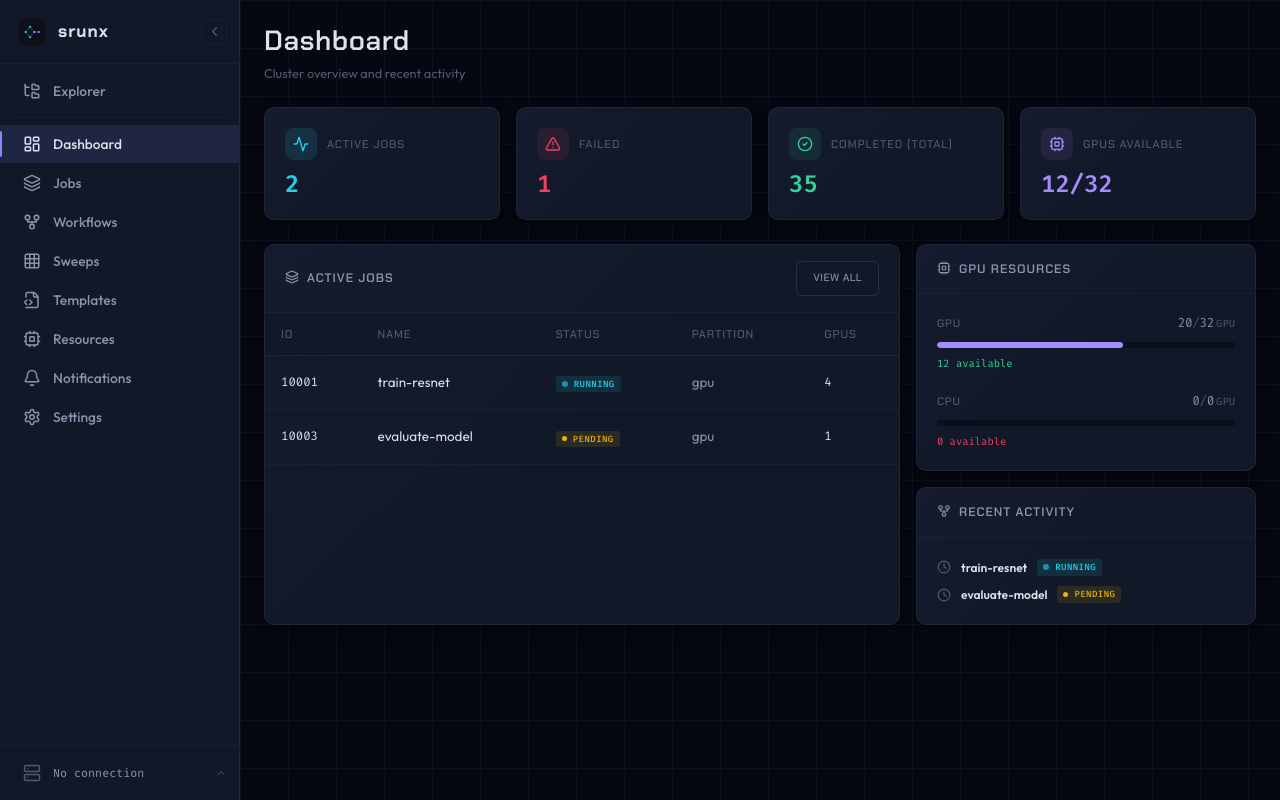
A dashboard for visual cluster management. Connect to your SLURM cluster over SSH and manage jobs, workflows, and resources from a browser.
srunx ui                # -> http://127.0.0.1:8000
srunx ui --port 3000    # custom port
srunx ui --project ~/work/other-repo   # serve extra projects (repeatable)
The cluster and project are chosen in the sidebar; every API request carries them explicitly.
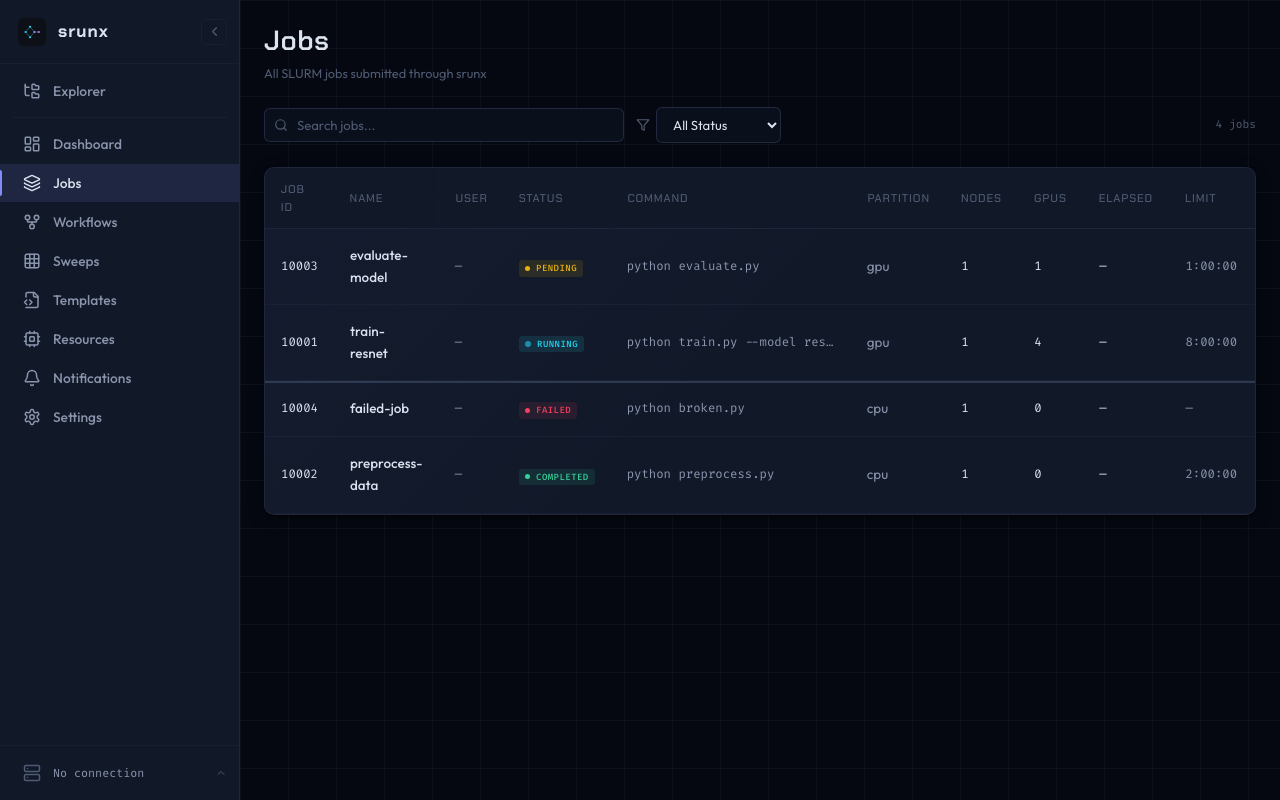
Jobs
Browse, search, filter, and cancel jobs.
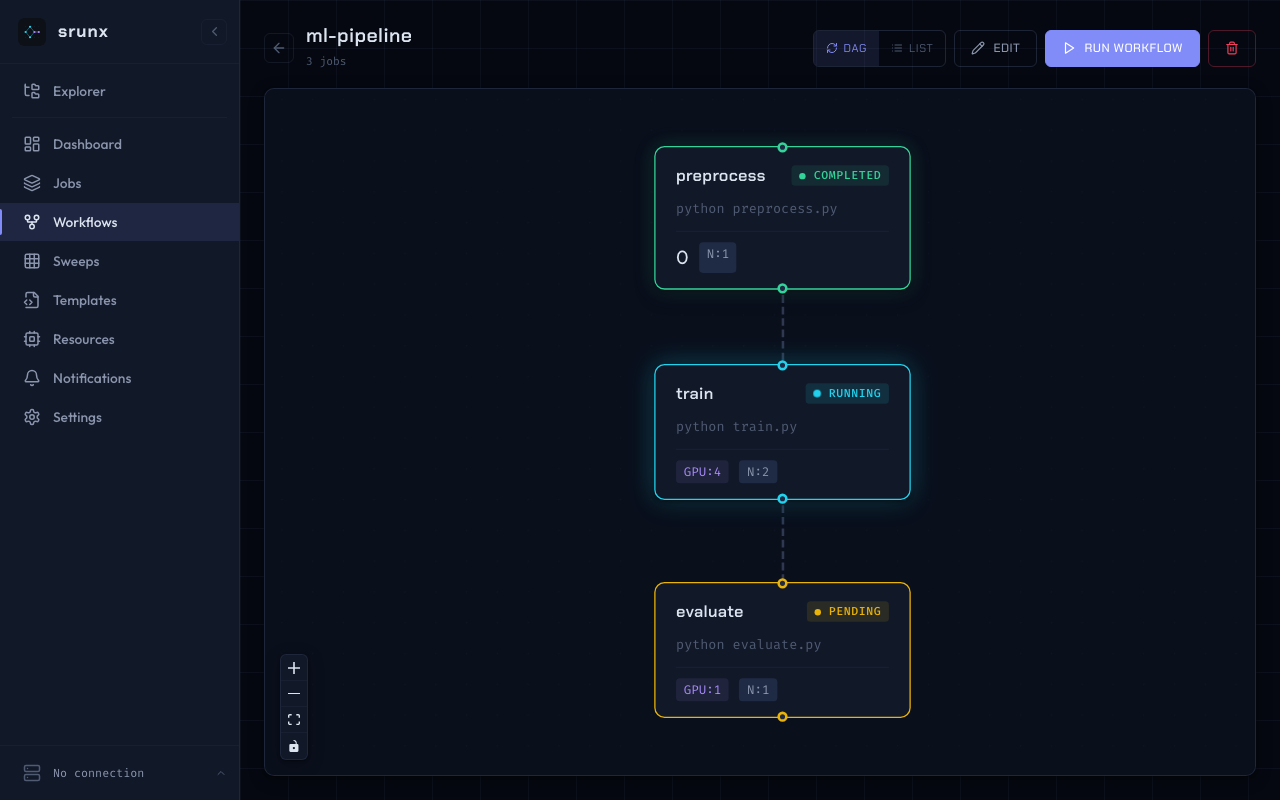
Workflow DAG
Visualize job dependencies. Run workflows directly from the UI.
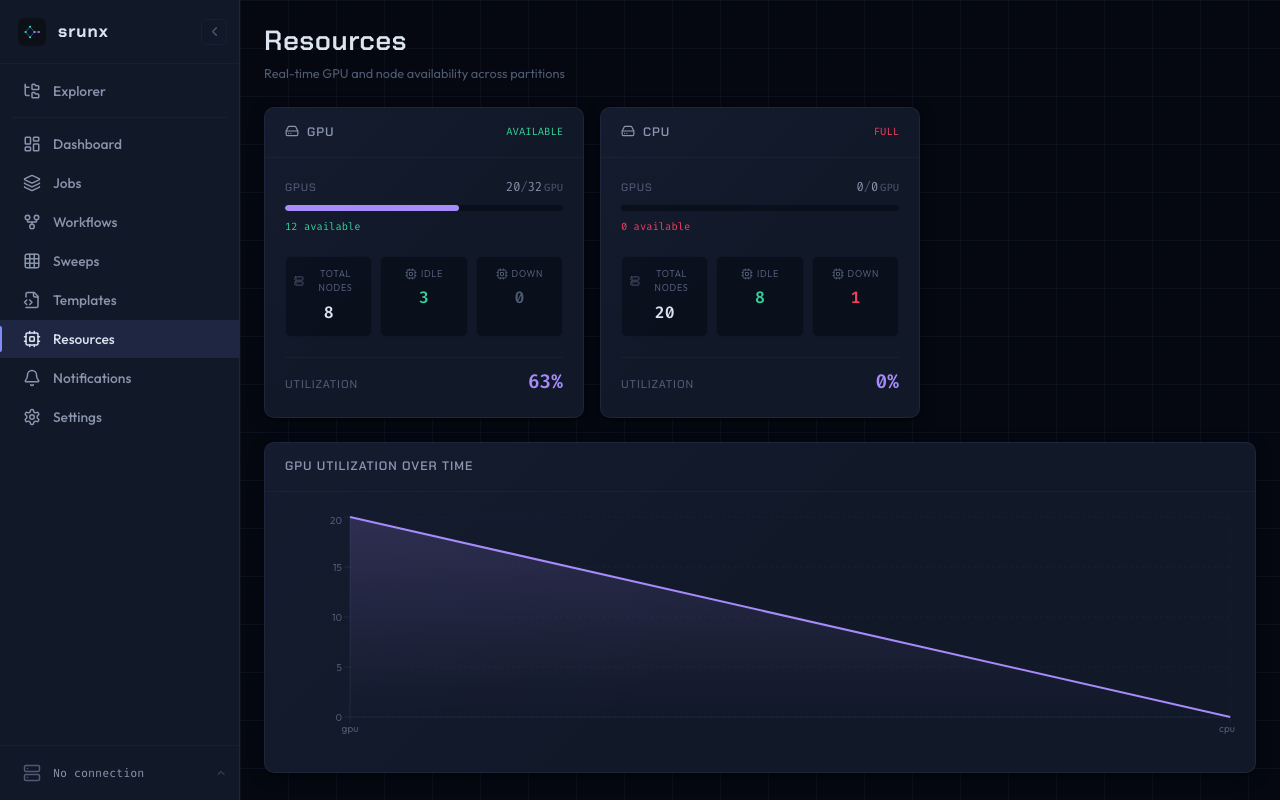
Resources
GPU and node availability per partition.
Explorer
Browse remote files via the selected project's mounts. Shell scripts can be submitted as sbatch jobs directly from the file tree.
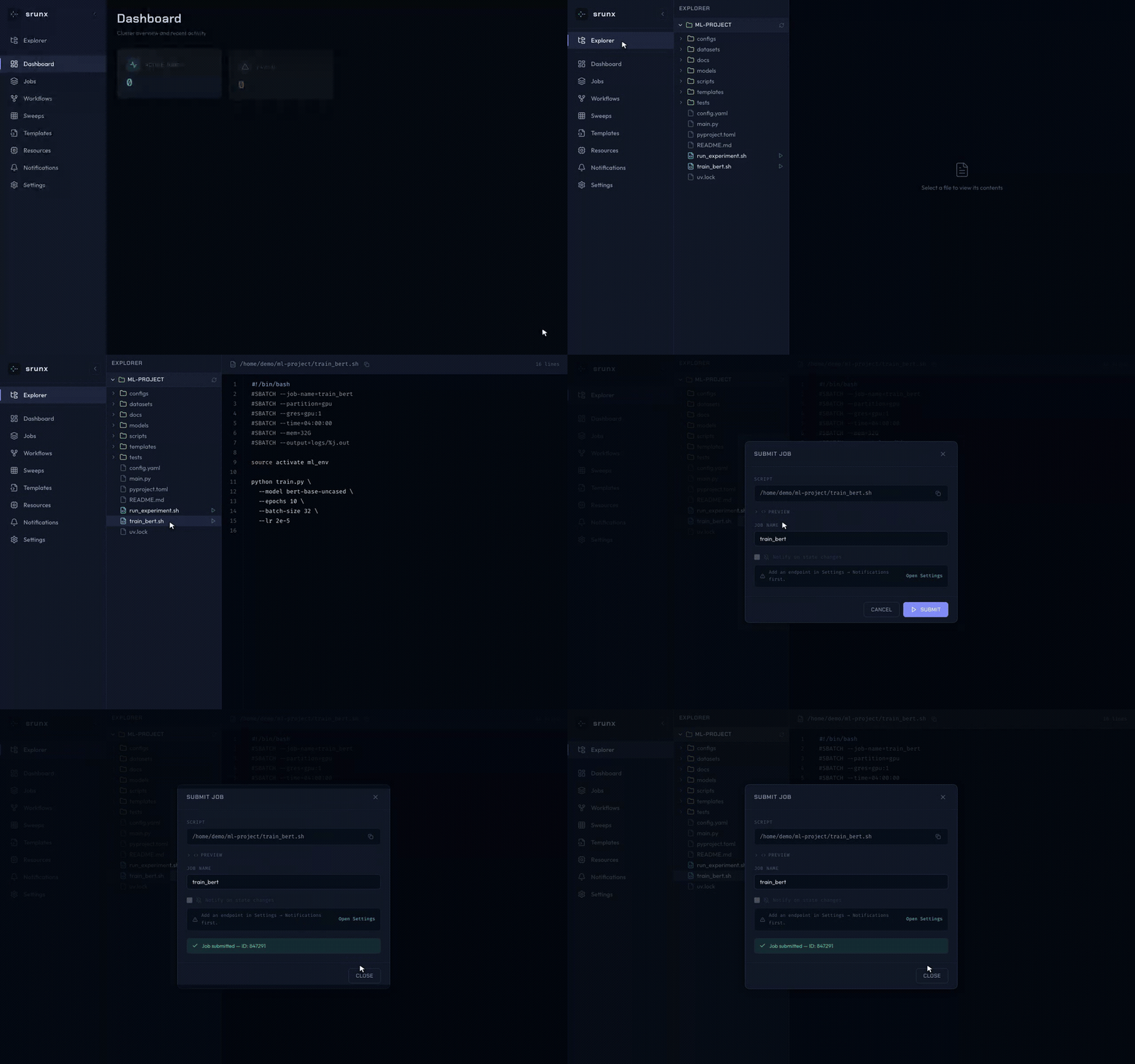
Full walkthrough: Web UI tutorial · Web UI how-to · Explorer how-to
Workflow Orchestration
Define pipelines in YAML. Jobs run as soon as their dependencies complete — independent branches execute in parallel automatically.
name: experiment
args:
  model: "bert-base-uncased"
  output_dir: "/outputs/{{ model }}"

jobs:
  - name: preprocess
    command: ["python", "preprocess.py", "--out", "{{ output_dir }}/data"]
    exports:
      DATA_PATH: "{{ output_dir }}/data/processed.parquet"

  - name: train
    command: ["python", "train.py", "--model", "{{ model }}", "--data", "{{ deps.preprocess.DATA_PATH }}"]
    depends_on: [preprocess]
    gpus_per_node: 2
    environment:
      container:
        image: nvcr.io/nvidia/pytorch:24.01-py3
        mounts:
          - /data:/data
    exports:
      MODEL_PATH: "{{ output_dir }}/models/best.pt"

  - name: evaluate
    command: ["python", "eval.py", "--model", "{{ deps.train.MODEL_PATH }}"]
    depends_on: [train]
What this shows off:
argswith Jinja2 — reusable, parameterized pipelines ({{ model }},{{ output_dir }})- Inter-job exports — parents declare
exports:; children read them via{{ deps.<parent>.<key> }}, fully resolved at workflow load time (no runtime env files) - Containers per job — Pyxis / Apptainer / Singularity are first-class (
environment.container) - Dependency-driven scheduling —
evaluateblocks ontrain; parallel branches run automatically
Run it:
srunx flow run workflow.yaml              # execute
srunx flow run workflow.yaml --dry-run    # show plan only
srunx flow run workflow.yaml --from train # resume / partial execution
Retry with retry: N and retry_delay: <seconds> per job.
Parameter Sweeps
Run the same workflow across a matrix of hyperparameters without copying YAML. Each cell materializes into its own sbatch submission and is tracked independently.
name: train
args:
  lr: 0.01
  seed: 1

sweep:
  matrix:
    lr: [0.001, 0.01, 0.1]
    seed: [1, 2, 3]
  fail_fast: false
  max_parallel: 4

jobs:
  - name: train
    command: ["python", "train.py", "--lr", "{{ lr }}", "--seed", "{{ seed }}"]
    gpus_per_node: 1
Run it — or declare the axes ad-hoc on the command line:
srunx flow run train.yaml                                                # YAML-declared sweep
srunx flow run --sweep lr=0.001,0.01 --max-parallel 2 train.yaml          # ad-hoc
srunx flow run --sweep lr=0.001,0.01 --max-parallel 2 --dry-run train.yaml
Sweeps are a first-class concept across CLI, Web UI, and MCP. Cells run on the selected cluster (Web-triggered sweeps on SSH clusters route through a bounded SlurmSSHExecutorPool). The Web UI surfaces per-cell progress with ETA, filter / sort, and per-cell cancellation.
Full workflow surface (validation, retries, partial execution, sweep recipes): Workflows how-to
Monitoring
# Monitor a job until completion
srunx watch jobs 12345

# Wait for GPUs, then submit
srunx watch resources --min-gpus 4
srunx sbatch --wrap "python train.py" --gpus-per-node 4

# Periodic cluster reports to Slack
srunx watch cluster --schedule 1h --notify $SLACK_WEBHOOK
Full monitoring options (continuous watch, thresholds, scheduled reports): Monitoring how-to
Remote SSH
Keep your local editor workflow while the jobs actually run on the cluster. Add a cluster once, and every srunx command accepts --cluster <name> with the same syntax as local:
# One-time setup (user config: $XDG_CONFIG_HOME/srunx/config.toml)
srunx cluster add dgx --host dgx1 --default      # host alias from ~/.ssh/config
srunx cluster test dgx

# Per project: .srunx/config.toml (commit it)
cd ~/projects/ml-exp
srunx config init-project                        # name = directory name
srunx config set cluster dgx --project           # this project's default cluster
srunx config set remote_dir /home/user/ml-exp --cluster dgx --project

# Same verbs you already use — now against the remote cluster
srunx sbatch train.sh                            # auto-rsyncs the project + sbatch runs in-place on the remote path
srunx squeue                                     # live queue on the remote cluster
srunx tail 847291 --follow                       # stream remote logs
srunx flow run pipeline.yaml                     # full DAG: sync once, hold the per-mount lock, submit
- SSH config hosts, ProxyJump support; connection settings live only in the user/system config, never in a project file
- Environment variable passthrough (
--env KEY=VALUE) - File sync via rsync with per-mount locking; the first sync to a new remote path asks for confirmation (
--yesto approve) - Layered job defaults (user → cluster → project → project × cluster → script
#SBATCH→ CLI flags);srunx config showshows where each value came from sbatch --snapshotruns the job from a read-only per-commit copy of your git repo, so later syncs cannot change code under queued jobs
Mount model, sync semantics, snapshots, and in-place execution rules: SSH sync how-to
Slack Notifications
Get notified when jobs finish — set SLACK_WEBHOOK_URL (or configure it in the web dashboard), then append --slack to any srunx flow run command. In Python, pass SlackCallback to the runner (see the Python API section below).
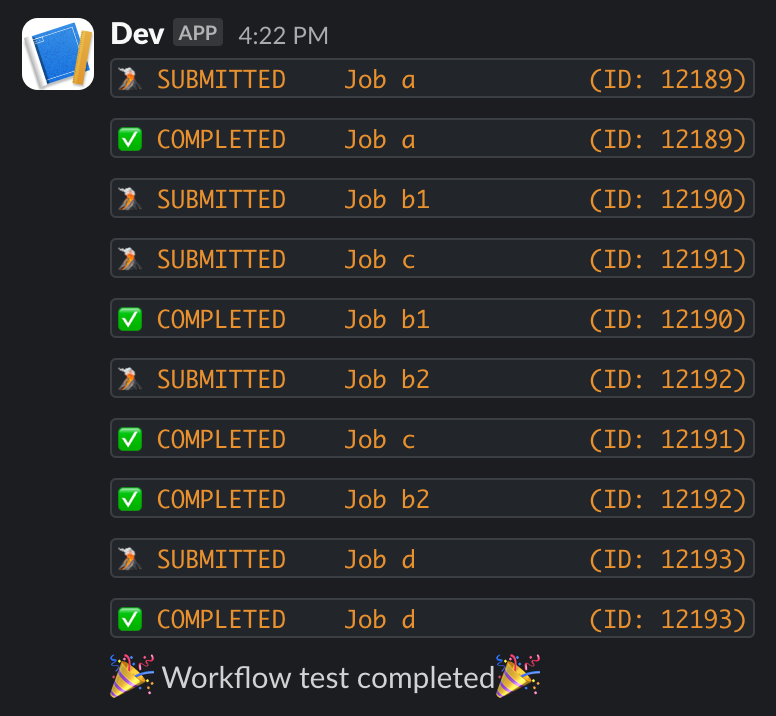
export SLACK_WEBHOOK_URL="https://hooks.slack.com/services/..."
srunx flow run workflow.yaml --slack
MCP Server
srunx ships an MCP server so Claude Code (and other MCP clients) can submit jobs, inspect the queue, and drive workflows over stdio. Install the extra and register the server with your client:
uv add "srunx[mcp]"
srunx-mcp                                                              # launch the stdio server directly

# Or register with Claude Code in one shot
claude mcp add --scope user srunx -- uvx --from 'srunx[mcp]' srunx-mcp
Once connected, the agent can call run_workflow with optional sweep and mount parameters:
run_workflow(
    yaml_path="train.yaml",
    sweep={"matrix": {"lr": [0.001, 0.01]}, "max_parallel": 2},
    cluster="dgx",
    project="/home/me/ml-exp",
    mount="ml-exp",
)
cluster is always explicit — MCP tools never fall back to an implicit cluster (call list_clusters to see what is configured). project is the project root holding .srunx/config.toml; it supplies project defaults and the mounts that mount=<name> refers to. mount translates work_dir / log_dir into that mount's remote paths and requires an SSH cluster plus project, so the agent can launch mount-aware submissions against a remote cluster without leaving the chat.
Setup + tool-by-tool usage: MCP Setup tutorial · MCP Usage how-to · MCP Tools reference
Python API
The full CLI surface is available as a Python library. Use it inside notebooks, existing Python pipelines, or custom tooling.
Submit and wait:
from srunx import Job, JobResource, JobEnvironment, Slurm

job = Job(
    name="training",
    command=["python", "train.py"],
    resources=JobResource(nodes=1, gpus_per_node=2, time_limit="4:00:00"),
    environment=JobEnvironment(conda="ml_env"),
)

client = Slurm()
completed = client.run(job)  # submit, poll, and return when terminal
print(completed.status, completed.job_id)
Fire-and-track:
submitted = client.submit(job)                 # returns Job with job_id populated
info = client.retrieve(submitted.job_id)       # poll status on demand
client.cancel(submitted.job_id)                # if you change your mind
Run a YAML workflow programmatically, with callbacks:
from srunx.observability.notifications.legacy_slack import SlackCallback
from srunx.runtime.workflow.runner import WorkflowRunner

runner = WorkflowRunner.from_yaml(
    "workflow.yaml",
    callbacks=[SlackCallback(webhook_url="...")],
)
runner.run()                                    # blocks until the DAG finishes
Documentation
Full docs (Diátaxis-structured) at ksterx.github.io/srunx:
- Tutorials (learn by doing) — Installation · Quickstart · Web UI · MCP setup
- How-to guides (solve specific tasks) — User guide · Workflows & sweeps · Monitoring · SSH sync · Web UI · Explorer · MCP usage · Settings · Smoke-test notifications
- Reference (look up exact API) — Python API · Web API · MCP tools
- Explanation (how it works under the hood) — Architecture · MCP architecture
Development
git clone https://github.com/ksterx/srunx.git
cd srunx
uv sync --dev

# Full pre-commit quality gate
uv run pytest && uv run mypy . && uv run ruff check .
Contributions welcome — please open an issue or PR on GitHub.
License
Apache-2.0


