

Every git repo you own, on one screen.
What's unpushed, what's behind, and what to do next, across every repository on your machine.








Install
Homebrew
brew install rushirb2001/tap/cohors
pip
pip install cohors
npm
npm install -g @cohors/cli
Cargo
cargo install cohors
Shell installer
curl -LsSf https://github.com/rushirb2001/cohors/releases/latest/download/cohors-installer.sh | sh
Run once, without installing
uvx cohors@latest
npx @cohors/cli@latest
Then run cohors. To try it on sample repositories first, run cohors demo.
Prebuilt for macOS and Linux; Cargo builds it anywhere Rust runs. All it needs is git. The examples below are real output from the cohors demo sample fleet, trimmed where marked ….
What it answers

Where it looks. With no config, the folders where code usually lives. Point it at yours with cohors --root ~/code (repeat for more), or save them with cohors init, which writes ~/.config/cohors/config.toml for roots, aliases, groups and ignore rules.
Use it in the terminal
cohors
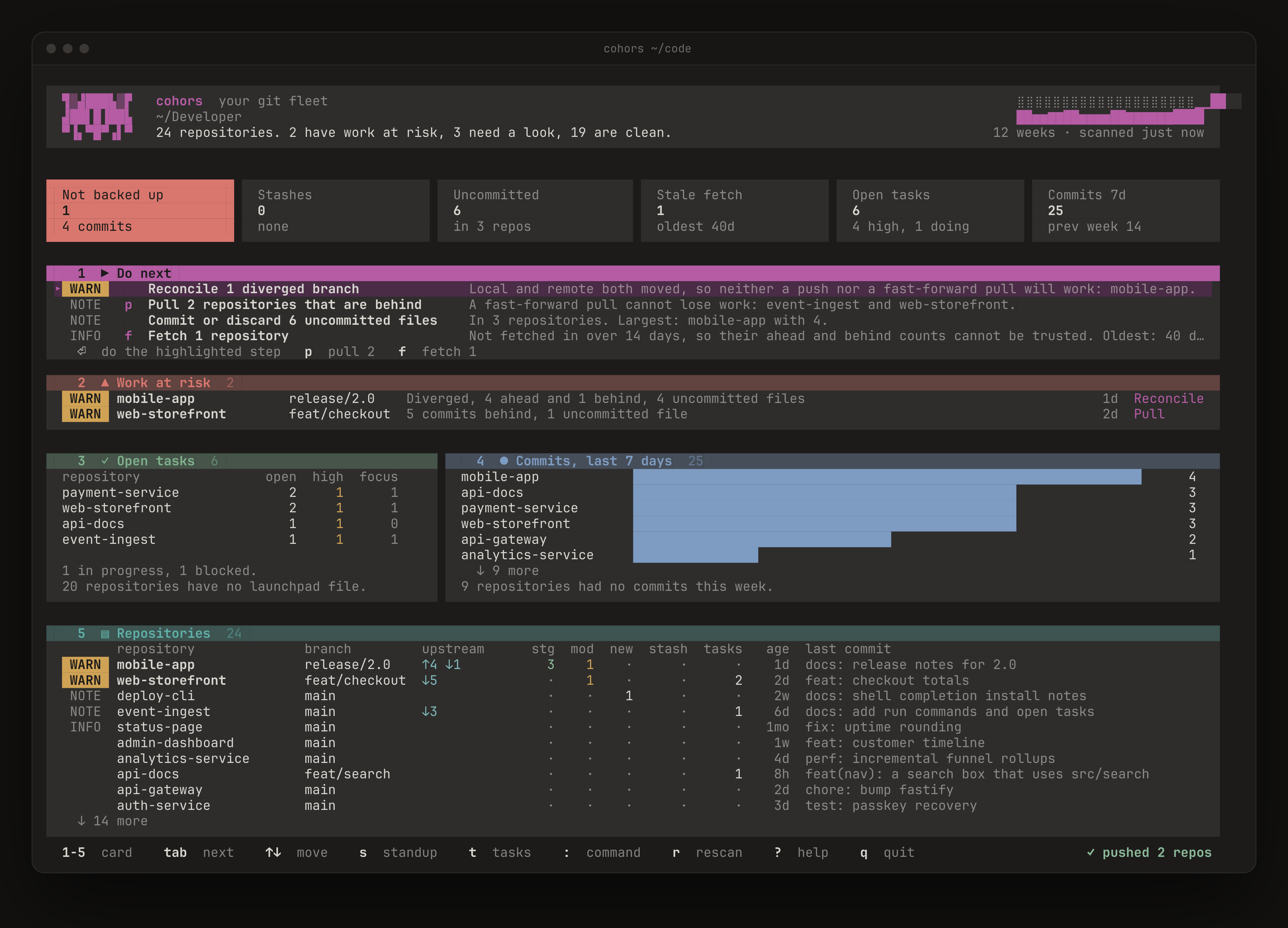
Do next lists what to do, most urgent first. Press a step's letter to act on every repo in it, or mark repos with Space and press the letter yourself. Either way cohors says what it is about to do and waits for y.
The mouse works too: click a card to focus it, a row to select it and the same row again to open it, and any key shown on screen is a button. New to it? The line under the header teaches one thing a day; x shows the next.

From the : line: :commit wip: cart drawer commits the marked repos, :!npm test runs a command in them, :jump payment-service goes to one. cohors --watch keeps it all live.
 Use it with Claude Code
/plugin marketplace add rushirb2001/cohors
/plugin install cohors@cohors
Ask "what needs my attention across my repos?" and Claude gets the whole fleet in one call:

More to ask:

In a fleet, a repository opens where it is. In the repository list, the one under the cursor shows its worktrees beneath its row, each with what it holds; the rest stay one line.
One repository works too. Run cohors --root . inside a repository and its checkouts are the rows: the main one and each worktree, with what each holds that is on no remote, the agent session that ran there, and P to push its branch. On a first run, plain cohors typed inside such a repository opens it.
Agent worktrees are covered. When a coding agent works in a git worktree (Claude Code keeps them under .claude/worktrees/), cohors reads it as part of its repo: commits that were never pushed and files that were never committed show up as work at risk, with the folder to go to. cohors scan --select worktree-work lists the repos that have any.
A session starts with a note about it. When you open Claude Code in a repository that has work left behind, such as a worktree holding commits or files that are on no remote, or commits unpushed for days, cohors adds one short note for you and for Claude. A repository with nothing left behind gets none, work touched in the last hour is left out, and you see the same note at most once a day; the plugin's Session notes setting turns it off. Without the plugin, add cohors hook session-start as a SessionStart hook in your own Claude Code settings.
It starts read-only. Turn on what Claude may do with claude plugin configure cohors@cohors, then start a new session:

Or let cohors brief Claude for you: cohors agent plan-day, or cohors agent idempotency-keys --repo payment-service to start on one task. cohors agent --resume picks a conversation up again, and cohors next lists the ones worth resuming.
Other MCP clients
{ "command": "uvx", "args": ["cohors@latest", "mcp"] }
{ "command": "npx", "args": ["-y", "@cohors/cli@latest", "mcp"] }
{ "command": "docker", "args": ["run", "-i", "--rm", "-v", "/path/to/your/code:/repos", "ghcr.io/rushirb2001/cohors"] }
The Docker image serves every repository in the folder mounted at /repos. It's built for linux/amd64 and linux/arm64.
Or with cohors installed: claude mcp add --scope user cohors -- "$HOME/.local/bin/cohors" mcp, the self-updating copy cohors links on its first run (cohors doctor prints where it is), adding --allow-writes, --allow-run or --allow-launchpad. Listed in the MCP Registry as io.github.rushirb2001/cohors.
Use it from scripts
Every view is a command. At a terminal it prints a report; piped, it prints JSON. Add --report to get the report through a pipe too, as plain text: a fraction of the JSON's size, and the form to hand a coding agent's shell.

--select picks the repos. Join terms with a comma (all must match) and put ! in front to exclude:

cohors fetch --select all                      # refresh every remote
cohors run --select 'name:web-*' 'npm test'    # one command, many repos
cohors standup                                 # this week's commits, as Markdown
cohors overview --json | jq -r '.actions[].title'
At a terminal, a command that changes repositories lists them and asks [y/N] before it acts. Piped, or with --yes, it goes straight on.
Use it in VS Code and the browser
 |  |
|
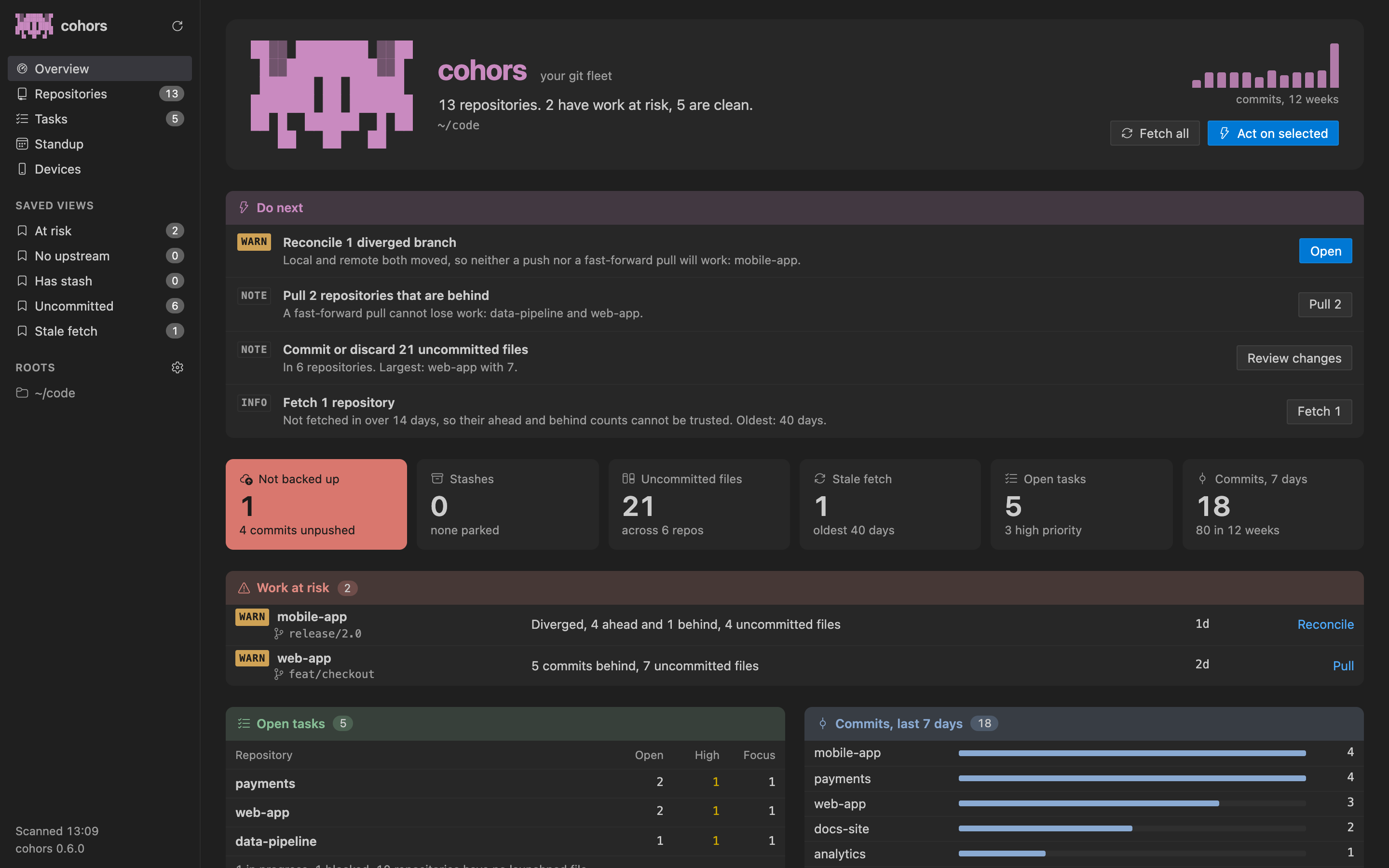
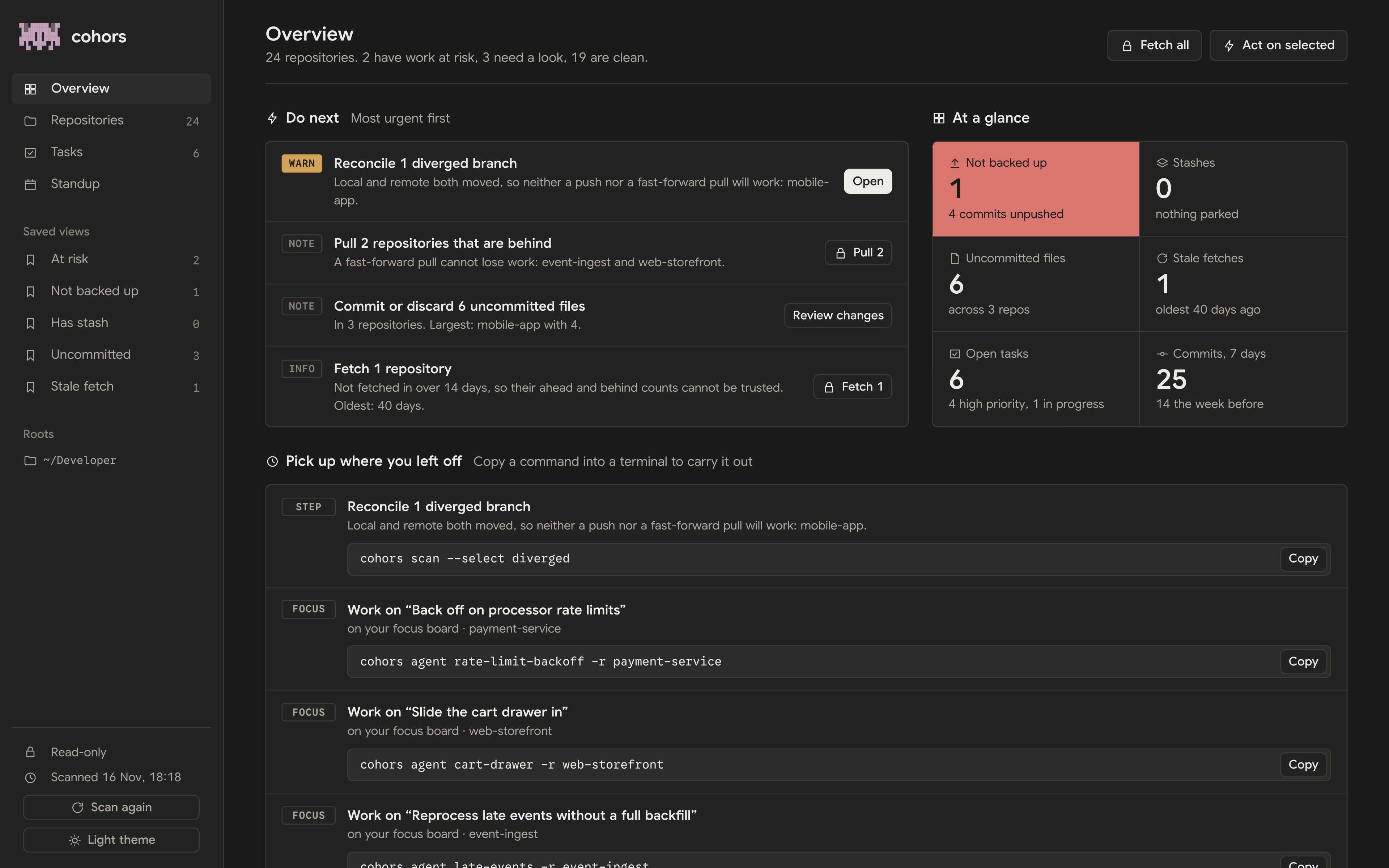
The cohors icon in the activity bar shows the fleet as native panes. Push, pull and fetch from any step, run a repo's commands in a terminal, or start Claude on a task.
Search cohors in the Extensions view. Cursor, Windsurf and VSCodium install it from Open VSX. |
|


The launchpad
A repo can commit one small file saying what to run there and what's in progress, so it travels with every clone:

Ask Claude to set up this repo for the launchpad and it writes the file. Commands from npm, Cargo, uv, Makefiles and Gradle are found without one.

Check a file with cohors launchpad validate .. The format is an open spec: spec/v1/SPEC.md.
Safe by default
pullis fast-forward only, and nothing force-pushes.- No action runs without
--selector repository names, and every one takes--dry-run. - Nothing changes unseen. At a terminal every command that changes repositories lists them and asks first. In the dashboard nothing reaches a remote or changes a repository on one key: fetch, pull, push, commit and stash each say what they will do and wait for y.
- The MCP server and the browser dashboard start read-only.
- One unreadable repo is reported, never fatal.
- No account, no telemetry. It talks only to GitHub. See the privacy policy.
Staying up to date
cohors keeps itself up to date however you installed it. Its first run sets up cohors' own copy in ~/.local/share/cohors (with ~/.local/bin/cohors linked to it) and from then on hands over to the newest version there, the way Claude Code does: it looks for a release when it starts and every few minutes, downloads it, checks its SHA-256, tries it, and switches to it. When you open the dashboard and a newer release is out, cohors installs it first and opens the new version (it waits about a second to hear, and up to twenty for the download, then opens what you have). A release that comes out while the dashboard is open is installed behind it; the dashboard then says Updated to … — restart to use it; press R. cohors update does it now and cohors doctor says how your copy is set up. Set updates = "notify" or "off" in the config, or COHORS_DISABLE_UPDATES=1, to change that. Never in CI, and never for a build from source.
Updating by hand

How it compares

Contributing · Changelog · Privacy · MIT License
cohors is Latin for "cohort": every repository, marshalled under one command.


