
Heimdall — App Store Connect MCP
Your whole App Store Connect account, in one tool.





🇬🇧 English · 🇹🇷 Türkçe
Heimdall 3.0 is here! 🎉
I released Heimdall three months ago. Since then it has been downloaded more than 6,800 times from npm, about 1,700 installs a month. It has passed 50 stars on GitHub, with 37 releases in 3 months. Thank you all; 3.0 is built on exactly the feedback you sent.
3.0 is the biggest update Heimdall has had:
- Profiles are cut by the work you do: 13 profiles, 50 sub-profiles.
- Images and files now take just four tools: we removed 73 separate ones.
media__list,media__upload,media__arrangeandmedia__deletehandle everything from screenshots to build files.- Everything you send to review goes in one call.
- The confirmation dialog is clear and plain.
Everything that changed is in the changelog.
If you see anything odd, I'd love to hear about it.
Ask, and it answers. Tell it, and it's done.
- "Summarize this week's 1-star reviews and draft replies."
- "Which builds are stuck in review?"
- "Raise this subscription's price in every country."
- "What does this subscription cost in each country?"
- "Which screenshots are on the store listing?"
- "Add build 42 to the Internal and External groups."
- "Why did my Xcode Cloud build fail?"
Almost anything you'd click through App Store Connect to do, you can now just ask your AI to do. More examples in the Guide.

A real AI session, sped up. The App Store Connect account is a stand-in so the recording can be public.
Heimdall
One package for the App Store Connect API and the App Store Server API (StoreKit 2), built from Apple's own OpenAPI specification. 14 profiles, 51 sub-profiles, 786 tools. Each profile runs as its own small MCP server.
Apple's specification lists 1036 API operations. Heimdall leaves out the 185 that Apple has deprecated or replaced with a newer version, and 19 that repeat another operation from the other side or that no task needs. Of the remaining 832, 734 become tools, and 52 hand-written ones join them: 786 tools in all. The other 98 are covered by the media tools, which do in one call what took several raw ones.
Most App Store Connect MCP servers give you a hand-picked slice of the API. That works until you need the one endpoint they left out, and then you're off hunting for yet another tool.
Heimdall does the opposite: it gives you the whole API, cut by the work you do. Releases, TestFlight, subscriptions and in-app purchases, the store page and reviews, Game Center, Xcode Cloud, provisioning, webhooks, sales and finance reports: each is a profile, and a big one splits into sub-profiles, so monetization:subscription loads subscriptions without the rest of the money tools. You pick what you need, and add or remove profiles whenever you like.
ASC-Core comes with every profile. Finding your apps, searching every tool, and the media tools are the same whatever you work on, so they run once, in a server of their own that setup registers next to your picks. The media tools handle every screenshot, video, image and file App Store Connect takes: store page media, App Clip and Game Center images, in-app purchase and subscription images, review screenshots and attachments, encryption documents, routing coverage, background asset and build upload files (the full list).
Profiles shows what each one covers, down to every tool. You don't have to memorize any of it, though: ask "Is there a tool for in-app events?" and Heimdall tells you which profile has it.
Not sure which profiles you need? The starter packs suggest a set for your role.
Runs on your machine
Most MCP guides recommend remote HTTP servers. Heimdall runs locally instead. It reads your App Store Connect key from the Keychain, signs a short-lived token and talks to Apple directly. Nothing sits in between, so your key stays with you.
flowchart LR
  ai["Your AI app"] -->|"stdio, no network"| h
  subgraph mac["Your machine"]
    h["Heimdall<br/>read-only mode hides every write"] --> gate["Asks before risky changes"]
    gate --> rl["Paces requests under<br/>Apple's rate limit"]
    rl --> sign["Signs a 20-minute token"]
    kc[("Keychain")] -.->|"key, read when needed"| sign
  end
  sign -->|HTTPS| apple["App Store Connect API"]
[!NOTE] Give your key the narrowest role that does the job. Roles explains what each App Store Connect role can do.
Asks before risky changes
Before changing a price, giving someone Admin access or deleting something, Heimdall asks you to confirm and shows what will change. By default it asks in two ways:
- You type CONFIRM for changes to revenue, deletions, code signing and access, and for the few steps that cannot be walked back: releasing a version, ending a pre-order, expiring a build. Assigning a build to beta groups in one call (
testflight__assign_build_to_groups) asks for CONFIRM too. - You answer yes or no for the other steps that reach customers, players or testers: sending something to review, starting a new subscription or in-app purchase version, changing a phased rollout, sending a build to external review, selling in a country, changing a product page test, sending a score or achievement for a player, changing the message customers see while cancelling a subscription, replying to a customer review.
Everything else goes through your AI app's own approval.
flowchart LR
  w["A write"] --> q{"What does<br/>it change?"}
  q -->|"money, deletion,<br/>signing, access"| c["You type CONFIRM"]
  q -->|"reaches customers,<br/>players or testers"| y["You answer yes or no"]
  q -->|"anything else"| a["Your AI app's approval"]
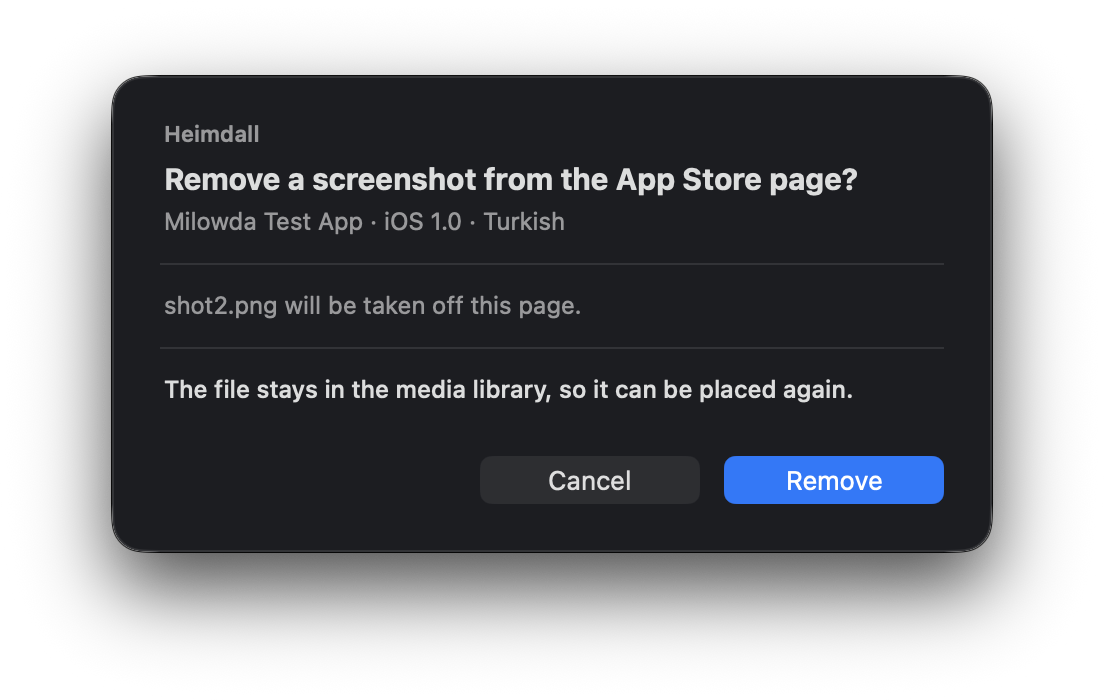
If your AI app can't show the question (like the Code tab in Claude Desktop), Heimdall asks in a window of its own on a Mac. Its button says what it does: Remove, Upload, Delete. The AI can neither see nor press it, and waits until you answer.
More in Security.
Works alongside Fastlane
Heimdall doesn't replace Fastlane; it complements it. Fastlane for the pipeline, Heimdall for everything you'd otherwise do by hand.
Setup
One command:
npx -y @erayendes/asc-mcp setup
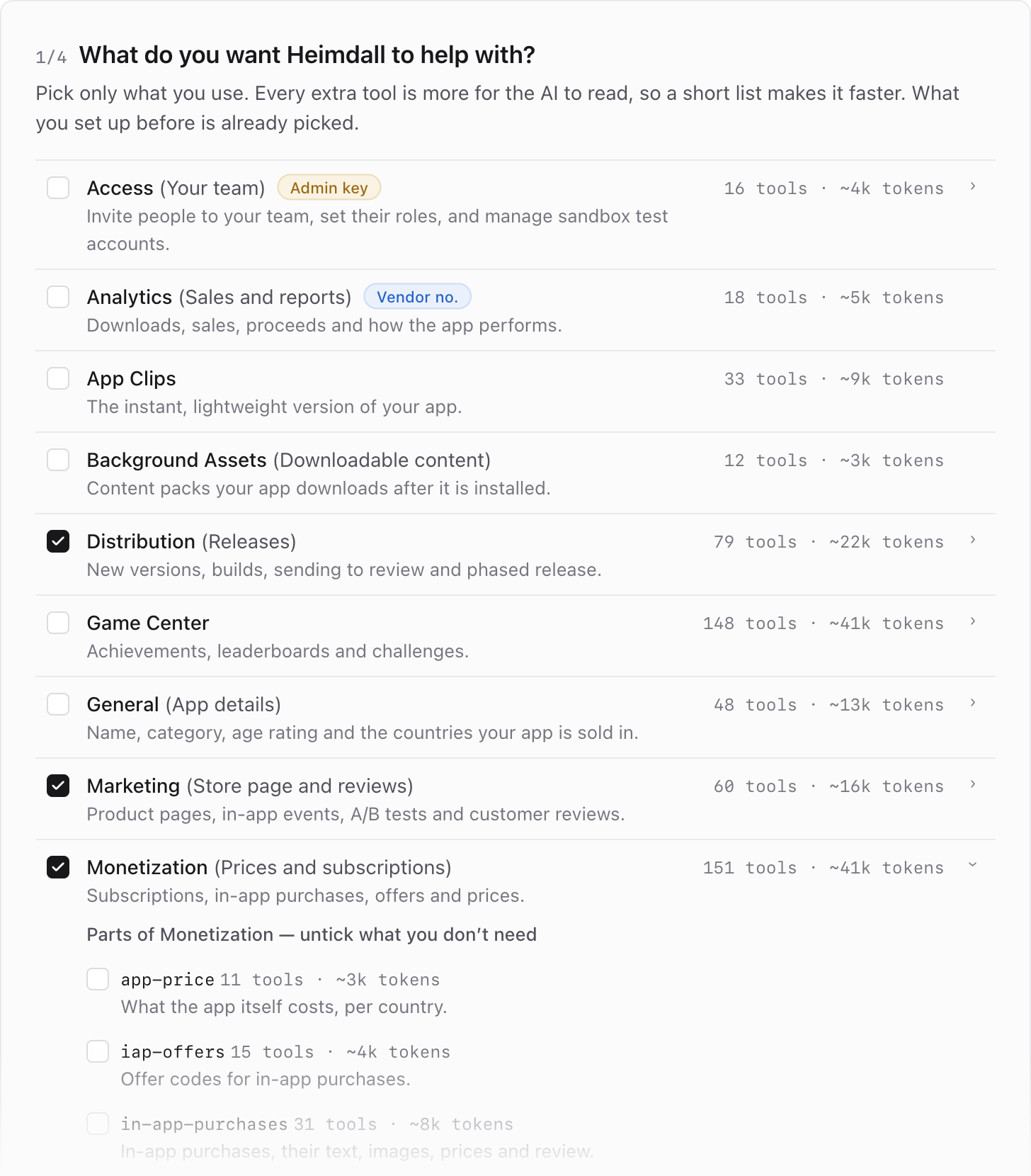
Setup in the browser: pick what you need and see what it costs the AI as you go. All four steps are in Setup.
Coming from 2.x? Run setup once more and pick your profiles again; the old ones no longer exist. To stay on 2.x, use @erayendes/asc-mcp@2.8.0.
It asks whether to continue in your browser (recommended) or the terminal. You'll need an App Store Connect API key; the browser page tells you which role to give it from what you pick, so you can run setup before creating the key. Node.js 20.19 or later.
Setup does two things: it saves your key, and it registers the profiles you pick, with ASC-Core beside them, in every AI app it finds. Your AI can do the second half for you with register; the key is always yours to hand over, through setup.
Want your AI to install it for you, or to use it in Xcode 27? Everything else is in Setup.
About the name and the project
In Norse mythology, Heimdall keeps watch over Bifröst, the rainbow bridge that links Asgard to the nine realms. Here, his job is to guard the road between your App Store Connect account and your machine. That's where the name comes from.
I build Heimdall on my own, in the evenings, and release it free and open source under the MIT license. If it gets you out of the App Store Connect dashboard, it has done its job.
License
MIT © Eray Endes
SECURITY.md | SUPPORT.md | CHANGELOG.md | CONTRIBUTING.md | CODE_OF_CONDUCT.md | GOVERNANCE.md
Heimdall is generated from the App Store Connect OpenAPI specification published by Apple Inc. App Store Connect, TestFlight, StoreKit, Xcode and Game Center are trademarks of Apple Inc. This project is not affiliated with Apple Inc.


