
glovebox-mcp
A sandboxed computer-use MCP server — let an AI agent drive a real browser and desktop apps (mouse, keyboard, screenshots, clipboard, vision grounding), confined to a nested X11 window so its input and vision never touch your real screen or the windows of your other apps.
Like a lab glovebox: the agent reaches in and manipulates real applications, sealed off from your desktop. Bring the sandbox up, log into whatever sites or apps you want to automate inside that window, and the agent operates only there — you can watch it live and close it instantly.
Speaks the Model Context Protocol, so it works with MCP clients like Claude Code. Your host can run Wayland; the sandbox gives the agent a real X server to drive.
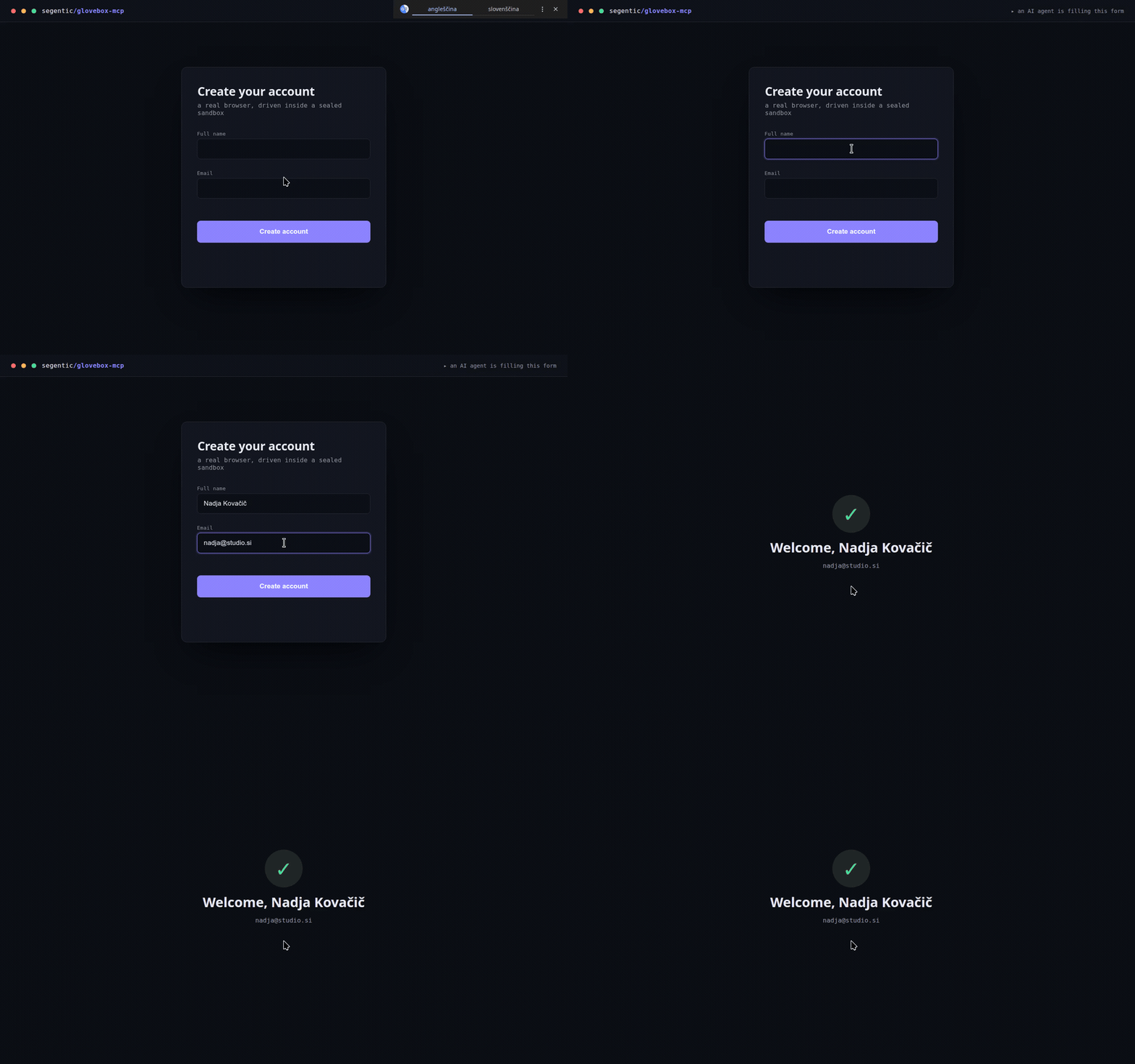
An agent driving a real browser in the sandbox — gliding the cursor, inserting a unicode name (Nadja Kovačič), typing, and submitting. All confined to a nested X11 window.
Why a nested X11 sandbox?
- Most desktop automation (xdotool, PyAutoGUI) is X11-only, but many modern desktops run Wayland.
- Xephyr provides a real X server inside a single window (
DISPLAY :1). Everything the agent does — clicks, typing, screenshots — is confined to that window, not your real desktop. - You stay in control: watch it live,
pkill Xephyrto close everything.
The isolation is display-level (see Safety): the apps themselves run as your user with your filesystem. For OS-level isolation run glovebox inside a VM or container.
Requirements
- Linux — the sandbox nests a real X server (Xephyr), so it works even on Wayland hosts (via Xwayland). Developed on Ubuntu; any modern Linux with the packages below. macOS / Windows, or a Linux you do not want to install packages on: use container mode — it needs only Docker.
- Python 3.10+ and
uv(used for the virtualenv). - System packages —
xserver-xephyr(Xephyr),openbox,scrot,x11-utils,x11-xkb-utils(xkbcomp: gives the sandbox your keyboard layout),xdotool,wmctrl,xclip, optionalat-spi2-core+gir1.2-atspi-2.0+python3-gi(focus check in native apps) (+tesseract-ocrforbasic). On Debian/Ubuntu the installer auto-installs them viaapt(sudo); on Fedora/Arch it prints the matchingdnf/pacmancommand. The MCP server itself is distro-agnostic — any Linux with these tools works.openboxis not optional in practice: without a window manager Xephyr ignores synthetic pointer motion, so clicks would land in the screen center (launch_appwarns when it is missing). - A browser in the sandbox (Chromium, Chrome, Brave, Edge, Vivaldi or Opera).
- NVIDIA GPU (≥6 GB VRAM) — only for the
localvision mode. The server checks this itself (status()→vision.gpu) andautofalls back tobasic/nonewhen it is not met.
Install
One command. Run on a terminal with no arguments, the installer asks — on this desktop or in a Docker container, which vision backend or app set, whether to install the Claude Code skill — offering only what this machine can run (it shows the GPU and whether Docker is there), then prints the plan as the equivalent command and installs after a last Enter:
git clone https://github.com/segentic-lab/glovebox-mcp && cd glovebox-mcp && ./install.sh
Glovebox installer
  This machine: Linux x86_64 · GPU: NVIDIA RTX A5000 (16384 MiB) · Docker: found

Where should the sandbox run?
  1) On this desktop      — the apps and logins you already have, as windows on your screen
  2) In a Docker container — only Docker is installed; apps cannot see your files; you watch it in a browser tab
  Choice [1]:
  …
Plan — the same as running:  ./install.sh container --apps full --no-skill
Proceed? [Y/n]:
Every question has a default, so Enter all the way through is ./install.sh auto. Nothing is
asked when a mode is named (./install.sh auto, basic, container, …), with -y/--yes, or
when the script is not on a terminal (piped, CI) — those behave as before. --plan prints what
would be installed and stops.
Natively, the installer probes the GPU, installs the system packages (auto via apt on
Debian/Ubuntu; it prints the line for dnf/pacman), creates the Python env from pyproject.toml,
downloads the vision models the machine can run, writes mcp-config.json and .mcp.json
(Claude Code) with your paths, and installs the Claude Code skill.
What auto picks: an NVIDIA GPU with ≥ 6 GB VRAM → local (OmniParser + ScreenParser, typed
elements; ~4 GB of downloads, --no-screenparser skips the 153 MB detector); otherwise
basic (Tesseract OCR, CPU). Tesseract is installed in every mode — the server's own auto
backend selection falls back to it when the GPU is busy. Force a mode with ./install.sh none|basic|local;
./install.sh skill installs only the skill; --no-skill, --dev (pytest) are the other flags.
Re-running is safe: it only downloads what is missing.
The requested mode is written to .vision-mode (auto unless you forced one; override per run
with the GLOVEBOX_VISION env var). python vision.py check prints the same diagnosis status()
returns (GPU, weights, detector, tesseract).
Container mode (Docker)
The same server in a Linux container, for hosts that are not Linux (macOS, Windows) or when the sandbox should not have your files. Nothing but Docker is installed on the machine:
git clone https://github.com/segentic-lab/glovebox-mcp && cd glovebox-mcp && ./install.sh container
# or, without the installer:   docker compose up -d --build
container "glovebox"   (long-lived; survives agent sessions, restarts with Docker)
  Xvfb :0 + openbox + noVNC      a desktop nobody sits at — you watch and use it in a browser:
    │                            http://localhost:6080/vnc.html?autoconnect=1&resize=scale
    ├─ Xephyr :2  ── chromium    one window per instance, exactly as on a real desktop
    └─ Xephyr :3  ── …
  each agent session:  docker exec -i glovebox glovebox-server      (MCP over stdio)
MCP client config — either form:
// 1. the launcher: starts the container when it is not running (needs python3 on the host)
{ "command": "python3", "args": ["/path/to/glovebox-mcp/container.py"] }
// 2. plain Docker: the container must already be up (`docker compose up -d`)
{ "command": "docker", "args": ["exec", "-i", "glovebox", "glovebox-server"] }
An existing native install switches with one line in its config: "env": {"GLOVEBOX_MODE": "container"}
— server.py then hands the session to the container instead of driving your desktop.
What is different from native mode — status() says so in container and notes:
| Native | Container | |
|---|---|---|
| Isolation | display only: apps run as you, with your files | the container: apps see only container-data/files and container-data/profiles |
| Apps | everything installed on your machine | the image's app set (below); status().container.apps.installed lists them |
| Logins | your per-instance profiles in profiles/ | container-data/profiles — log in once through the web viewer; kept across rebuilds |
| Where you watch | windows on your desktop | the web viewer, published on 127.0.0.1 only (GLOVEBOX_VNC_PASSWORD adds a password) |
| Grounding | accessibility, OCR, or OmniParser on your GPU | accessibility and OCR; optionally your GPU through the host's vision service (below) |
| File paths in replies | host paths | container paths (/app/files/<N>/… = container-data/files/<N>/… on the host) |
Chromium runs with --no-sandbox in the container, because Docker's default seccomp profile
forbids the user namespaces its sandbox needs; status() reports it (container.browser_sandbox).
The container itself is then the isolation layer. Start the container with a seccomp profile that
allows user namespaces and Glovebox keeps Chromium's sandbox on by itself.
App sets — chosen when the image is built:
| Set | Apps | Image size |
|---|---|---|
browser (default) | Chromium | ~1.8 GB |
basic | + Mousepad (editor), PCManFM (files), Evince (PDF), Eye of GNOME (images), Galculator, File Roller, xterm | ~2.0 GB |
full | + LibreOffice, GIMP, Inkscape, Firefox ESR, VLC | ~3.5 GB |
./install.sh container --apps full              # or: GLOVEBOX_APPS=full python3 container.py build
docker build -t glovebox-mcp:local --build-arg APPS=basic --build-arg EXTRA_APT="thunderbird kate" .
python3 container.py install gedit              # into the RUNNING container; lasts until `down`
All of them except Firefox answer through accessibility (source: at-spi), so find_elements and
act work on them without any vision; Firefox is read by OCR. Any Debian package can be added
with EXTRA_APT.
Vision — three levels, cheapest first:
- Accessibility (always on): browsers and the apps above describe themselves. No model.
- OCR (always in the image): Tesseract, for what accessibility does not expose.
- Your GPU, shared from the host (opt-in, Linux hosts with a native
./install.sh local):./install.sh container --vision host, orGLOVEBOX_CONTAINER_VISION=hostwhen the container is created. The container gets nothing but a read-only mount of one directory holding a link to the host's vision-service socket;parse_screenthen answers with"via": "host-service". The image stays small, and native and container agents share one model load. The trade-off is stated instatus(): screenshots sent for parsing leave the container. When the host's service is not running (it idle-exits), vision falls back to OCR and says why; every new session throughcontainer.pystarts it again.
There is no image with the GPU models built in: it would be ~8 GB larger, need the NVIDIA container toolkit, and the icon detector's AGPL-3.0 weights could not be shipped in it anyway.
The sandbox user inside the container takes the numeric id of the data folder's owner, so what the apps write there belongs to you, whatever your user id is.
python3 container.py up | down | status | build | install manage the container; the image is built for
amd64 and arm64 (Apple Silicon) and both are exercised in CI.
Claude Code skill
The installer copies skills/glovebox/SKILL.md into ~/.claude/skills/glovebox/ when ~/.claude
exists (./install.sh skill does only that) — a skill that teaches Claude Code the observe → act → verify loop, grounding per vision mode, the
upload and navigation gotchas, and when to stop. Claude Code loads it automatically when an agent
is asked to drive a GUI app (or explicitly with /glovebox). AGENTS.md remains the long form for
any other agent/harness.
Works with any MCP client / harness
Claude Code, Cursor, Codex, or your own agent — it's a standard MCP server, not tied to any one host.
Two compatibility notes: basic/local return element coordinates as text, so they work even
with text-only agents; none relies on the client passing the tool's screenshots to a
multimodal model (fine for Claude Code, Cursor, and other image-capable MCP clients). In any mode,
clipboard() gets exact text out of an app without vision at all.
Quickstart
- Start the sandbox (leave it running):
Log into any sites or apps you want to automate in that window.
./start-display.sh # 1440×900 Xephyr window with a browser ./start-display.sh 1920x1080 # …or pass a screen size (or set $RES) - Register the server with your MCP client.
install.shalready wrotemcp-config.jsonwith your real install path — copy itsgloveboxblock into your client's MCP config:Restart the client so it loads the server.{ "mcpServers": { "glovebox": { "command": "/abs/path/to/glovebox-mcp/.venv/bin/python", // filled in by install.sh "args": ["/abs/path/to/glovebox-mcp/server.py"], "env": { "DISPLAY": ":1" } } } } - Ask the agent to screenshot / click / type — it operates only on the
:1window.
Driving it with an AI agent? Paste
AGENTS.mdinto the agent's system prompt — it teaches the observe → act → verify loop, grounding, the upload/unicode gotchas, and when to stop.
Tools (31)
| Tool | What |
|---|---|
status() | Server + sandbox status in one read-only call: version, the vision diagnosis (requested vs. effective backend and why, GPU name/VRAM, OmniParser code/weights, tesseract languages), live instances, and which system deps are present. Run it first — and paste it into bug reports. |
screenshot(instance, region?, scale?, format?, save_as?) | [json, image]. region="x,y,w,h" zooms into a rectangle, scale=0.5 shrinks, format="jpeg" compresses — cut payload or read small text. save_as="step1.png" writes the image into the staging folder and returns JSON only (evidence to attach, no image tokens). |
parse_screen(instance, source?, granularity?) | The on-screen elements as JSON (id, type, label, interactive, pixel-center; capped at 300 per call, flagged via "truncated") + a numbered Set-of-Mark image. source="auto" asks the app first — its accessibility information: exact labels, real element types, states (disabled, checked, expanded…), value, no GPU, tens of milliseconds — and falls back to vision for apps that expose nothing (canvas, games, Tk); "source" in the reply says who answered (browser-dom, at-spi, vision). In vision mode basic OCR words are merged into lines ("Sign in" = one target; granularity="word" for single words). |
find_elements(query, type?, source?) | Parse + filter in one call: the elements whose label contains query (and optionally of one type), ids ready for click_element / act / fill(element=). With an accessibility source it also finds what is scrolled out of view ("onscreen": false) — the click scrolls it in. count: 0 is an honest "not there". |
act(element, action?, value?) | Operate an element through the app's accessibility interface — no pointer, no keyboard, no coordinates: press (button, link, checkbox, menu item), set_value (text, a <select> option, true/false, a slider number), focus, scroll_into_view. Returns the element's states and value before and after (and verified for set_value). In browsers press is a real, trusted click delivered over DevTools; in native apps it is the widget's AT-SPI action. Refuses stale ids, disabled or read-only elements and unannounced password fields with nothing done. |
wait_for_text(text, timeout_ms?, appear?) | Poll the app's accessibility text (or OCR/parse) until a text appears (or disappears) — the honest replacement for "sleep and hope" after navigation; timed_out is reported, never hidden. |
fill(text, x, y | element=id, submit?, verify?, allow_password?) | Set a form field in one verified call: click it, check the focus before typing, replace its content, read the value back. The focus check runs through the page's DOM in browsers and through the accessibility bus (AT-SPI) in native GTK/Qt/LibreOffice apps: a click that landed on a label (the focus stayed elsewhere), a non-editable widget, or a password field you did not announce (allow_password=true) fails with nothing typed and focus naming what has it. verified: true = the field holds exactly the text; false + value = it reformatted or cut it; null = unreadable. Where nobody can tell the focus (canvas, games, Xlib-only apps) the reply says focus_checked: false, a warning, and click_effect (did any pixel near the click change) — never a clean success. |
click_element(id, modifiers?) | Click an element from the last parse_screen/find_elements (no coordinate guessing). Accessibility ids are located again at click time: an element that moved is clicked where it is now, one out of view is scrolled in, one that is gone fails with stale: true instead of clicking whatever took its place. |
click(x,y, count?, modifiers?) · double_click · move_mouse · scroll(amount, direction?, x?, y?, axis?) · drag(…, steps?) | Pointer ops. In Chromium-family browsers a click returns hit — the element under the point, read from the DOM just before the click ({"role": "checkbox", "name": "Remember me", "checked_before": false}), so a misclick is visible at once. scroll(3, direction="down") or the signed form (negative = down). Coordinates outside the display are rejected (xdotool would silently clamp them). count=2/3 double/triple-clicks, modifiers="ctrl+shift" holds keys (released whatever happens). scroll can move to x,y first, scroll horizontal, and reports applied/clamped (max 100 notches). drag emits intermediate motion events so canvases and sliders register it, and releases the button even if a step fails. |
type_text(text, clear?, submit?) | Unicode-safe typing (ASCII via xdotool; anything with č/š/ž… is inserted via the clipboard, because xdotool's synthetic unicode is silently dropped by some GTK apps; the clipboard is put back afterwards). clear=true replaces the field's content, submit=true presses Return — one call to fill and submit. |
press_keys("ctrl+a" / "Return" / "ctrl+a Delete") | Keys, combos, and space-separated sequences (xdotool syntax). Every token is validated against the X keysym table before anything is pressed — an invalid name anywhere in a sequence errors with nothing pressed. |
browser(action="info"|"navigate"|"text"|"eval") | The instance's Chromium over CDP: current URL/title and tabs, exact navigation (waits for load), the rendered page text without OCR, or a JavaScript expression's value (Promises awaited; timeout_s 1–600, default 30; results over max_chars come back truncated and flagged). info also returns viewport (dpr, left, top) to turn the page's CSS pixels into click coordinates. |
manage_window(action, window_id?) | activate / close / minimize / maximize / restore / move / resize a window (ids from window_info; 0 = the active one) — switch between an app's windows and dialogs. |
start_app(command) | Start another app on an existing instance (same window/cursor) — a second tool, or a restart. |
clipboard(action="get"|"set", text?) | Read the instance's clipboard (select + ctrl+c, then read exact text — no OCR) or set it (then ctrl+v). Per-instance; text is mirrored to/from the host clipboard by the per-instance bridge, so a person can copy-paste across. |
wait_for_stable(instance, timeout_ms?, threshold?) | Wait until the screen stops changing (page loaded, app drew) instead of guessing a delay. Reports stable/timed_out honestly. |
window_info(instance) | Active window title + geometry, the visible windows (ids for manage_window) and the pointer position — confirm navigation or that an app opened, without an image. |
upload_file(filepath, selector?, page_url_contains?) | Attach a local file to a page's <input type=file> via the Chrome DevTools Protocol. The nested X11 file picker is invisible to automation and hangs the renderer, so use this for all uploads — never click an upload button expecting a dialog. Works on Chromium-family browsers started by launch_app/start-display.sh (per-instance --remote-debugging-port, 9222+N). Browser file inputs only — for native apps see open_file. |
open_file(filepath, app?) | Open a local file in a native app on the instance's display (e.g. app="gimp") or via xdg-open. Fails honestly if the handler exits immediately (no app registered for that type). |
put_file(name, content, encoding?, overwrite?) | Write a file (text, or binary as base64; max 10 MB) into the instance's staging folder — hand the sandbox something you produced, then open_file/upload_file it by name. Only inside files/<N>/: absolute paths, .. and symlinks out are refused; an existing file needs overwrite=true. |
list_files() | The instance's staging folder files/<N>/ + entries with size, mtime and a partial flag for in-progress downloads. |
app_log(instance, lines?) | Tail of the launched app's stderr — read it when an app crashed or drew nothing. |
launch_app(command, name?, size?) · list_instances() · close_instance(n | all_launched=true) | Multi-instance control (see below). launch_app also makes the window usable by a person: the host keyboard layout is copied in (keyboard) and the clipboard bridge started (clipboard_sync). list_instances shows each window's title; instances closed by hand disappear and their number is reused. |
wait_ms(ms) · get_screen_size() | Timing / sandbox size + effective vision backend. |
Every control tool takes instance=N and optional observe / settle_ms /
observe_region="x,y,w,h" (see below; the region crops the returned screenshot to the part you
care about — a fraction of the tokens of a full frame). Action tools add warnings when the
pointer is not where the server left it: a person or another agent is using the same instance.
In local mode OmniParser is lazy-loaded on first parse_screen (~6 s once, then ~2 s/parse),
after a GPU preflight (VRAM present and free).
Structured, honest responses
Every tool returns JSON: {"ok": true, "action": "click", "instance": 1, "detail": "clicked (10,20) button 1", …}.
Failures come back with the MCP isError flag set and the same JSON shape embedded in the error
text — {"ok": false, "error": "…", "fix": "…"} — where fix names the call that unblocks you
(e.g. a click on a dead instance says to run list_instances() / launch_app(); an unknown element
id says to re-run parse_screen(); a GPU that is too small says which mode to switch to). Silent
no-ops are treated as failures too: an invalid keysym, a zero scroll, an off-screen click, closing an
instance that isn't running, an app that exits on launch, or non-ASCII typing without xclip all
error instead of pretending success. Clamped waits are flagged (clamped / settle_clamped).
Image-returning calls (screenshot(), observe="screenshot"|"parse") return [json, image].
No subprocess can hang a call: xdotool/xdpyinfo/xclip run under timeouts and a frozen display is
reported as such; a missing binary is a structured error, never a raw exception.
Two more rules of the contract: an action that happened is never reported as failed because the
observation after it failed (click(observe="parse") whose parse hits a GPU error returns
ok: true, observed: false, observe_error: … — the agent must not click again), and the host
display is never driven: instance=0 (or whatever GLOVEBOX_HOST_DISPLAY is) is refused by every
tool. Calls that touch one instance's cursor, keyboard or clipboard are serialized per instance, so
two overlapping calls from one agent cannot interleave a mousemove with another call's click;
different instances run in parallel.
Grounding: the app first, pixels second
parse_screen, find_elements and wait_for_text ask the app before they look at pixels:
| Source | Covers | What you get |
|---|---|---|
browser-dom | the active tab of a Chromium-family browser (over DevTools) | roles, accessible names, states, values and <select> options from the DOM, open shadow roots and same-origin iframes included; elements outside the viewport too. A long article is listed in ~0.2 s. Cross-origin iframes are counted in frames_skipped, not read; the browser's own toolbar is never listed. |
at-spi | native GTK, Qt and LibreOffice apps (the display's own accessibility bus) | roles, names, states, values and the actions each widget offers. Needs the AT-SPI packages install.sh adds (Kate must be started as kate -b). |
vision | anything with pixels | the backend below. Used when the app exposes fewer than 3 elements (a11y_unavailable says why), or when you pass source="vision". |
Ids from the first two are handles, not remembered pixels: click_element, fill(element=) and
act look the element up again before they touch it. All tools carry MCP annotations
(readOnlyHint for the twelve that only look, wait or list), so a client can auto-approve those.
Vision backend (selectable, self-diagnosing)
GLOVEBOX_VISION env var, or the .vision-mode file, or default auto:
| Mode | parse_screen | Needs | When |
|---|---|---|---|
auto | the best ready backend below (local → basic → none); status() says which and why | — | default |
none | no pixel grounding (accessibility still answers where the app has it; otherwise a note) — use screenshot() + reason, clipboard() for exact text | nothing (mcp, mss, xdotool) | lightest; let the agent's own vision do grounding |
basic | Tesseract OCR → text lines + coords (+ confidence) | tesseract-ocr + pytesseract | no GPU; text-only grounding |
local | OmniParser → text + icons + coords; with the optional ScreenParser detector → typed elements (button, link, tab, input, checkbox, …) | torch + CUDA + OmniParser weights + NVIDIA GPU ≥ 6 GB | best grounding |
In local mode the models are loaded by one shared vision-service process per machine
(vision_service.py), not by every agent's server: the first parse_screen starts it, parallel
agents queue on it (queued_ms in the result), and it exits after 15 idle minutes so a forgotten
service never pins the GPU. If it can't be reached the server loads the models in-process instead —
the service is an optimization, never a new failure mode. status() shows it under
vision.omniparser.service; python vision_service.py status|stop from the shell.
An explicitly requested basic/local that is not usable fails parse_screen with the fix named
(OmniParser not installed, no/too-small GPU, GPU out of memory, missing tesseract language data) —
it never silently falls back; only auto does, and it says so. Tesseract languages default to
slv+eng filtered to what is installed (GLOVEBOX_TESS_LANG overrides). Switch anytime with
./install.sh <mode> (installs only what that mode needs).
Multi-instance (a fleet of app windows)
Every control tool takes instance=N (default 1 = the start-display.sh sandbox). Spin up more —
each its own Xephyr display/window on the host desktop:
launch_app(command, name?, size?)→ starts the next free:Nrunning any GUI app (chromium,gimp,inkscape,xterm, …). Chromium-family browsers auto-get X11 flags, a per-instance profile, a remote-debugging port, and downloads routed tofiles/<N>/; other GTK apps get D-Bus isolation. Returns the instance id, size and any warnings.list_instances()·close_instance(n)·app_log(n).
A person can use the window too. Two things do not cross the nested-X-server boundary on their
own, and launch_app (and start-display.sh) fix both:
- Keyboard layout — Xephyr copies the host's keysyms but files the AltGr key under plain
Alt, so on Slovenian, Croatian, German, … layouts AltGr+V arrives as Alt+v and@ { } [ ] | ~ €cannot be typed by hand (the agent'stype_textis unaffected — xdotool addresses keysyms). The host's complete keymap is copied into every instance (xkbcomp), verified, and re-copied by the bridge within 5 s if Xephyr reloads its own map or you switch the host layout. The launch result reportskeyboard: {method: "host-keymap", host_layout, verified}.GLOVEBOX_KEYBOARD=deforces a layout instead. - Clipboard — each X server has its own; the per-instance bridge process mirrors text
between the host and the instance clipboard (both directions, ~0.5 s,
CLIPBOARDonly, no images). On Wayland desktops the compositor already bridges the Xwayland clipboard to native apps, so copy on the host → paste in the sandbox and back just works.type_textrestores the previous clipboard after its unicode paste so agent text does not linger on your host clipboard. Disable withGLOVEBOX_CLIPBOARD_SYNC=0;list_instancesshowsclipboard_syncper instance. The bridge exits by itself when the instance closes.
Because each display has its own cursor, multiple agents can drive different instances in parallel —
one window each. Each agent's server process allocates display numbers under a cross-process lock,
so simultaneous launches don't collide. The GPU is shared through the vision service (one model
load, requests queue; see above). The host display for new windows is GLOVEBOX_HOST_DISPLAY
(default :0); XAUTHORITY is auto-discovered. Instances outlive the server process by default
(another agent or session can pick them up via list_instances); set GLOVEBOX_CLEANUP_ON_EXIT=1 to
close the ones a server launched when it exits.
One-call action + observe
click · click_element · type_text · press_keys · scroll · drag · double_click ·
upload_file · wait_for_stable · act · fill take observe (none default · screenshot ·
parse · elements · changes) and most take settle_ms. elements returns the element list
alone — no image, so a few hundred tokens instead of a screenshot when the app exposes
accessibility. changes returns only what the action changed: the elements that appeared (with
ids you can use at once), disappeared, or changed state or value, plus a focus move and a page
navigation — the app's accessibility information compared before and after. With observe="screenshot" the action returns its result and the
resulting screen in a single call — no separate screenshot round-trip. Use settle_ms when you know
the delay, wait_for_stable(observe="screenshot") when you don't. Default none keeps routine steps
cheap; opt into screenshot/parse on the steps that change the page (navigations, submits).
Files & uploads
Each instance gets a staging folder files/<N>/ inside the install dir — a stable place to drop
files for that instance (readable by native apps and, since it's under $HOME, by snap Chromium too).
list_files(instance) shows the folder and its contents, with sizes and a partial flag for
in-progress downloads.
- Browser
<input type=file>→upload_file(path, instance)(via CDP;page_url_containspicks the tab when several are open). The nested file picker is invisible to automation and hangs snap Chromium, so never click an upload button expecting a dialog. - Native apps (GIMP, Inkscape, editors) →
open_file(path, instance, app="gimp"), or just drive the app's own Open dialog — unlike the browser's, it's a real visible window you can type a path into (Ctrl+Lin a GTK file chooser). - Saving / downloads → apps run as your user, so they can save anywhere you can write.
launch_appbrowser instances are pre-configured to download and "save as" intofiles/<N>/; point native apps' Save dialogs there too, thenlist_files(instance)to see the results.
Environment variables
| Variable | Default | Meaning |
|---|---|---|
GLOVEBOX_VISION | auto (or .vision-mode) | auto · none · basic · local |
GLOVEBOX_HOST_DISPLAY | :0 | host display where new Xephyr windows appear |
GLOVEBOX_CLEANUP_ON_EXIT | off | 1 → close the instances this server launched when it exits |
GLOVEBOX_CLIPBOARD_SYNC | 1 | per-instance host bridge (clipboard mirroring + keymap kept equal to the host); 0 = off |
GLOVEBOX_CLIPBOARD_POLL | 0.5 | seconds between clipboard polls in the bridge |
GLOVEBOX_KEYBOARD | unset | force a layout for new instances (si, de(nodeadkeys)) instead of copying the host keymap |
GLOVEBOX_TESS_LANG | slv+eng ∩ installed | tesseract language string for basic |
GLOVEBOX_VISION_SERVICE | 1 | local mode parses through the shared per-machine service; 0 = load models in every server process |
GLOVEBOX_VISION_SOCKET | $XDG_RUNTIME_DIR/glovebox-vision.sock | the service's Unix socket |
GLOVEBOX_VISION_IDLE_MIN | 15 | the service exits after this many idle minutes |
GLOVEBOX_OCR_SCALE | 2 | upscale factor before OCR in basic (1–4); UI text is too small for tesseract at 1x |
GLOVEBOX_DETECTOR | auto | detector inside local: auto = ScreenParser when installed, else OmniParser's; omniparser · screenparser force |
DISPLAY | :1 | instance 1's display (set by mcp-config.json) |
GLOVEBOX_MODE | unset | container → server.py serves from the Docker container instead of this desktop |
GLOVEBOX_CONTAINER · GLOVEBOX_IMAGE · GLOVEBOX_DATA · GLOVEBOX_VIEW_PORT | glovebox · glovebox-mcp:local · ./container-data · 6080 | container mode: name, image, host folder for files + profiles, host port of the web viewer |
GLOVEBOX_DESKTOP_SIZE · GLOVEBOX_VNC_PASSWORD | 1920x1080 · none | container mode: size of the virtual desktop, password for the viewer (applied when the container is created) |
GLOVEBOX_APPS | browser | container mode: app set of the image container.py build / compose make (browser · basic · full) |
GLOVEBOX_CONTAINER_VISION | unset (OCR) | container mode: host → a newly created container shares this machine's GPU vision service |
Maintenance (local mode)
The OmniParser lifecycle lives in vision.py (the server owns it; install.sh local just calls
it): python vision.py install-omniparser clones OmniParser,
downloads the v2 weights into OmniParser/weights/, and makes PaddleOCR optional (this uses easyocr).
python vision.py check reports readiness. transformers is pinned to 4.49.0 — newer releases
break Florence-2's remote config. If you upgrade OmniParser manually, re-run install-omniparser to
re-apply the patch.
Optional detector: ScreenParser. OmniParser's own detector only knows "interactable icon", so
every detected box is type: "icon". ScreenParser
(docling, ICML 2026, Apache-2.0, 153 MB) is a YOLO11-L trained on 1.45M screenshots with 55 element
classes; dropped into the same pipeline (easyocr text + Florence-2 captions) it gives parse_screen
typed elements — button, link, tab, input, checkbox, radio, switch, select,
slider, image, icon, … plus the raw class — and the paper reports fewer missed targets
(ScreenSpot action accuracy 77.8 → 80.1 with a fixed agent). Install it and it is used automatically:
python vision.py install-screenparser     # downloads best.pt next to the OmniParser weights
python vision_service.py stop             # a running vision service keeps the old detector until restarted
Measured on an RTX A5000 Laptop, 1440×900 Google results page: 110 elements vs. 93, same 1.7 s per
parse (OCR and captions dominate; the detector itself is 60 ms), 10 s model load. Layout containers
(window, toolbar, side bar, table, …) are not reported — they would swallow the text inside them.
GLOVEBOX_DETECTOR=omniparser|screenparser forces one; status() shows
vision.omniparser.detector.
Stop
pkill Xephyr # closes the sandbox (browser + WM + display)
Safety
- The agent's input and vision are scoped to the sandbox display — it does not see or control your real desktop.
- The server process and the apps it launches run as your user (shell/file access, like any MCP server); only the GUI control is sandboxed to the Xephyr window. Files the agent saves, opens or uploads are your real files. For OS-level isolation from your files use container mode: there the apps see only the two folders mounted into it.
- You can watch everything live and close it instantly with
pkill Xephyr. - Automate responsibly — only sites and services you are authorized to use.
Files
server.py— the MCP server (all 31 tools).a11y.py— accessibility grounding: the in-page DOM walker for browsers (read, re-locate, act over CDP) and the AT-SPI client.a11y_tree.py— AT-SPI helper that dumps and operates a native app's accessibility tree; runs under the systempython3likea11y_focus.py.vision.py— vision backends: selection rules, GPU preflight, tesseract grouping, OmniParser lifecycle (check/install-omniparserCLI).vision_service.py— the shared OmniParser process (Unix socket, idle-exit,status/stopCLI)._paths.py— shared helpers: the 0700 per-user temp dir, display naming, the liveness probe.skills/glovebox/SKILL.md— a Claude Code skill that teaches an agent the workflow (./install.sh skillinstalls it).- Launched apps are told to draw on the instance's X display (
XDG_SESSION_TYPE=x11,QT_QPA_PLATFORM=xcb), LibreOffice gets a per-instance profile (profiles/libreoffice-<N>) so it cannot hand a document to a LibreOffice on the host, andclose_instanceends the whole process group it started. a11y_focus.py— AT-SPI helper forfill()'s focus check; runs under the systempython3(needspython3-gi,gir1.2-atspi-2.0,at-spi2-core—install.shadds them; without themfillstill works and reportsfocus_checked: false).host_bridge.py— per-instance host bridge: host keymap copy (AltGr fix) + clipboard mirroring (keymap/serve/spawn/statusCLI).install.sh— mode-aware installer (none/basic/local/container).Dockerfile,docker/,docker-compose.yml— the container image (virtual desktop + web viewer + the server).container.py— stdlib-only launcher for container mode (up/down/status/build, or serve MCP throughdocker exec).start-display.sh— launches the Xephyr sandbox (display + window manager + browser).AGENTS.md— drop-in tool-usage instructions for the AI agent (paste into its system prompt).ROADMAP.md— what is planned next (MCP SDK 2.x migration, …).mcp-config.json— a ready-to-paste MCP client config snippet.
Credits
local vision mode uses Microsoft's OmniParser
(cloned and weights downloaded by vision.py, under its own license). Screen capture uses
mss; input is driven with
xdotool. Not affiliated with Microsoft.
Contributing
Shipped as-is under MIT. Issues and PRs are welcome, but this is maintained by one person — no support or response time is guaranteed. If it's useful to you, a ⭐ helps.
License
MIT — see LICENSE.


