
🚀 MCPAgent SDK & Website
Download/Clone this project from GitHub, or copy the files directly to your environment.
1. MCPAgent SDK (Python)
The MCPAgent SDK provides a high-level interface for building and interacting with MCP-compatible servers. It uses the MCP Python SDK under the hood to manage resources, tools, and prompts in a standardized way.
Installation
-
Install MCP from PyPI:
pip install mcp -
Clone this repository or copy the relevant files (e.g.,
mcpagent.py,server_multi.py, etc.) into your project.
Getting Started with MCPAgent
Below is a snippet showing how you can incorporate the MCPAgent class in your own Python code. This class launches your MCP server in a subprocess and helps you easily call resources, tools, or prompts.
from mcpagent import MCPAgent  # example import from your local file
import asyncio

async def main():
    # Point to your server script (e.g., server_multi.py)
    agent = MCPAgent("server_multi.py")

    # Start MCP server & initialize session
    await agent.start()

    # Interact with the server: call a resource, tool, or prompt
    info_text = await agent.read_info("Python")
    print("Resource info:", info_text)

    product = await agent.multiply(7, 8)
    print("Tool result (7*8):", product)

    prompt_messages = await agent.run_prompt("You are a powerful math Agent\nQ: give the formula of derivative of cos(x)\nA:")
    for msg in prompt_messages:
        print(f"{msg.role.upper()} - {msg.content.text}")

    # Clean up
    await agent.stop()

if __name__ == "__main__":
    asyncio.run(main())
Core Features
-
Resource Access
Easily read or write contextual data via resource URIs (e.g.,myresource://...). -
Tool Invocation
Execute server-defined tools (functions) by name, passing in JSON arguments. Perfect for hooking into AI model logic. -
Prompt Usage
Render or retrieve prompt templates from the server, returning them as messages for the LLM. -
Subprocess Integration
TheMCPAgentcan spawn the MCP server script in a subprocess (via stdio), so you don’t need separate windows or manual commands.
2. MCP Website & Hosting Description
The below describes the MCP Agents web interface and broader context for the Model Context Protocol.
🚀 MCP Agents: The Future of AI Agent Architectures
Welcome to MCP Agents, a modern web interface showcasing the revolutionary Model Context Protocol (MCP), the next step forward in AI agent architectures. 🌐
With MCP, the way AI models interact and share contexts is being transformed into a standardized, scalable, and flexible solution. This project serves as both an introduction to the protocol and a resource hub for developers. 💡
Tech-Spec: https://modelcontextprotocol.io/introduction
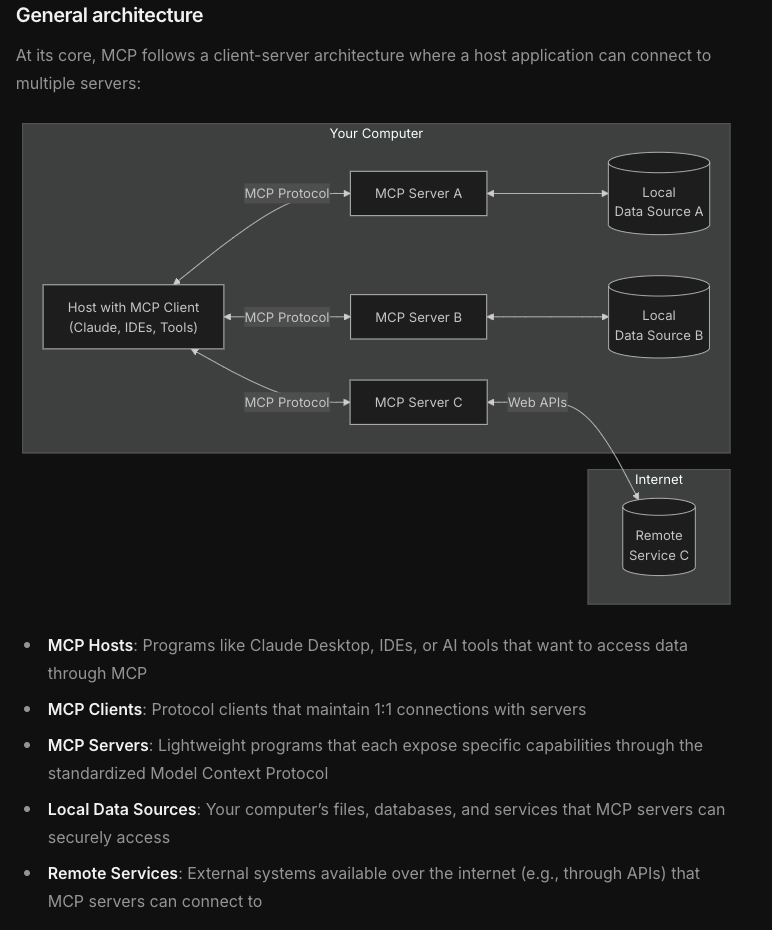
🤔 What is MCP?
The Model Context Protocol (MCP) is a cutting-edge standard for context sharing and management across AI models and systems. Think of it as the language AI agents use to interact seamlessly. 🧠✨
Here’s why MCP matters:
- 🧩 Standardization: MCP defines how context can be shared across models, enabling interoperability.
- ⚡ Scalability: It’s built to handle large-scale AI systems with high throughput.
- 🔒 Security: Robust authentication and fine-grained access control.
- 🌐 Flexibility: Works across diverse systems and AI architectures.
✨ Features of MCP Agents
- 🖼️ Futuristic UI: Built using Next.js and Tailwind CSS, providing a sleek and minimalistic experience.
- 📑 Tech Docs: Curated documentation on how to get started with MCP, from Python SDKs to server setup.
- 🗿 Roadmap: A visual timeline of MCP's milestones and future plans.
🚀 Getting Started
🔧 Prerequisites
To run the web interface locally, you’ll need:
- Node.js (v16 or higher recommended)
- npm or yarn
🛠️ Installation
Clone the repository and install dependencies:
git clone https://github.com/yourusername/mcp-agents.git
cd mcp-agents
npm install
🏃♂️ Run the Development Server
npm run dev
Open http://localhost:3000 in your browser to see the website in action! 🌟
📑 Key Sections
🏠 Landing Page
Learn what MCP is all about, with real-world context and getting-started code snippets.
📖 Tech Docs
Comprehensive, developer-friendly guides covering:
- 📦 MCP Python SDK installation and setup.
- ⚙️ Creating an MCP-compliant server.
- 🔧 Example workflows and integrations.
🗿 Roadmap
A sleek, timeline-based visualization of MCP's progress:
- ✅ POC and MVP completed.
- 🚀 Next steps: Scalability, Feature Enhancements, and Community Building.
💻 Tech Stack
This project is powered by:
- ⚛️ Next.js – A React framework for server-side rendering and static site generation.
- 🌠 Tailwind CSS – A utility-first CSS framework for rapid UI development.
- 💡 react-syntax-highlighter – Beautiful code highlighting for developers.
🤝 Contributing
We’d love your help to improve MCP Agents! 🛠️ Feel free to:
- Submit issues and pull requests.
- Improve documentation and examples.
- Share your feedback and suggestions.
📩 Contact
Got questions? Reach out to us via:
- Email: support@mcpagents.com
- Twitter: @mcpagents
Enjoy building with MCP and the MCPAgent SDK, shaping the future of AI! 🚀✨