
READMEmain
We couldn't render this README. Read it on GitHub
Cursor Talk to Figma MCP
This project implements a Model Context Protocol (MCP) integration between Cursor AI and Figma, allowing Cursor to communicate with Figma for reading designs and modifying them programmatically.
https://github.com/user-attachments/assets/129a14d2-ed73-470f-9a4c-2240b2a4885c
Project Structure
src/talk_to_figma_mcp/- TypeScript MCP server for Figma integrationsrc/cursor_mcp_plugin/- Figma plugin for communicating with Cursorsrc/socket.ts- WebSocket server that facilitates communication between the MCP server and Figma plugin
Get Started
- Install Bun if you haven't already:
curl -fsSL https://bun.sh/install | bash
- Run setup, this will also install MCP in your Cursor's active project
bun setup
- Start the Websocket server
bun socket
- MCP server
bunx cursor-talk-to-figma-mcp
- Install Figma Plugin
Quick Video Tutorial
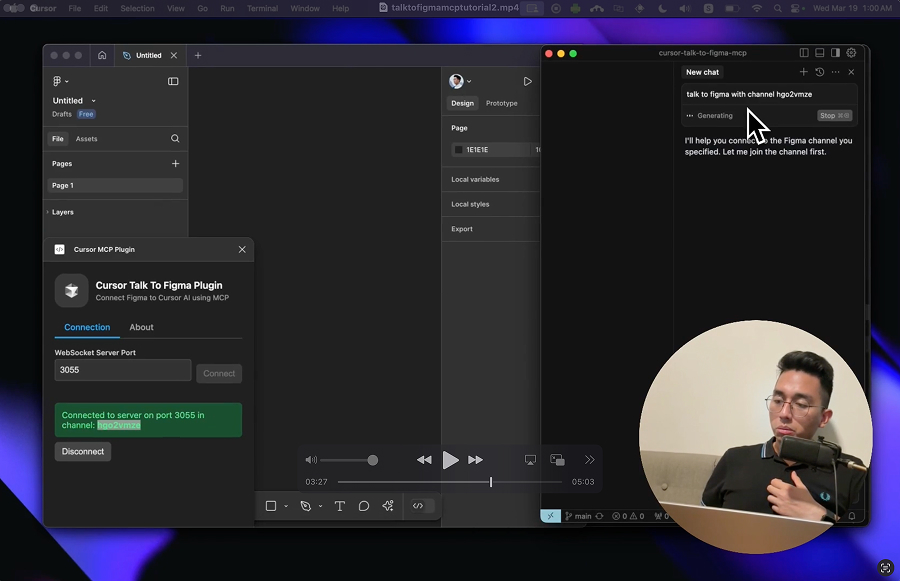
Manual Setup and Installation
MCP Server: Integration with Cursor
Add the server to your Cursor MCP configuration in ~/.cursor/mcp.json:
{
  "mcpServers": {
    "TalkToFigma": {
      "command": "bunx",
      "args": ["cursor-talk-to-figma-mcp"]
    }
  }
}
WebSocket Server
Start the WebSocket server:
bun socket
Figma Plugin
- In Figma, go to Plugins > Development > New Plugin
- Choose "Link existing plugin"
- Select the
src/cursor_mcp_plugin/manifest.jsonfile - The plugin should now be available in your Figma development plugins
Windows + WSL Guide
- Install bun via powershell
powershell -c "irm bun.sh/install.ps1|iex"
- Uncomment the hostname
0.0.0.0insrc/socket.ts
// uncomment this to allow connections in windows wsl
hostname: "0.0.0.0",
- Start the websocket
bun socket
Usage
- Start the WebSocket server
- Install the MCP server in Cursor
- Open Figma and run the Cursor MCP Plugin
- Connect the plugin to the WebSocket server by joining a channel using
join_channel - Use Cursor to communicate with Figma using the MCP tools
MCP Tools
The MCP server provides the following tools for interacting with Figma:
Document & Selection
get_document_info- Get information about the current Figma documentget_selection- Get information about the current selectionget_node_info- Get detailed information about a specific nodeget_nodes_info- Get detailed information about multiple nodes by providing an array of node IDs
Creating Elements
create_rectangle- Create a new rectangle with position, size, and optional namecreate_frame- Create a new frame with position, size, and optional namecreate_text- Create a new text node with customizable font properties
Modifying text content
set_text_content- Set the text content of an existing text node
Styling
set_fill_color- Set the fill color of a node (RGBA)set_stroke_color- Set the stroke color and weight of a nodeset_corner_radius- Set the corner radius of a node with optional per-corner control
Layout & Organization
move_node- Move a node to a new positionresize_node- Resize a node with new dimensionsdelete_node- Delete a nodeclone_node- Create a copy of an existing node with optional position offset
Components & Styles
get_styles- Get information about local stylesget_local_components- Get information about local componentsget_team_components- Get information about team componentscreate_component_instance- Create an instance of a component
Export & Advanced
export_node_as_image- Export a node as an image (PNG, JPG, SVG, or PDF)execute_figma_code- Execute arbitrary JavaScript code in Figma (use with caution)
Connection Management
join_channel- Join a specific channel to communicate with Figma
Development
Building the Figma Plugin
-
Navigate to the Figma plugin directory:
cd src/cursor_mcp_plugin -
Edit code.js and ui.html
Best Practices
When working with the Figma MCP:
- Always join a channel before sending commands
- Get document overview using
get_document_infofirst - Check current selection with
get_selectionbefore modifications - Use appropriate creation tools based on needs:
create_framefor containerscreate_rectanglefor basic shapescreate_textfor text elements
- Verify changes using
get_node_info - Use component instances when possible for consistency
- Handle errors appropriately as all commands can throw exceptions
License
MIT