
MCP Remote Inspect
A minimal, browser-based tool for inspecting real, raw message exchanges between an MCP Client and a remote MCP Server. Unlike the official @modelcontextprotocol/inspector, this project is client-only—no local proxy server required. You can use it instantly 👉 HERE.
flowchart TD
    subgraph Official_Inspector["@modelcontextprotocol/inspector"]
        C[MCP Client] <--> D["[Proxy MCP Server] <br> Local Proxy <br> [Proxy MCP Client]"] <--> E[MCP Server]
    end
    subgraph This_Project["mcp-inspect.vercel.app"]
        A[MCP Client] <--> B[MCP Server]
    end
https://mcp-inspect.vercel.app
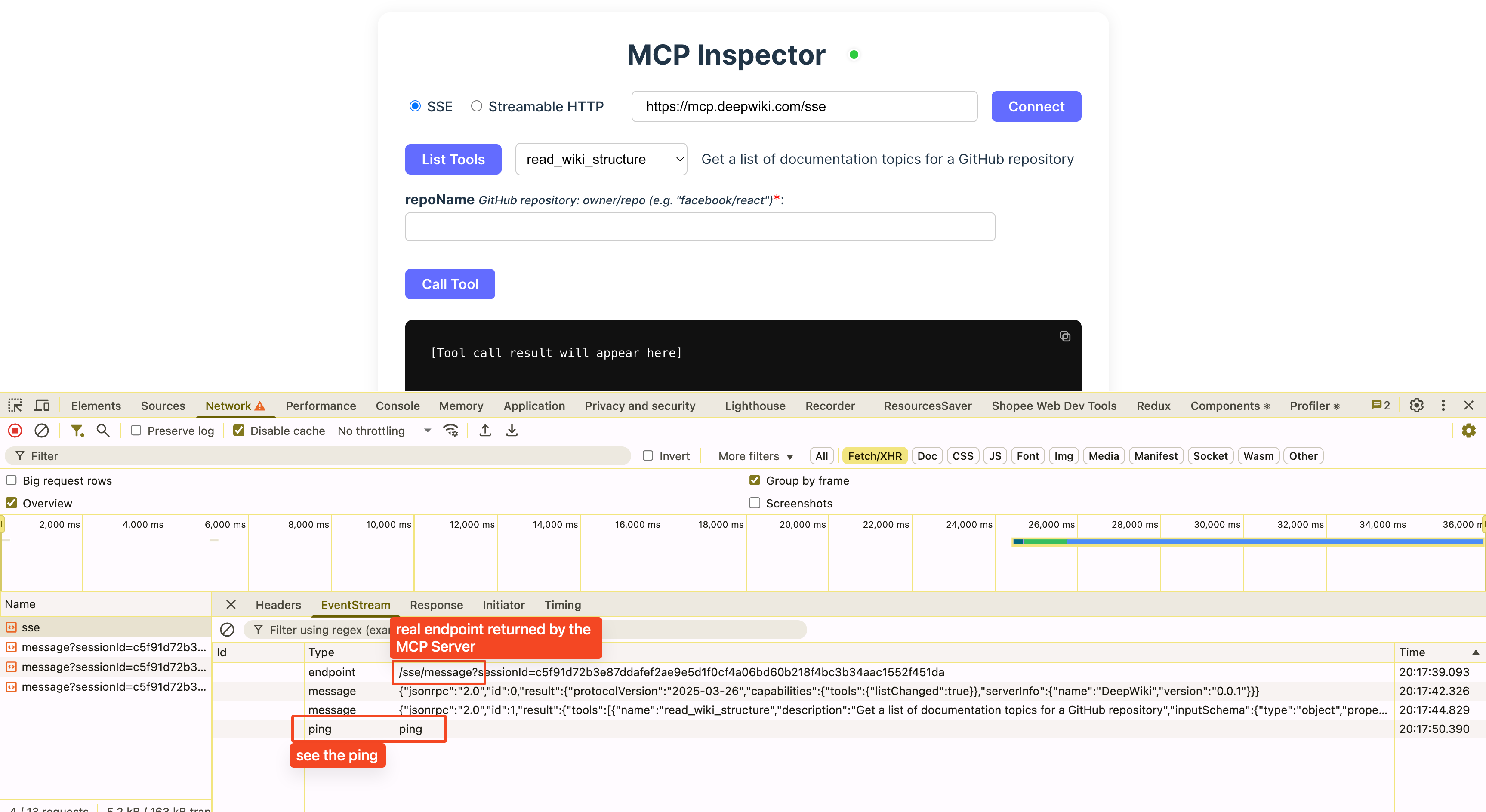
@modelcontextprotocol/inspector
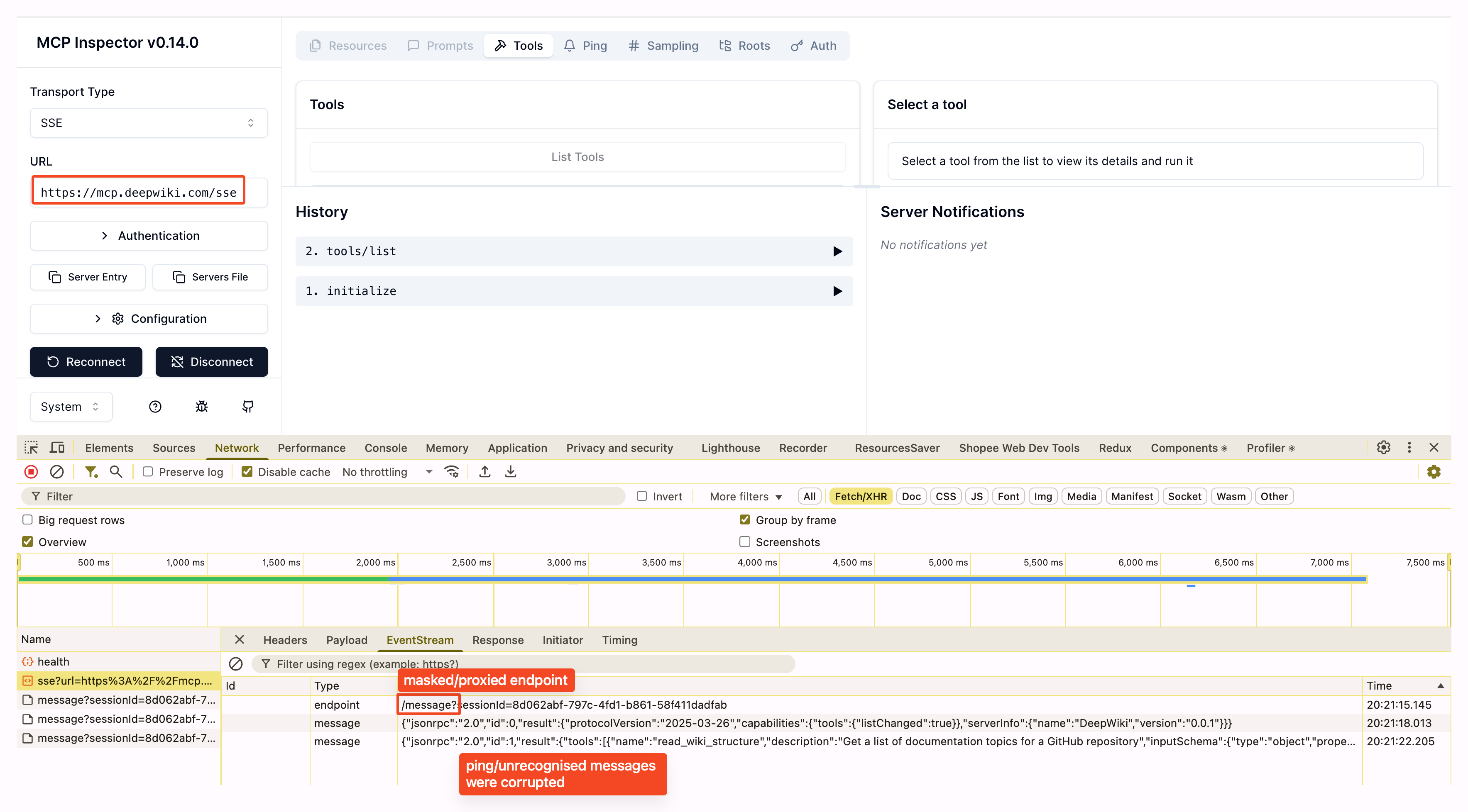
Key Features & Differences
- Direct-to-Server: Connects directly to any MCP Server endpoint (SSE or Streamable HTTP), so you see the real messages and endpoints—no proxy masking.
- Raw Endpoint Visibility: If the server sends a message to
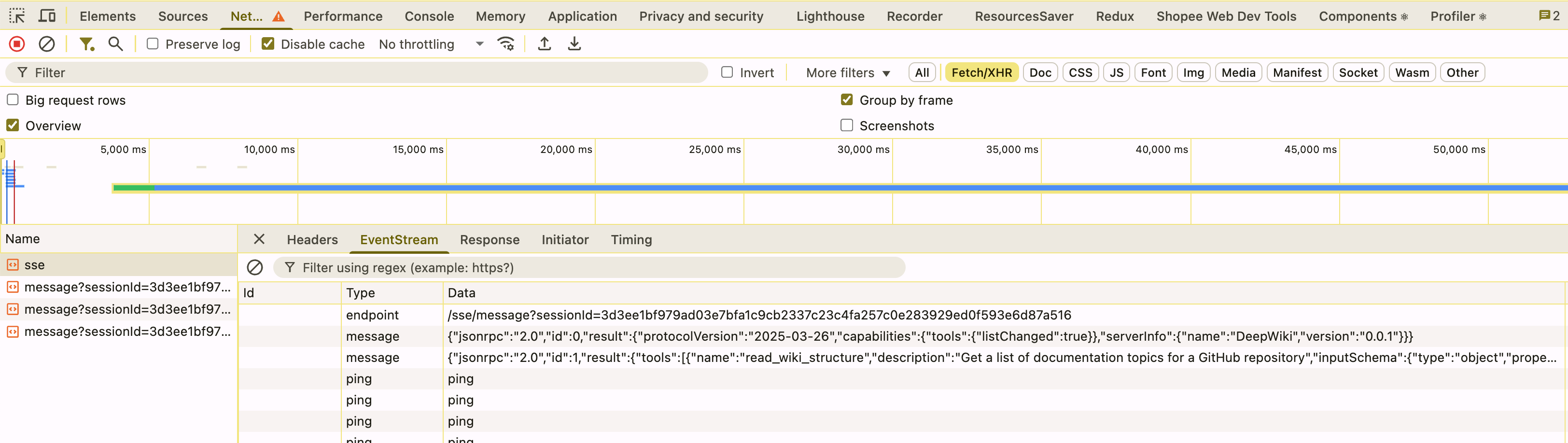
/mcp/message, you'll see/mcp/message(not/messageas with the official inspector's proxy). - Heartbeat/Ping Support: All messages, including server heartbeats (ping), are visible. The official inspector hides these.
- Streamable HTTP Mode: If the server uses
enableJsonResponse=true, you'll see the actual JSON response. The official inspector always showstext/event-stream(from its proxy), not the real server response.
Limitations
- Tools-Only Focus: Only supports the Tools use case (SSE and Streamable HTTP). Does not support STDIO, Prompts, Resources, etc.
- CORS: As a browser app, it is subject to CORS restrictions. If the MCP Server does not allow cross-origin requests, you may not be able to connect. Unlike the official inspector, there is no local proxy to bypass CORS.
When to Use This
- You want to see the real message flow between your MCP Client and a remote MCP Server.
- You want to debug or understand the actual protocol, endpoints, and message types (including heartbeats/pings).
- You don't want to install or run @modelcontextprotocol/inspector, just access an MCP Inspector directly.
How to Use
1. Use the Live Demo
Just open https://mcp-inspect.vercel.app in your browser.
- Enter your MCP Server URL (examples:
https://mcp.deepwiki.com/ssefor SSE,https://mcp.context7.com/mcpfor Streamable HTTP). - Choose the transport type (SSE or Streamable HTTP).
- Connect, list tools, select a tool, fill in parameters, and call the tool.
- View and copy the raw results and all exchanged messages.
- Tip: Open your browser's DevTools Network tab to see the real HTTP requests and responses exchanged directly with the MCP server—no proxy, no masking.
2. Run Locally (for development)
npm install
npm run dev
Then open http://localhost:5173 in your browser.
3. Build for Production
npm run build
Why Not Use the Official Inspector?
- The official
modelcontextprotocol/inspectorruns a local proxy server, so you only see messages as they pass through the proxy—not the real server endpoints or all message types. - This project is ideal for protocol debugging, CORS testing, and understanding the actual MCP Client/Server exchange.
Message Exchange in Different Transport Types
I. STDIO
sequenceDiagram
    participant Client
    participant Server

    Note over Client,Server: 1. Start Server as Subprocess
    Client->>+Server: [spawn process, open stdin/stdout]
    Note over Client,Server: 2. Tool Discovery (Initialization)
    Client-->>+Server: stdin: {"jsonrpc":"2.0", "method":"initialize", ...}\n\n
    Server-->>-Client: stdout: {"jsonrpc":"2.0", "id":..., "result": ...}\n\n
    Client-->>+Server: stdin: {"jsonrpc":"2.0", "method":"notifications/initialized", ...}\n\n
    Client-->>+Server: stdin: {"jsonrpc":"2.0", "method":"tools/list", ...}\n\n
    Server-->>-Client: stdout: {"jsonrpc":"2.0", "id":..., "result": ...}\n\n
    Note over Client,Server: 3. Tool Call
    Client-->>+Server: stdin: {"jsonrpc":"2.0", "method":"tools/call", ...}\n\n
    Server-->>-Client: stdout: {"jsonrpc":"2.0", "id":..., "result": ...}\n\n
    Note over Client,Server: ...
    Client->>Server: [close stdin to terminate]
II. SSE (Deprecated)
sequenceDiagram
    participant Client
    participant Server

    Note over Client,Server: 1. Establish SSE Connection
    Client->>+Server: GET /sse
    Server-->>+Client: 200 OK
    Server-->>-Client: SSE: event: endpoint\ndata: /messages?sessionId=...

    Note over Client,Server: 2. Tool Discovery (Initialization)
    Client->>+Server: POST /messages?sessionId=...\nBody: {"jsonrpc":"2.0", "method":"initialize", ...}
    Server->>Client: 202 Accepted
    Server-->>-Client: SSE: event: message\ndata: {"id":..., "result": ...}

    Client->>+Server: POST /messages?sessionId=...\nBody: {"jsonrpc":"2.0", "method":"notifications/initialized", ...}
    Server->>-Client: 202 Accepted

    Client->>+Server: POST /messages?sessionId=...\nBody: {"jsonrpc":"2.0", "method":"tools/list", ...}
    Server->>Client: 202 Accepted
    Server-->>-Client: SSE: event: message\ndata: {"id":..., "result": ...}

    Note over Client,Server: 3. Tool Call
    Client->>+Server: POST /messages?sessionId=...\nBody: {"jsonrpc":"2.0", "method":"tools/call", ...}
    Server->>Client: 202 Accepted
    Server-->>-Client: SSE: event: message\ndata: {"id":..., "result": ...}

    Note over Client,Server: ...
    Client->>Server: [close connection]
III. Streamable HTTP
1. Direct JSON Response in POST
The server replies to the POST request with a standard JSON body. Used for "API wrapper" servers.
sequenceDiagram
    participant Client
    participant Server

    Note over Client,Server: 1. Session Initialization
    Client->>+Server: POST /mcp\nBody: {"jsonrpc":"2.0", "method":"initialize", ...}
    Server->>-Client: 200 OK\nHeaders: content-type: application/json\nBody: {"id":..., "result": ...}

    Note over Client,Server: 2. Tool Call
    Client->>+Server: POST /mcp\nHeaders: content-type: application/json\nBody: {"jsonrpc":"2.0", "method":"tools/call", ...}
    Server->>-Client: 200 OK\nHeaders: content-type: application/json\nBody: {"id":..., "result": ...}
2. Streaming Response in POST (SSE in POST)
The server replies to the POST request with a streaming response using Content-Type: text/event-stream. The client reads the stream from the POST response body.
sequenceDiagram
    participant Client
    participant Server

    Note over Client,Server: 1. Session Initialization
    Client->>+Server: POST /mcp\nBody: {"jsonrpc":"2.0", "method":"initialize", ...}
    Server-->>-Client: 200 OK\nHeaders: content-type: text/event-stream\nBody: {"id":..., "result": ...}

    Note over Client,Server: 2. Tool Call (Streaming)
    Client->>+Server: POST /mcp\nBody: {"jsonrpc":"2.0", "method":"tools/call", ...}
    Server-->>-Client: 200 OK\nContent-Type: text/event-stream\nSSE: event:message\ndata: {"id":..., "result": ...}
3. Streaming Response via Persistent SSE Channel (GET /mcp)
The server replies to the POST with an acknowledgment (often 202 Accepted), and delivers the actual results asynchronously over a persistent SSE stream (opened via GET /mcp).
sequenceDiagram
    participant Client
    participant Server

    Note over Client,Server: 1. Session Initialization
    Client->>+Server: POST /mcp\nBody: {"jsonrpc":"2.0", "method":"initialize", ...}
    Server-->>-Client: 200 OK\nHeaders: mcp-session-id: <sessionId>\nBody: {"id":..., "result": ...} (application/json)

    Note over Client,Server: 2. Open Persistent SSE Channel
    Client->>+Server: GET /mcp\nHeaders: mcp-session-id: <sessionId>, Accept: text/event-stream
    Server-->>-Client: 200 OK\nContent-Type: text/event-stream

    Note over Client,Server: 3. Tool Call (Async)
    Client->>+Server: POST /mcp\nHeaders: mcp-session-id: <sessionId>\nBody: {"jsonrpc":"2.0", "method":"tools/call", ...}
    Server-->>-Client: 202 Accepted
    Server-->>+Client: SSE: event:message\ndata: {"id":..., "result": ...} (delivered on SSE channel)

    Note over Client,Server: 4. Resuming Stream (SSE Reconnect)
    Client->>+Server: GET /mcp\nHeaders: mcp-session-id: <sessionId>, Accept: text/event-stream, Last-Event-Id: <lastEventId>
    Server-->>-Client: 200 OK\nContent-Type: text/event-stream\nSSE: event:message\ndata: {"id":..., "result": ...} (resumed)
License
MIT