
WhatsApp MCP Server with Wati API v3
[!TIP] Wati now has an official hosted MCP server. There's nothing to install and no API key: connect
https://mcp.wati.io/mcp(EU:https://eu-mcp.wati.io/mcp) and sign in with OAuth. It works with Claude, ChatGPT, Meta Muse, Cursor and more, and also manages Astra AI agents. Setup guide: wati-io/wati-mcp · support article. This self-hosted server is still available if you need it.
This is a Model Context Protocol (MCP) server for WhatsApp using the Wati API v3.
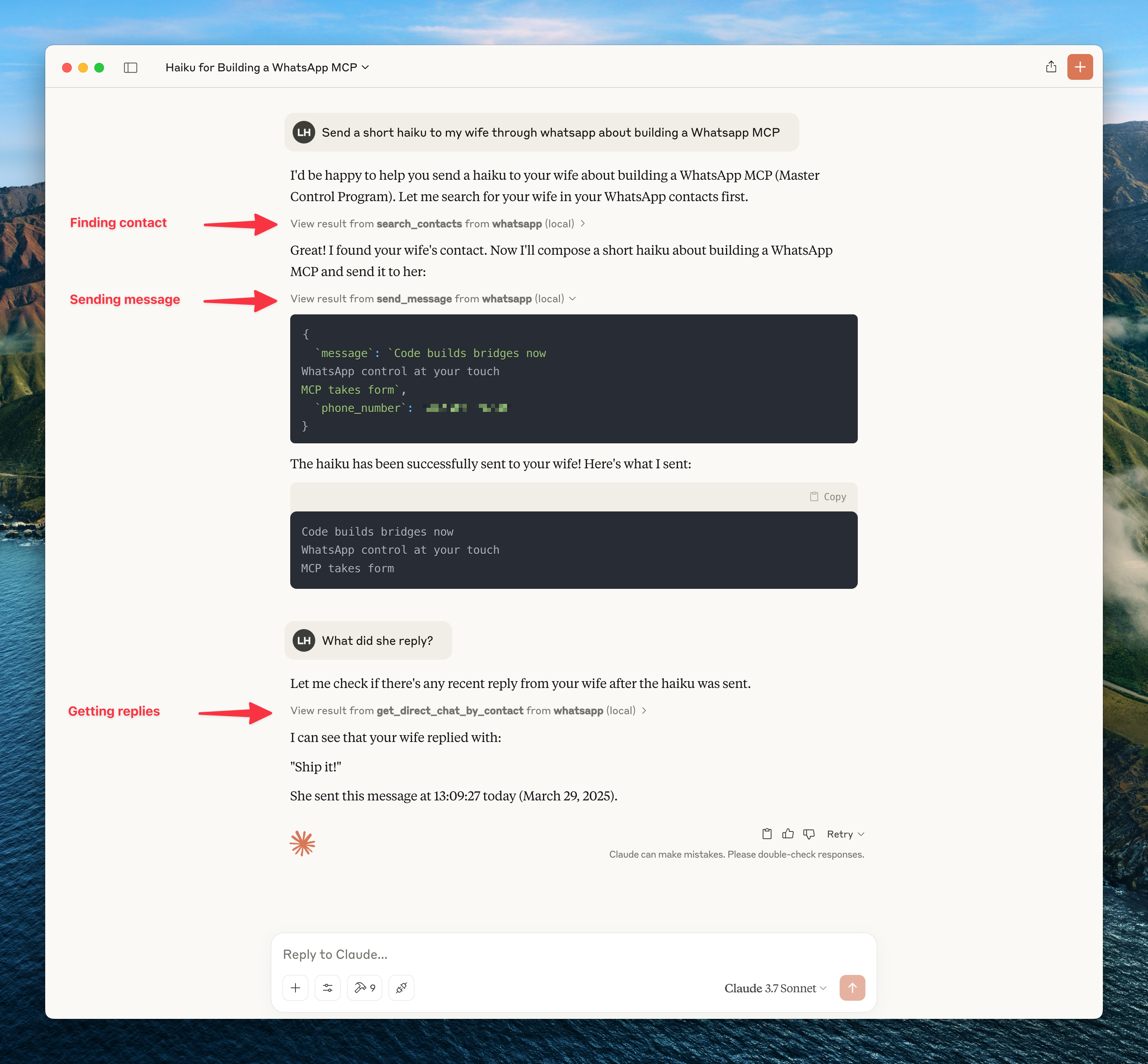
Manage your WhatsApp conversations, contacts, templates, campaigns, and channels through AI assistants like Claude. Search and read messages, send texts and files, manage contacts, and automate workflows — all via MCP tools.
To get updates on this and other projects enter your email here
What's New in v0.2.0
Breaking change: This release migrates from the legacy Wati v1 API to the v3 API (/api/ext/v3/*).
Changes
- API v3 migration — All endpoints updated to
/api/ext/v3/*paths - URL scheme — Tenant ID no longer embedded in URL path; resolved from Bearer token
WATI_TENANT_IDis now optional — Only needed for multi-channel setups (Channel:PhoneNumber targeting)- New tools:
list_contacts,get_contact,add_contact,update_contacts,get_contact_count,assign_contact_teams,send_file_via_url,send_interactive(buttons + list),assign_operator,update_conversation_status,list_templates,get_template,send_template,list_campaigns,get_campaign,list_channels - Removed tools:
list_chats,get_chat,get_direct_chat_by_contact,get_contact_chats(replaced bylist_contacts/get_contact/get_messages) - Simplified response parsing — v3 has standardized response schemas
Migration Guide
- Update
WATI_API_BASE_URLto your Wati server (e.g.https://live-mt-server.wati.io) WATI_TENANT_IDcan be removed unless you use multi-channel targeting- Update tool calls:
send_message(recipient=...)→send_message(target=...) - Replace
list_chats/get_chatwithlist_contacts/get_contact+get_messages
Installation
Installing via Smithery
npx -y @smithery/cli install @wati-io/wati-mcp-server --client claude
Prerequisites
- Python 3.11+
- Anthropic Claude Desktop app (or Cursor)
- UV (Python package manager), install with
curl -LsSf https://astral.sh/uv/install.sh | sh - Wati API access (you'll need your authentication token)
Steps
-
Clone this repository
git clone https://github.com/wati-io/wati-mcp-server.git cd wati-mcp-server -
Configure the Wati API
Copy the example environment file and edit it with your Wati API credentials:
cp .env.example .env # Edit .env with your Wati API credentialsRequired:
WATI_API_BASE_URL: The base URL for the Wati API (e.g.https://live-mt-server.wati.io)WATI_AUTH_TOKEN: Your Wati authentication token (Bearer token from dashboard)
Optional:
WATI_TENANT_ID: Your Wati tenant ID (only for multi-channel setups)
-
Connect to the MCP server
Copy the below json with the appropriate {{PATH}} values:
{ "mcpServers": { "whatsapp": { "command": "{{PATH_TO_UV}}", "args": [ "--directory", "{{PATH_TO_SRC}}/wati-mcp-server", "run", "main.py" ] } } }For Claude, save this as
claude_desktop_config.jsonin:~/Library/Application Support/Claude/claude_desktop_config.jsonFor Cursor, save this as
mcp.jsonin:~/.cursor/mcp.json -
Restart Claude Desktop / Cursor
MCP Tools
Contacts
- search_contacts — Search contacts by name or phone number
- list_contacts — List contacts with pagination
- get_contact — Get detailed contact info by phone or ID
- add_contact — Add a new WhatsApp contact
- update_contacts — Bulk-update contact custom parameters
- get_contact_count — Get total contact count
- assign_contact_teams — Assign a contact to teams
Messages & Conversations
- get_messages — Get conversation messages for a contact
- send_message — Send a text message
- send_file — Send a file (image, video, document, audio) via upload
- send_file_via_url — Send a file by URL (no local download needed)
- download_media — Download media from a message
- send_interactive — Send interactive buttons or list messages
- assign_operator — Assign an operator to a conversation
- update_conversation_status — Update conversation status (open/solved/pending/block)
Templates
- list_templates — List message templates
- get_template — Get template details
- send_template — Send template messages to recipients
Campaigns
- list_campaigns — List broadcast campaigns
- get_campaign — Get campaign details and statistics
Channels
- list_channels — List available WhatsApp channels
Architecture
Claude/AI Assistant
    ↕ MCP Protocol (stdio)
Python MCP Server (FastMCP)
    ↕ HTTPS + Bearer Auth
Wati API v3
    ↕
WhatsApp Business
- Claude sends requests to the Python MCP server via MCP protocol
- The MCP server makes authenticated API calls to the Wati v3 API
- The Wati API communicates with WhatsApp's backend
- Data flows back through the chain to Claude
Troubleshooting
- Authentication errors: Ensure your
WATI_AUTH_TOKENis valid and not expired - 404 errors: Make sure
WATI_API_BASE_URLpoints to your correct Wati server - Rate limiting: The Wati API has rate limits. If you hit them, wait or contact Wati support
- Media upload failures: Check file type support and size limits
- Permission issues with uv: Add it to your PATH or use the full path to the executable
For MCP integration troubleshooting, see the MCP documentation.