
Escape the limitations of no-code builders and the complexity of starting from scratch.











VoltAgent Multi-Agent System
A production-ready TypeScript framework for building intelligent, orchestrated AI agent ecosystems.
VoltAgent is an advanced open-source framework that enables developers to create sophisticated multi-agent AI systems with ease. Our implementation showcases a complete ecosystem of specialized agents working in harmony, featuring advanced reasoning capabilities, persistent memory, and comprehensive tool integration.
🚀 System Overview
- 🧠 Supervisor Agent: Central orchestrator with advanced delegation and workflow management.
- 🔬 10 Specialized Agents: Domain experts for data analysis, development, content creation, and more.
- 💾 Thread-Aware Memory: Persistent, context-aware memory across all conversations.
- 🛠️ Rich Tool Ecosystem: 25+ tools including browser automation, Git operations, and MCP integration.
- 📊 Structured Generation: Zod-validated schemas for reliable, type-safe outputs.
✨ Key Features
🏗️ Architecture
- VoltAgent Core: Enterprise-grade TypeScript framework with full type safety.
- Google Gemini Integration: Primary LLM provider with advanced reasoning capabilities.
- Memory Architecture: Thread-aware, persistent memory with vector search capabilities.
- Tool Composition: Modular tool system with dynamic composition and validation.
🤖 Agent Ecosystem
- Supervisor Agent: Intelligent delegation and multi-agent workflow orchestration.
- Specialized Agents: Browser, Developer, Data Analysis, Content Creation, Research, System Admin, File Manager, Documentation, and more.
- Unified Prompt & Capabilities: All agents use a dynamic, capability-driven prompt and config schema.
🧩 Dynamic Toolkit Awareness
- Auto-Synced Capabilities: The supervisor agent's capabilities are always generated from the real toolset—no manual config needed.
- Context & Memory Integration: The toolkit is always available in the agent's config, LLM prompt/context, and memory options for all subagents and consumers.
- Zero Drift: Add or remove tools and the system instantly reflects the change everywhere (config, prompt, memory, UI).
Usage Example
const toolkit = supervisorAgent.memoryOptions.toolkitCapabilities;
// or, from config:
const toolkit = supervisorConfig.capabilities;
This ensures your UI, subagents, and orchestration logic are always in sync with the real tools available.
🔄 Multi-Agent Workflows
- Intelligent Delegation: Context-aware agent selection and task routing.
- Parallel Processing: Concurrent agent execution for complex workflows.
- Memory Sharing: Cross-agent context and knowledge persistence.
- Error Recovery: Robust error handling and workflow continuation.
🧰 Technology Stack
- Node.js 18+: Runtime environment
- TypeScript 5.x: Type safety and modern development
- Zod: Schema validation and type-safe outputs
- Google Gemini: Advanced LLM for reasoning and generation
- Playwright: Browser automation and web scraping
- LibSQL/Turso: Distributed, persistent memory storage
- VoltAgent Core: Multi-agent orchestration framework
🖥️ VoltAgent Console: Real-Time Agent Visualization & Debugging
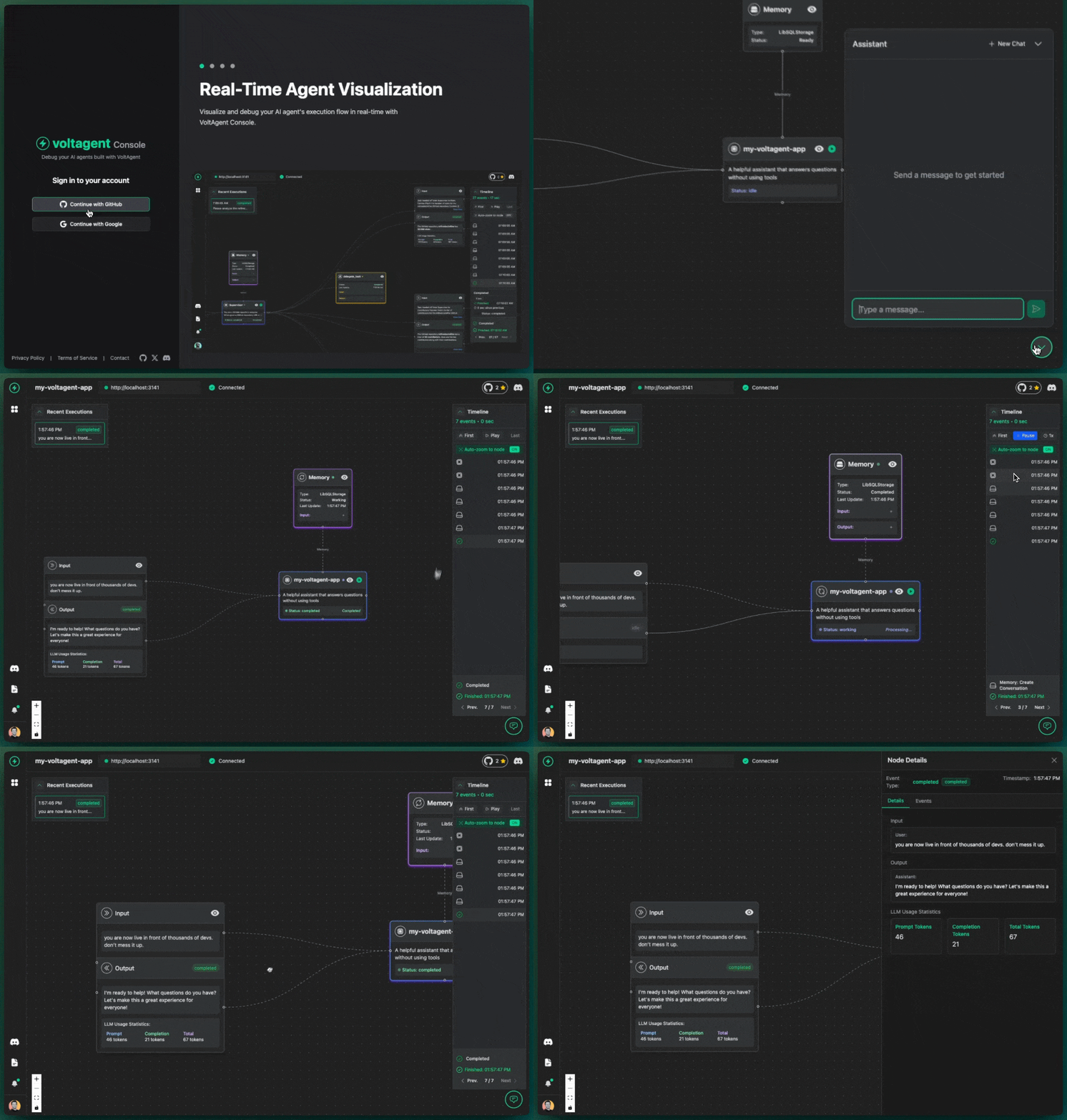
Visualize, debug, and understand your AI agent workflows in real-time with the VoltAgent Console.
The VoltAgent Console is a modern, web-based UI for observing, debugging, and optimizing your multi-agent system. It provides a live, interactive visualization of agent workflows, tool usage, and memory—making it easy to develop, test, and operate complex AI systems with confidence.
🌟 Key Features
- Real-Time Visualization: Instantly see your agents' execution graphs, including all function calls, tool invocations, and message flows as they happen.
- Step-by-Step Debugging: Inspect every step in the agent's reasoning, including LLM prompts, tool inputs/outputs, and memory state.
- Timeline & Trace: View a chronological timeline of all agent actions, with the ability to drill down into any event for full context.
- Multi-Agent Awareness: See how the supervisor and all subagents interact, delegate, and collaborate on tasks.
- Secure Local Debugging: All data remains on your machine during local development—no cloud upload unless you enable production telemetry.
- Production Telemetry (Optional): With VoltAgentExporter, send traces and logs to the VoltAgent cloud for persistent monitoring, audit, and analytics.
🚀 Getting Started
-
Enable Observability: Ensure your VoltAgent app is started with observability enabled (default in this repo). You'll see output like:
VOLTAGENT SERVER STARTED SUCCESSFULLY ✓ HTTP Server: http://localhost:3141 Developer Console: https://console.voltagent.dev -
Open the Console: Go to https://console.voltagent.dev/ in your browser.
-
Connect to Localhost: The console will auto-connect to your local agent server (
http://localhost:3141). You can change the URL in settings if needed. -
Sign In (Optional): Use GitHub or Google to sign in for cloud features, or use local mode for private debugging.
🧑💻 UI Walkthrough
- Login Screen: Authenticate with GitHub or Google for cloud projects, or continue in local mode.
- Agent List View: See all active and recent agent sessions.
- Execution Graph: Visual, node-based flow of agent actions, tool calls, and subagent delegations.
- Timeline Panel: Chronological list of all events, with status indicators and filtering.
- Step Inspector: Click any node or event to see full details: prompts, tool parameters, outputs, logs, and memory snapshots.
- Connection Status: Live feedback on your connection to the local agent server.
🔒 Data Privacy
- Local Debugging:
All execution data stays on your machine when using the console with
localhost. - Production Telemetry:
To enable persistent, cloud-based monitoring, configure the
VoltAgentExporterwith your project keys. See Production Tracing with VoltAgentExporter.
📈 Why Use the Console?
- Accelerate Development: Instantly see what your agents are doing, catch bugs, and optimize workflows.
- Enterprise Observability: Monitor, audit, and analyze agent behavior in production with full traceability.
- Collaboration: Share traces and debug sessions with your team for faster troubleshooting.
📚 Learn More
🚦 Future Scope & Roadmap
Gantt-Style Timeline (2025)
gantt
    title VoltAgent Multi-Agent System Roadmap (2025)
    dateFormat  YYYY-MM-DD
    section Core Platform
    Supervisor Agent           :done,    sup1, 2025-05-01,2025-05-15
    Specialized Agents         :done,    agt1, 2025-05-10,2025-05-25
    Tool Ecosystem             :done,    tool1,2025-05-10,2025-05-28
    Thread-Aware Memory        :done,    mem1, 2025-05-15,2025-05-28
    Dynamic Toolkit Awareness  :done,    dyn1, 2025-05-28,2025-05-30
    section Advanced Features
    Workflow Tracing           :active,  wf1,  2025-06-01,2025-06-10
    UI Toolkit/Inspector       :         ui1,  2025-06-05,2025-06-20
    OpenAPI/Swagger Export     :         api1, 2025-06-10,2025-06-15
    Agent Self-Reflection      :         refl1,2025-06-15,2025-06-25
    Deployment Automation      :         dep1, 2025-06-20,2025-06-30
    section Deployment
    Staging Deployment         :         stag1,2025-06-25,2025-06-28
    Production Release         :         prod1,2025-06-29,2025-07-01
Planned Features
- Workflow Tracing: Visualize and debug multi-agent workflows.
- UI Toolkit/Inspector: Web UI for agent/tool inspection and orchestration.
- OpenAPI/Swagger Export: Auto-generate API docs from Zod schemas.
- Agent Self-Reflection: Agents can reason about their own capabilities and history.
- Deployment Automation: CI/CD for seamless updates and scaling.
- Staging & Production Releases: Robust deployment pipeline.
🚀 Quick Start
Prerequisites
# Node.js 18+ required
node --version

# Install dependencies with npm
npm install
Basic Usage
import { supervisorAgent } from './src/index.js';

const result = await supervisorAgent.generateText(
  "Analyze the React codebase in this repository and suggest improvements",
  { userId: 'user-123', conversationId: 'analysis-session' }
);

console.log(result.text);
📈 Performance & Scalability
- Concurrent Processing: Multi-agent parallel execution.
- Memory Optimization: Efficient vector search and context retrieval.
- Type Safety: Full TypeScript compliance with Zod validation.
- Error Resilience: Comprehensive error handling and recovery.
- Monitoring: Built-in telemetry and performance tracking.
🔧 Configuration
Environment Variables
GOOGLE_GENERATIVE_AI_API_KEY=your_gemini_api_key
DATABASE_URL=your_database_url
VOLTAGENT_PUBLIC_KEY=your_voltagent_public_key
VOLTAGENT_SECRET_KEY=your_voltagent_secret_key
Database Setup
The system uses LibSQL/Turso for persistent memory storage.
🚀 Deployment
- Staging: Deploy to a staging environment for integration and QA.
- Production: Use CI/CD to deploy to production. Ensure all environment variables and database connections are set.
- Monitoring: Use built-in telemetry and logs for health and performance.
- Scaling: Horizontally scale agents and memory as needed for workload.
📦 Project Structure Graph
graph TD
5055["User<br>External Actor"]
subgraph 5043["External Systems"]
5052["AI APIs<br>Google GenAI, etc."]
5053["Data Source APIs<br>GitHub, Web Search, Exa, etc."]
5054["Tool Platform APIs<br>Composio, etc."]
end
subgraph 5044["Voltmachines Agent Framework<br>Node.js/TypeScript"]
5045["Main Application<br>TypeScript"]
5046["AI Agents<br>TypeScript"]
5047["Agent Memory & Retrieval<br>TypeScript"]
5048["Supervisor & System Tools<br>TypeScript"]
5049["Browser Automation Tools<br>TypeScript"]
5050["External Data & Tool Connectors<br>TypeScript"]
5051["Core Agent Support Tools<br>TypeScript"]
%% Edges at this level (grouped by source)
5045["Main Application<br>TypeScript"] -->|orchestrates| 5046["AI Agents<br>TypeScript"]
5045["Main Application<br>TypeScript"] -->|configures/uses| 5047["Agent Memory & Retrieval<br>TypeScript"]
5045["Main Application<br>TypeScript"] -->|uses| 5048["Supervisor & System Tools<br>TypeScript"]
5045["Main Application<br>TypeScript"] -->|uses| 5050["External Data & Tool Connectors<br>TypeScript"]
5045["Main Application<br>TypeScript"] -->|uses| 5051["Core Agent Support Tools<br>TypeScript"]
5047["Agent Memory & Retrieval<br>TypeScript"] -->|uses registry of| 5046["AI Agents<br>TypeScript"]
5048["Supervisor & System Tools<br>TypeScript"] -->|inspects/uses registry of| 5046["AI Agents<br>TypeScript"]
5048["Supervisor & System Tools<br>TypeScript"] -->|manages/uses| 5047["Agent Memory & Retrieval<br>TypeScript"]
5051["Core Agent Support Tools<br>TypeScript"] -->|delegates to| 5046["AI Agents<br>TypeScript"]
5046["AI Agents<br>TypeScript"] -->|persist/retrieve state| 5047["Agent Memory & Retrieval<br>TypeScript"]
5046["AI Agents<br>TypeScript"] -->|execute using| 5049["Browser Automation Tools<br>TypeScript"]
5046["AI Agents<br>TypeScript"] -->|execute using| 5050["External Data & Tool Connectors<br>TypeScript"]
5046["AI Agents<br>TypeScript"] -->|execute using| 5051["Core Agent Support Tools<br>TypeScript"]
end
%% Edges at this level (grouped by source)
5055["User<br>External Actor"] -->|initiates tasks| 5045["Main Application<br>TypeScript"]
5046["AI Agents<br>TypeScript"] -->|calls| 5052["AI APIs<br>Google GenAI, etc."]
5050["External Data & Tool Connectors<br>TypeScript"] -->|accesses| 5053["Data Source APIs<br>GitHub, Web Search, Exa, etc."]
5050["External Data & Tool Connectors<br>TypeScript"] -->|integrates with| 5054["Tool Platform APIs<br>Composio, etc."]
🤝 Contributing
We welcome contributions! See TASKS.md for areas where you can help.
📚 Documentation
- Project Overview: Detailed architecture and technical specifications.
- Development Tasks: Roadmap and contribution opportunities.
- Changelog: Version history and recent improvements.
- VoltAgent Docs: Official framework documentation.
🙏 Acknowledgments
Built with:
Ready to build intelligent agent systems? Get Started • Join Discord • VoltAgent Core