
READMEmaster
We couldn't render this README. Read it on GitHub
Flight Recommendation System
A comprehensive travel planning system that combines A2A (Agent-to-Agent) communication with MCP (Model Context Protocol) to provide intelligent flight search, hotel recommendations, and itinerary generation services.
🎥 Demo Video
https://github.com/user-attachments/assets/d2d0b306-f414-4190-9044-b0609ab95c96
🌟 Features
- 🛫 Flight Search Agent: Powered by Google ADK (Agent Development Kit)
- 🏨 Hotel Search Agent: Built with LangGraph for intelligent hotel recommendations
- 📋 Itinerary Generation Agent: Uses CrewAI for comprehensive travel planning
- 🔄 Agent-to-Agent Communication: Seamless multi-agent collaboration
- 🌐 Web Interface: Modern UI for easy interaction
- 🔌 MCP Integration: Model Context Protocol for enhanced agent communication
🏗️ Architecture
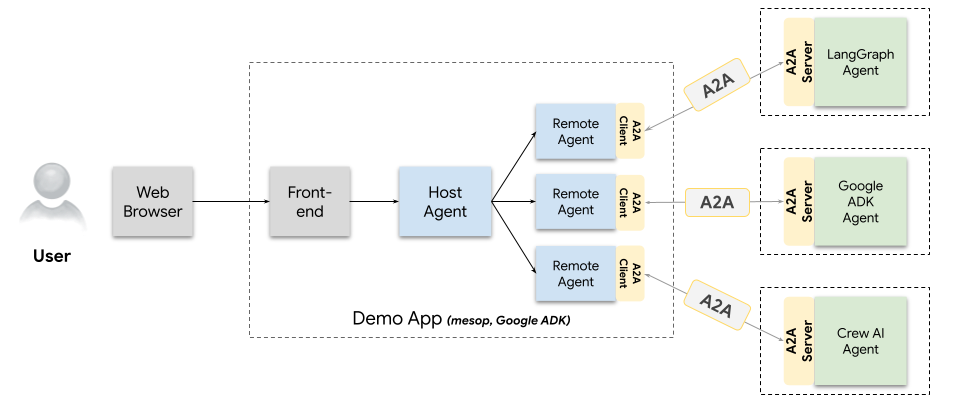
This project demonstrates the integration of multiple AI frameworks:
- A2A (Agent-to-Agent): Enables seamless communication between different specialized agents
- MCP (Model Context Protocol): Provides standardized communication protocol for AI agents
- Multi-Agent System: Three specialized agents working together to create comprehensive travel solutions
Agent Overview
| Agent | Framework | Purpose |
|---|---|---|
| Flight Search | Google ADK | Find and compare flight options |
| Hotel Search | LangGraph | Discover and recommend hotels |
| Itinerary Generation | CrewAI | Create detailed travel itineraries |
🚀 Quick Start
Prerequisites
- Python 3.11+
- uv (Python package manager)
- Required API keys (see Configuration section)
Installation
-
Clone the repository
git clone https://github.com/YOUR_USERNAME/Flight-Recommendation.git cd Flight-Recommendation -
Install dependencies
uv sync -
Set up environment variables
cp .env.example .env # Edit .env with your API keys -
Run the demo UI
cd demo/ui
uv run python main.py
🔧 Configuration
Create a .env file in the project root with the following variables:
# Google ADK Configuration (for Flight Search Agent)
GOOGLE_ADK_API_KEY=your_google_adk_api_key

# SerpAPI Configuration (for Hotel Search Agent)
SERP_API_KEY=your_serpapi_key

# Groq Configuration (for LangGraph)
GROQ_API_KEY=your_groq_api_key

# CrewAI Configuration (for Itinerary Agent)
OPENAI_API_KEY=your_openai_api_key

# MCP Server Configuration
MCP_SERVER_HOST=localhost
MCP_SERVER_PORT=8000
📁 Project Structure
Flight-Recommendation/
├── demo/                           # Demo application and UI
│   ├── ui/                        # Web interface
│   └── a2a_demo_arch.png         # Architecture diagram
├── mcp_server/                    # MCP server implementation
│   └── server.py                  # Main MCP server
├── samples/python/                # Agent implementations
│   ├── agents/
│   │   ├── flight_search_agent/   # Google ADK-based flight search
│   │   ├── hotel_search_agent/    # LangGraph-based hotel search
│   │   └── itinerary_generation_agent/ # CrewAI-based itinerary
│   ├── common/                    # Shared utilities and types
│   └── hosts/                     # Agent hosting infrastructure
└── README.md                      # This file
🎯 Usage Examples
Flight Search
from samples.python.agents.flight_search_agent import FlightSearchAgent

agent = FlightSearchAgent()
flights = agent.search_flights(
    origin="NYC",
    destination="LAX",
    departure_date="2024-06-15",
    return_date="2024-06-22"
)
Hotel Search
from samples.python.agents.hotel_search_agent import HotelSearchAgent

agent = HotelSearchAgent()
hotels = agent.search_hotels(
    location="Los Angeles",
    check_in_date="2024-06-15",
    check_out_date="2024-06-22"
)
Itinerary Generation
from samples.python.agents.itinerary_generation_agent import ItineraryAgent

agent = ItineraryAgent()
itinerary = agent.generate_itinerary(
    destination="Los Angeles",
    duration=7,
    interests=["beaches", "entertainment", "dining"]
)
🔗 Agent Communication
The system uses A2A communication to enable agents to work together:
- Flight Search Agent finds available flights
- Hotel Search Agent recommends accommodations based on flight details
- Itinerary Generation Agent creates a comprehensive travel plan using both flight and hotel information
🛠️ Development
Running Individual Agents
# Flight Search Agent
cd samples/python/agents/flight_search_agent
uv run python agent.py

# Hotel Search Agent
cd samples/python/agents/hotel_search_agent
uv run python agent.py

# Itinerary Generation Agent
cd samples/python/agents/itinerary_generation_agent
uv run python agent.py
Running the MCP Server
cd mcp_server
uv run python server.py
Testing
# Run all tests
uv run pytest

# Run specific test suite
uv run pytest demo/ui/tests/
📚 Documentation
🤝 Contributing
- Fork the repository
- Create a feature branch (
git checkout -b feature/amazing-feature) - Commit your changes (
git commit -m 'Add some amazing feature') - Push to the branch (
git push origin feature/amazing-feature) - Open a Pull Request
📄 License
This project is licensed under the MIT License - see the LICENSE file for details.
🔮 Future Enhancements
- Real-time price monitoring
- Weather integration for travel planning
- Multi-language support
- Mobile application
- Advanced analytics and reporting
- Integration with more travel APIs
🙏 Acknowledgments
- Google ADK team for the flight search capabilities
- LangGraph community for the hotel search framework
- CrewAI developers for the itinerary generation tools
- MCP protocol contributors for standardized agent communication
📞 Support
If you encounter any issues or have questions:
- Check the Issues page
- Create a new issue with detailed information
- Join our community discussions
Made with ❤️ by [Your Name]