
MCP Image Generation Server
A Model Context Protocol (MCP) server for image generation using multiple AI providers including Tencent Hunyuan, OpenAI GPT Image, and Doubao APIs.
Version: 0.2.0
Features
🎯 Multi-API Provider Support
- Tencent Hunyuan: 18 artistic styles with Chinese optimization
- OpenAI GPT Image: High-quality image generation with English optimization
- Doubao (ByteDance): Balanced quality and speed with 12 styles
🚀 Core Features
- Generate images from text descriptions
- Support for multiple image styles across different providers
- Support for different image resolutions
- Negative prompts for excluding unwanted elements
- Intelligent provider selection and management
- Unified parameter format with provider-specific options
🌐 Transport Modes (New in v0.2.0)
- stdio Transport: Local IDE integration (Cursor, Windsurf)
- HTTP Transport: Remote access and enterprise deployment
- Multi-client concurrent connections
- Bearer Token authentication
- Session management
- RESTful API endpoints
- Suitable for cloud deployment and remote access
Why HTTP Transport? Version 0.2.0 adds Streamable HTTP support (MCP's official standard as of 2024-11-05) to enable:
- Remote Access: Claude remote MCP requires public HTTP endpoints (stdio only works locally)
- Enterprise Deployment: Centralized service deployment with multiple concurrent clients
- Cloud Native: Compatible with containers, Kubernetes, and load balancers
Note: This uses Streamable HTTP (POST/GET/DELETE), not the deprecated SSE-only approach. SSE is retained for compatibility but Streamable HTTP is the recommended standard.
🔧 Smart Provider Management
- Automatic detection of available API providers
- Support for specifying particular providers or automatic selection
- Unified error handling and retry mechanisms
- Flexible parameter formats:
provider:styleandprovider:resolution
Installation
Using UV (Recommended)
UV is a fast, modern Python package manager. Recommended usage:
# Install UV (Windows)
curl -sSf https://astral.sh/uv/install.ps1 | powershell

# Install UV (macOS/Linux)
curl -sSf https://astral.sh/uv/install.sh | bash

# Clone the project and enter the directory
cd path/to/image-gen-mcp-server

# Create a UV virtual environment
uv venv
# Or specify an environment name
# uv venv my-env-name

# Activate the virtual environment (Windows)
.venv\Scripts\activate
# Activate the virtual environment (macOS/Linux)
source .venv/bin/activate

# Install dependencies (recommended)
uv pip install -e .

# Or use the lock file for exact versions
uv pip install -r requirements.lock.txt
Using Traditional pip
If you prefer traditional pip:
# Create a virtual environment
python -m venv venv
# Activate the virtual environment (Windows)
venv\Scripts\activate
# Activate the virtual environment (macOS/Linux)
source venv/bin/activate

# Install dependencies
pip install -e .
# Or use the lock file
pip install -r requirements.lock.txt
Environment Setup
Create a .env file in the project root. See .env.example for all available options.
Basic Configuration
# Image save directory
MCP_IMAGE_SAVE_DIR=./generated_images
# Public base URL for generated image links (HTTP mode, optional but recommended)
# MCP_PUBLIC_BASE_URL=https://mcp.your-domain.com
# Metadata TTL for get_image_data cache (seconds)
# MCP_IMAGE_RECORD_TTL=86400
# Max bytes allowed in get_image_data base64 response
# MCP_GET_IMAGE_DATA_MAX_BYTES=10485760

# API Provider Credentials (configure at least one)
TENCENT_SECRET_ID=your_tencent_secret_id
TENCENT_SECRET_KEY=your_tencent_secret_key
OPENAI_API_KEY=your_openai_api_key
DOUBAO_API_KEY=your_doubao_api_key
# Optional but recommended when multiple providers are configured
# MCP_DEFAULT_PROVIDER=openai
Transport Configuration (Optional)
# Transport mode: stdio (default, for local IDE) or http (for remote access)
MCP_TRANSPORT=stdio

# HTTP transport settings (only needed for HTTP mode)
MCP_HOST=127.0.0.1
MCP_PORT=8000

# Authentication (recommended for HTTP mode)
MCP_AUTH_TOKEN=your-secure-random-token
Usage
🔄 Transport Modes
This server supports two transport modes:
| Feature | stdio Transport | HTTP Transport |
|---|---|---|
| Use Case | Local IDE integration | Remote access, enterprise deployment |
| Connection | Subprocess communication | HTTP/HTTPS network |
| Multi-client | ❌ Single client | ✅ Multiple concurrent clients |
| Remote Access | ❌ Not supported | ✅ Supported |
| Authentication | Not needed | Bearer Token |
| Deployment | Simple | Cloud-ready |
🚀 Quick Start
Unified Entry Point (Recommended)
# Method 1: Run as module (recommended)
python -m mcp_image_server

# Method 2: Use entry script
./mcp-server

# Method 3: After pip install
mcp-image-server
The unified server will automatically use the transport mode specified in your .env file:
MCP_TRANSPORT=stdio→ Local stdio mode for IDE integrationMCP_TRANSPORT=http→ HTTP server mode for remote access
📡 HTTP Transport Mode
For remote access and enterprise deployment, use HTTP transport:
1. Configure HTTP Mode
# Set in .env file
MCP_TRANSPORT=http
MCP_HOST=127.0.0.1
MCP_PORT=8000
MCP_AUTH_TOKEN=your-secure-token  # Optional but recommended
2. Start HTTP Server
python -m mcp_image_server
Server will start on http://127.0.0.1:8000 with endpoints:
GET /health- Health checkPOST /mcp/v1/messages- Send JSON-RPC messagesGET /mcp/v1/messages- Subscribe to SSE eventsDELETE /mcp/v1/messages- Close sessionGET /images/{filename}- Serve generated image files
generate_image tool returns images[].url for HTTP clients.
If server is exposed through reverse proxy/public domain, set MCP_PUBLIC_BASE_URL to ensure URL is externally reachable.
/images/* is intentionally public so browser/front-end image rendering works even when MCP API auth is enabled.
Best-practice agent flow:
- Call
generate_imageto get renderable image + stableimage_id/url. - Call
get_image_data(image_id=...)only when programmable base64 text is required.
3. Test HTTP Server
# Check server health
curl http://127.0.0.1:8000/health

# Run comprehensive tests
python test_mcp_server.py

# Test with API key for actual image generation
python test_mcp_server.py --with-api
4. Use HTTP Client
# Run example client
python example_http_client.py basic       # Explore server capabilities
python example_http_client.py generate    # Generate images (requires API key)
For detailed HTTP transport documentation, see HTTP_TRANSPORT_GUIDE.md
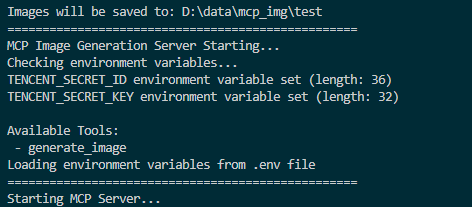
Screenshot of MCP server running successfully:
Connecting to the Server
You can connect from MCP-compatible client(recommand cursor now). The server provides the following features:
Resources
styles://list- List all available image stylesresolutions://list- List all available image resolutions
Tools
generate_image- Generate images based on prompt, style, and resolution (OpenAI also supportsbackground/output_format/output_compression/moderation)get_image_data- Fetch base64 text for a previously generated image byimage_id
Prompts
image_generation_prompt- Create image generation prompt templates
🎨 Multi-API Usage Examples
Basic Usage
# Auto-select best available provider
generate_image(prompt="A cute cat in a garden")

# Specify a particular provider
generate_image(prompt="A cute cat", provider="openai")
generate_image(prompt="一只可爱的小猫", provider="hunyuan")
generate_image(prompt="Cute kitten", provider="doubao")
Advanced Parameter Usage
# Use provider-specific styles and resolutions
generate_image(
    prompt="Cyberpunk city skyline",
    style="hunyuan:saibopengke",
    resolution="hunyuan:1024:768"
)

# Mix provider selection with standard parameters
generate_image(
    prompt="Fantasy magical forest",
    provider="doubao",
    style="fantasy",
    resolution="1024x768",
    negative_prompt="low quality, blurry"
)

# OpenAI with high-resolution output
generate_image(
    prompt="Artistic portrait of a musician",
    provider="openai",
    style="artistic",
    resolution="1536x1024"
)
📊 Supported Providers and Parameters
Tencent Hunyuan
- Styles: 18 options including
riman,xieshi,shuimo,saibopengke,youhua - Resolutions: 8 options from
768:768to1280:720 - Specialty: Chinese-optimized, rich artistic styles
OpenAI GPT Image
- Styles: 12 options including
natural,vivid,realistic,artistic,anime - Resolutions: 4 options:
1024x1024,1536x1024,1024x1536,auto - Advanced options:
background,output_format,output_compression,moderation(via MCP client) - Specialty: High-quality output, English optimization
Doubao (ByteDance)
- Styles: 12 options including
general,anime,chinese_painting,cyberpunk - Resolutions: Model-dependent (auto-validated by configured model/fallback model)
- Specialty: Balanced quality and speed
Cursor Integration
For integration setup details and sample config JSON, see:
Recommended minimum environment variables:
MCP_IMAGE_SAVE_DIR- Provider credentials you actually use:
TENCENT_SECRET_ID+TENCENT_SECRET_KEY,OPENAI_API_KEY,DOUBAO_API_KEY
Optional provider/model controls:
OPENAI_BASE_URL,OPENAI_MODELDOUBAO_ENDPOINT,DOUBAO_MODEL,DOUBAO_FALLBACK_MODELMCP_DEFAULT_PROVIDER(recommended when multiple providers are enabled)
After changing .env model/default-provider values at runtime, call reload_config.
🧪 Testing
The project includes comprehensive testing tools:
Protocol Tests (No API Key Required)
# Test MCP protocol functionality without API keys
python test_mcp_server.py
This tests:
- ✅ Health check endpoint
- ✅ MCP initialization handshake
- ✅ Tools listing
- ✅ Resources listing and reading
- ✅ Prompts listing
- ✅ Session management
Functional Tests (API Key Required)
# Test actual image generation with configured providers
python test_mcp_server.py --with-api
This additionally tests:
- ✅ Real image generation with OpenAI
- ✅ Real image generation with Hunyuan
- ✅ Real image generation with Doubao
Note: At least one API key must be configured in .env to run functional tests.
Troubleshooting
General Issues
- Ensure environment variables are set correctly
- Check for spaces in paths; use quotes if needed
- Ensure the virtual environment is activated (if using one)
- Try running the server script directly to check for errors
- Check UV environment with
uv --version
HTTP Transport Issues
- Connection refused: Ensure server is running on correct host/port
- 401 Unauthorized: Check
MCP_AUTH_TOKENconfiguration - 404 Session not found: Re-initialize connection to get new session ID
- No provider available: Configure at least one API provider in
.env
For detailed troubleshooting, see HTTP_TRANSPORT_GUIDE.md
Front-end Demo
For a front-end integration example, see web-design-demo/.
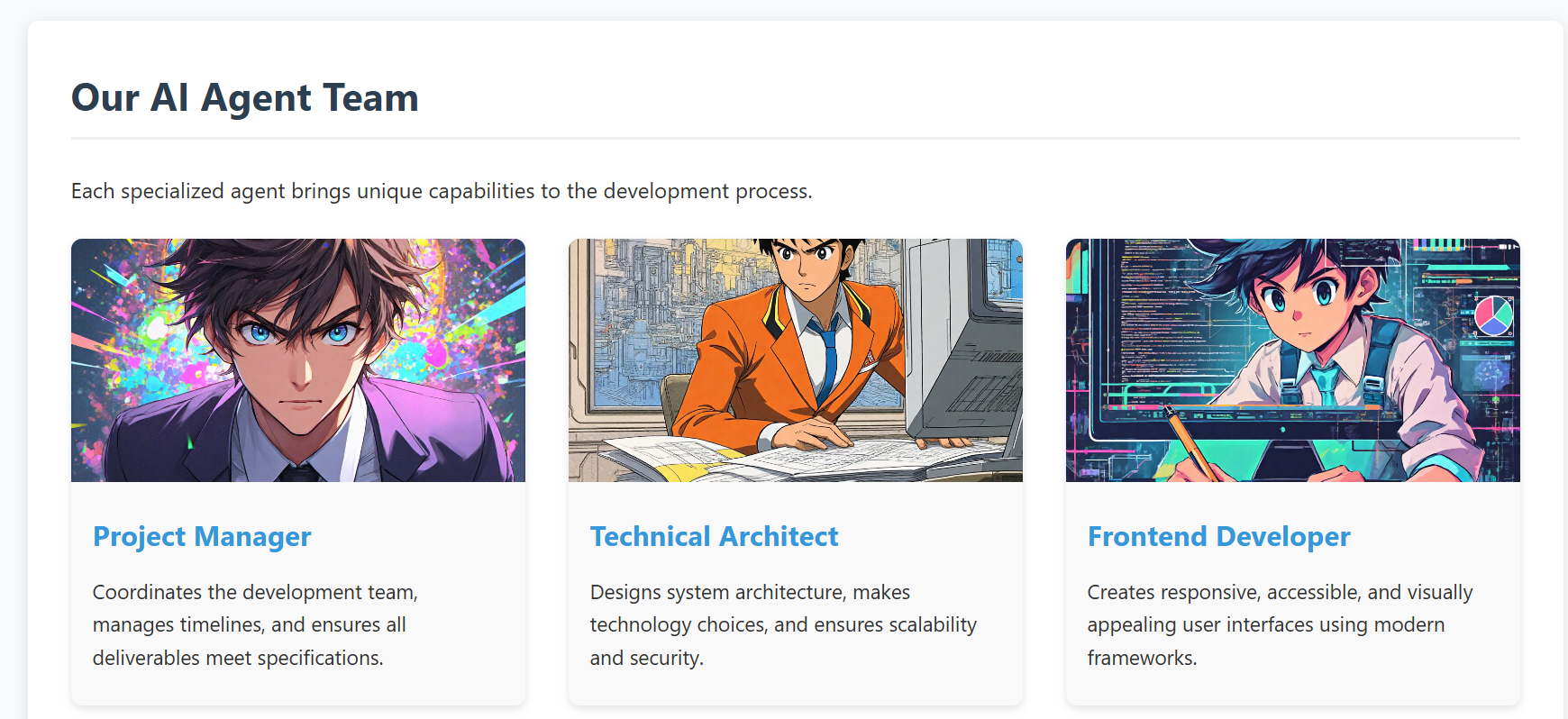
This example demonstrates how to develop a real project using Cursor IDE, where you can generate and manage images directly within your development environment using our MCP tool 🛠️. No need to switch between different image generation tools or leave your IDE - everything can be done right in your development workflow ✨.
- screenshot of the demo web
API Reference
Multi-API Architecture
The project now supports multiple image generation APIs through a unified interface:
Supported APIs
- Tencent Hunyuan Image Generation API (Original)
- OpenAI GPT Image API (New)
- Doubao Image Generation API (New)
Unified MCP Resources
providers://list- List all available providersstyles://list- List all styles from all providersresolutions://list- List all resolutions from all providersstyles://provider/{provider_name}- Get styles for specific providerresolutions://provider/{provider_name}- Get resolutions for specific provider
Enhanced MCP Tools
generate_image- Multi-provider image generation with intelligent routingget_image_data- Retrieve base64 text data for a generated image by idreload_config- Reload runtime config/models from env/.env without process restart (safe subset only)
Tencent Hunyuan Image Generation API
The project originally used and continues to support Tencent Hunyuan Image Generation API. Here are the key details:
API Endpoints
- Domain:
hunyuan.tencentcloudapi.com - Region:
ap-guangzhou(Currently only supports Guangzhou region) - Default API Rate Limit: 20 requests/second
- Concurrent Tasks: Default 1 task at a time
Task Flow
- Submit Task: Submit an asynchronous image generation task with text description
- Query Task: Get task status and results using task ID
- Result URL: Generated image URLs are valid for 1 hour
For detailed API documentation and pricing, please refer to:
OpenAI GPT Image API
API Features
- High-quality image generation
- Automatic prompt optimization
- Multiple style options
- High-resolution output support
Doubao API (ByteDance)
API Features
- ByteDance's proprietary image generation model
- Balanced quality and speed
- Chinese and English prompt support
- Multiple artistic styles
RoadMap
-
Version 0.2.0 (Current)
- ✅ Tencent Hunyuan image generation API
- ✅ OpenAI GPT Image API integration
- ✅ Doubao API integration
- ✅ Multi-provider management system
- ✅ Intelligent provider selection
- ✅ Unified parameter interface
- ✅ HTTP transport with Streamable HTTP protocol
- ✅ Remote access support
- ✅ Multi-client concurrent connections
- ✅ Bearer Token authentication
- ✅ Session management
- ✅ Comprehensive testing suite
-
Future Plans
- Support more mainstream text-to-image model APIs, including:
- Qwen-Image (Qwen/Wan family)
- Open-source model API services (for example: FLUX, SDXL/SD3.5)
- Advanced features:
- Image editing and modification
- Batch image generation
- Style transfer capabilities
- Custom model fine-tuning support
- Enhanced MCP integration:
- Real-time generation progress
- Image history and management
- Advanced prompt templates
- Support more mainstream text-to-image model APIs, including:
Community contributions for more model integrations and new features are welcome!
Compatibility
- stdio: Verified with Cursor and Windsurf.
- HTTP (Streamable HTTP): Works with MCP clients that support HTTP transport.
- For other clients/environments, compatibility depends on the client-side MCP implementation.
Contributing
We welcome contributions of all kinds! Here are some ways you can help:
- 🐛 Report bugs and issues
- 💡 Suggest new features or improvements
- 🔧 Submit pull requests
- 🎨 Add support for more image generation models
Getting Started with Contributing
- Fork the repository
- Create your feature branch (
git checkout -b feature/AmazingFeature) - Commit your changes (
git commit -m 'feat: add some AmazingFeature') - Push to the branch (
git push origin feature/AmazingFeature) - Open a Pull Request
Please make sure to update tests as appropriate and follow the existing coding style.
We appreciate your interest in making this project better!