
[!TIP] Mollie launched an official MCP Server! Go to https://docs.mollie.com/docs/mollie-mcp-server to find out more. If you want to tinker with MCP and your Mollie account, the offical MCP server is almost certainly the product you want to use.
Mollie MCP Server Proof-Of-Concept
This project implements a Model Context Protocol (MCP) server that interfaces with the Mollie API to provide information about Mollie payments.
What Is This Good For?
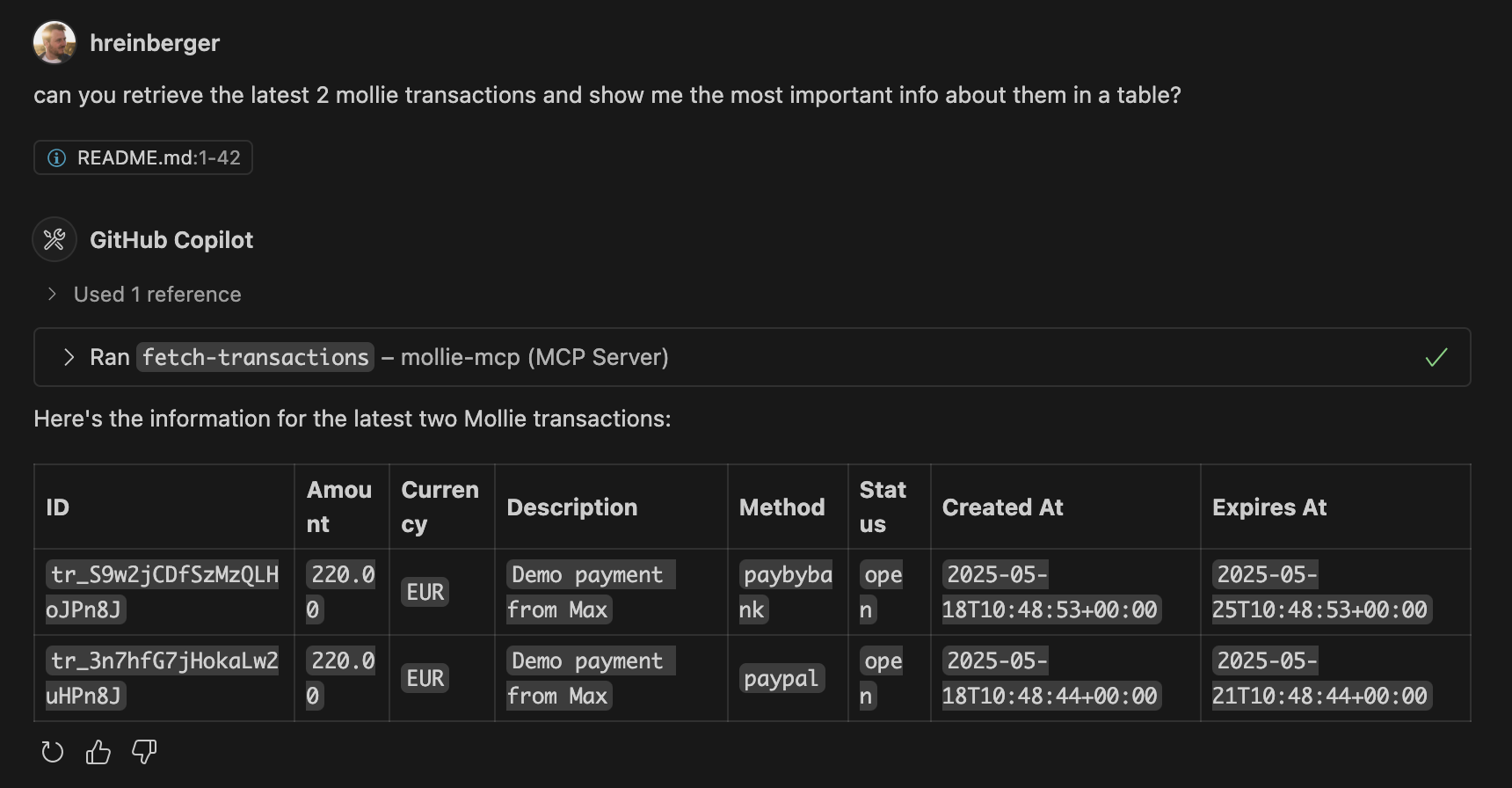
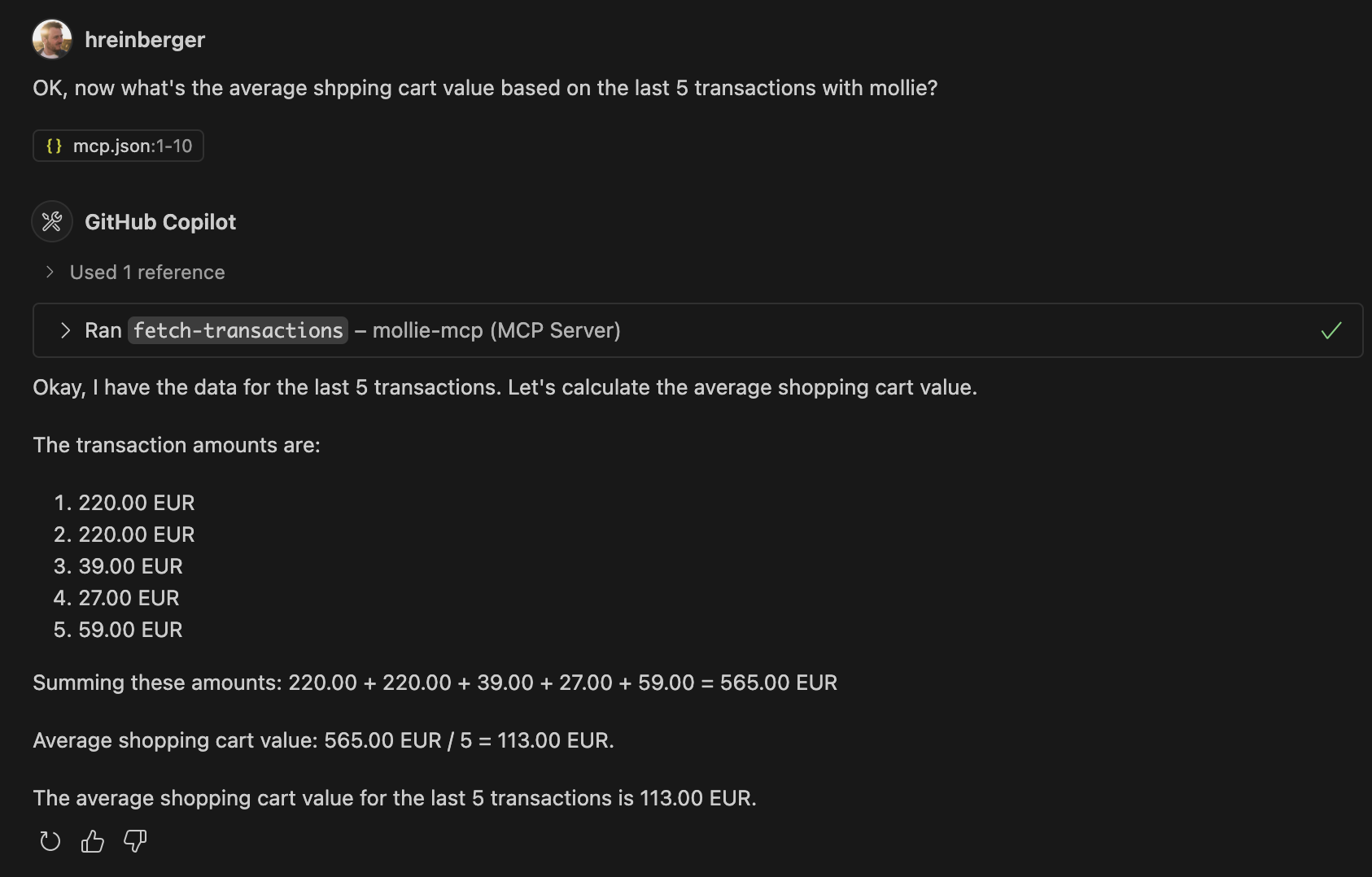
Since Mollie expects customers to be available for a redirect, it doesn't really make sense to do payments over an LLM conversation (except for payment links with a long runtime). So we're concentrating on information retrieval here. Users can ask for the latest transactions on their mollie account and the LLM will receive all available info on them. Based on this, we could let the LLM do creative things like advanced BI or writing Haikus about the names of your customers.
You can also get your current profile information (like profile ID, website, business email or your business category) and get a list of all supported payment methods in your account.
Additionally, you can ask the LLM to create payment links with a specific amount.
The benefit of piping your payment data to an LLM is that you can now query the data in natural language without rigid UIs.
About MCP Servers
Model Context Protocol (MCP) servers act as bridges between language models and various data sources or tools. They expose capabilities (like fetching data or executing actions) that a language model can then utilize to fulfill user requests. This allows language models to interact with external systems and access real-time information or perform tasks beyond their inherent knowledge. This server, for example, allows a model to query Mollie payment information.
Technology Used
- Node.js: Runtime environment for executing JavaScript/TypeScript.
- TypeScript: Superset of JavaScript that adds static typing.
- Mollie API Client: Official Node.js library for interacting with the Mollie API.
- dotenv: For loading environment variables from a
.envfile. - @modelcontextprotocol/sdk: For building the MCP server.
Setup Instructions
-
Clone the repository:
git clone git@github.com:hreinberger/mollie-mcp.git cd mollie-mcp -
Install dependencies:
npm install -
Set up environment variables:
- copy the example to a
.envfile in the root of the project:cp .env.example .env nano .env - Replace
your_mollie_api_test_or_live_keywith your actual Mollie API key. You can find your API keys in your Mollie Dashboard.
- copy the example to a
-
Build the project:
npm run buildThis will compile the TypeScript files from
src/to JavaScript in thebuild/directory. -
Run the MCP Server: If you are using an MCP-compatible client (I'm using Github Copilot), you can add the config in
.vscode/mcp.json.Example
mcp.json:{ "servers": { "mollie-mcp": { "type": "stdio", "command": "node", "args": ["<absolute-path-to-repo>/build/index.js"] } } }
Alternative: HTTP + OAuth (no API key, browser-based login)
src/httpServer.ts runs this server over Streamable HTTP instead of stdio,
as an OAuth-protected resource that delegates authorization to Mollie's own
authorization server (https://my.mollie.com -- the same one behind
Mollie's official mcp.mollie.com). No MOLLIE_API_KEY is needed for this
mode: each request carries its own bearer token, obtained by the MCP client
via browser-based login (PKCE, with Dynamic Client Registration where
supported).
npm run build
npm run start:http   # listens on :3001 by default
See examples/openwebui-oauth for a full local
walkthrough connecting this to Open WebUI's native MCP support (v0.6.31+),
including why this doesn't require hosting the server publicly.
Running with Docker
Two images are published to ghcr.io/hreinberger/mollie-mcp, one per
transport above -- there is no :latest tag, pick the one that matches how
you want to authenticate:
:http-- the OAuth server (src/httpServer.ts), no API key needed. Seeexamples/openwebui-oauthfor a full Open WebUI walkthrough.:mcpo-- the stdio server (src/index.ts) fronted bymcpoas an OpenAPI HTTP API, using a staticMOLLIE_API_KEY. Seeexamples/openwebuifor a full walkthrough.
Available Tools
The server exposes the following tools that can be called by an MCP client:
-
fetch-transactions:- Description: Get a list of the last transactions from Mollie.
- Input:
limit(number, optional, default: 5) - The number of transactions to retrieve. - Output: A JSON string containing the list of payment objects from Mollie.
-
create-payment-link:- Description: Create a payment link with a specified amount.
- Input:
amount(string) - The amount for the payment, formatted as a string with a dot for the decimal separator (e.g., "123.45"). - Output: A string containing the direct URL to the Mollie payment link.
-
transaction-info:- Description: Get all info for a given payment transaction. The transaction ID must start with "tr_".
- Input:
paymentId(string) - The Mollie payment transaction ID (e.g., "tr_xxx"). - Output: A JSON string containing the full payment object for the specified transaction.
-
fetch-methods:- Description: Get a list of all available payment methods from Mollie.
- Input: None.
- Output: A JSON string containing the list of available payment methods from Mollie.
-
profile-info:- Description: Get information about the currently used Mollie profile.
- Input: None.
- Output: A JSON string containing the profile information for the current Mollie account.
This MCP server is designed to be a simple example. It can be extended with more tools to interact further with the Mollie API or other services.
Caveats
Currently, we're handing back the full payment objects to the LLM, which include lots of data and thus, tokens. Be mindful of your LLM's context window.