
🚀 Design to Code with AI
Welcome to the Design to Code Workshop! This hands-on workshop guides you through implementing comprehensive design-to-code solutions using Figma, GitHub Copilot, and Azure AI Foundry for modern UI development.



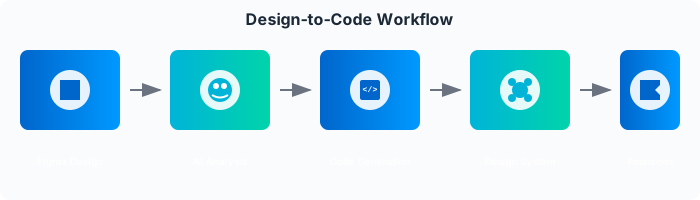
Design-to-Code Workflow - AI-Powered Implementation
🌐 Official Workshop Website: design-to-code.dev
📖 The Journey to AI-Enhanced Design-to-Code
Welcome to the Design-to-Code Enterprise Workshop! This repository takes you on a transformative journey from traditional manual design interpretation to the world of AI-assisted design-to-code workflows and automated component generation.
As a developer in today's fast-paced design-driven environment, you face a critical challenge: most of your time isn't spent creating new features. According to industry studies:
- Traditional design-to-code approaches require extensive manual interpretation
- High inconsistency leads to design system drift and maintenance overhead
- Difficult to maintain design fidelity across multiple frameworks
- Reactive bug fixing instead of proactive component optimization
This workshop provides hands-on guidance to implement modern design-to-code workflows using AI-powered tools. We'll demonstrate how GitHub Copilot, Figma API, and Azure AI Foundry can transform your frontend development strategy.
"Design-to-code is not about replacing designers or developers, but about amplifying their abilities to create consistent, accessible, and maintainable user interfaces faster than ever before."
📋 Workshop Structure
The workshop is organized into progressive modules, allowing you to choose the depth of coverage based on your time and experience:
| Level | Duration | Focus | Best For |
|---|---|---|---|
| Basic | 90 min | Core concepts and first component | Beginners, quick introductions |
| Intermediate | 2-3 hours | Complete component library | Standard workshops, team training |
| Advanced | 6+ hours | Enterprise-scale implementation | Experienced practitioners, deep dives |
🗺️ Learning Path
Module 1: Introduction to Design-to-Code Technologies
- Foundation concepts and modern workflow paradigms
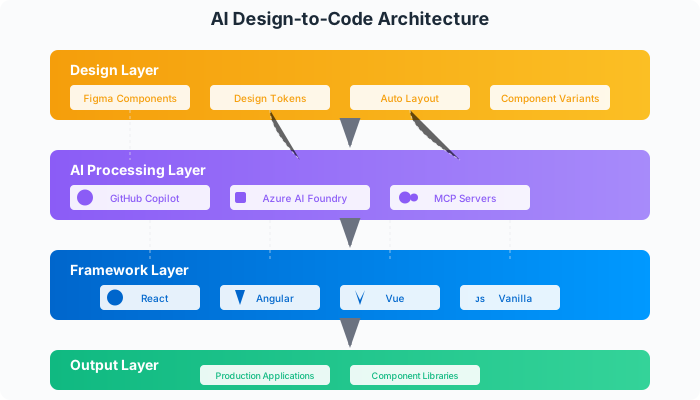
- The design-to-code pipeline: Figma → AI → Framework → Production
- Tools ecosystem overview and integration strategies
Module 2: Environment Setup & Basics
- Workshop preparation and tool configuration
- Creating your first AI-generated component
- Exploring Figma Dev Mode fundamentals
Module 3: Figma Analysis & Component Extraction
- Advanced design analysis techniques
- Component structure identification
- Design token extraction and management
Module 4: AI-Powered Code Generation
- GitHub Copilot optimization for component development
- Custom prompt engineering for design systems
- Advanced code generation patterns
Module 5: Design System Implementation
- Automated design token synchronization
- Cross-framework component architecture
- Scalable design system patterns
Module 6: Advanced Component Patterns
- Complex interaction implementations
- State management integration
- Performance optimization techniques
Module 7: Responsive Design & Accessibility
- Mobile-first responsive generation
- WCAG compliance automation
- Cross-device testing strategies
Module 8: Testing & Quality Assurance
- Visual regression testing setup
- Component testing automation
- Performance monitoring implementation
Module 9: Production Deployment & Optimization
- CI/CD pipeline integration
- Component library publishing
- Performance optimization in production
Advanced Troubleshooting Guide
- Common issues and solutions
- Advanced debugging techniques
- Performance optimization strategies
🔑 Prerequisites
Required Accounts
- Create Azure Free Account
- Azure AI Foundry (Free tier available)
- GitHub account with GitHub Copilot Free
- Create Figma Free Account
- Download VS Code
Technical Requirements
- Development environment: VS Code, Node.js 18+, Git
- Basic understanding of HTML, CSS, and JavaScript
- Familiarity with component-based frameworks (React, Angular, or Vue)
🛠️ Getting Started
-
Fork and Clone this Repository
git clone https://github.com/YourUsername/Design-to-Code-Dev.git cd Design-to-Code-Dev -
Quick Start (30 minutes)
- Follow our Quick Start Guide for immediate hands-on experience
- Complete setup verification and first component generation
-
Follow the Workshop Structure
- Start with Introduction to Design-to-Code Technologies
- Progress through modules based on your experience level
- Use the Advanced Troubleshooting Guide if needed
-
🚀 Try the Extra Module
- Check out the Extra Module: Practical Demo for hands-on exercises
- Includes complete landing page, React components, and automation scripts
- Perfect for applying what you've learned in a real-world context
🌟 Key Features
- AI-Enhanced Development: Learn to implement GitHub Copilot for intelligent component generation
- Multi-Framework Support: Build unified components for React, Angular, Vue, and vanilla JavaScript
- Real-World Scenarios: Practice with authentic enterprise design system challenges
- Progressive Learning: Start from basics and advance to enterprise-scale solutions
- Figma Integration: Master Figma API and Dev Mode for seamless design-to-code workflows
🔗 Related Repositories
AI Code Development
Complete workshop for leveraging AI tools like GitHub Copilot to optimize and improve code quality in enterprise environments. Learn advanced AI-assisted workflows, refactoring techniques, and best practices for integrating AI tools into development processes.
Secure Code AI Development
Comprehensive workshop for implementing secure coding practices using AI-powered tools, GitHub Advanced Security, and modern DevSecOps workflows. Learn to shift-left security, reduce vulnerabilities significantly, and achieve enterprise-grade security compliance with AI assistance.
Agentic Operations & Observability
Hands-on workshop for implementing comprehensive observability solutions using Azure Monitor, Application Insights, and AI-powered tools. Learn to build modern monitoring systems, implement AI-enhanced observability, and create intelligent DevOps practices for cloud applications.
Design-to-Code Development (This Workshop)
Comprehensive workshop for implementing design-to-code workflows using AI-powered tools, Figma integration, and modern development practices. Learn to bridge the gap between design and development, creating consistent and maintainable user interfaces with intelligent automation.
Figma-to-Code Development
Hands-on workshop for transforming Figma designs into production-ready code using GitHub Copilot Agent Mode and AI-powered tools. Learn to convert sophisticated designs into fully functional applications, achieving significant time reduction in development cycles with enterprise-grade features.
👤 Credits
This Design to Code Workshop was developed by Paula Silva, Developer Productivity Global Black Belt at Microsoft Americas.focusing on bridging the gap between design and development through AI-powered automation. The workshop provides a comprehensive approach to implementing modern design-to-code workflows for enterprise software applications.



