
🚀 Agentic Operations and Observability
Welcome to the Agentic Operations & Obervability Workshop! This hands-on workshop guides you through implementing comprehensive observability solutions for cloud applications using Azure Monitor, Application Insights, and new AI-powered tools like Azure SRE Agent.


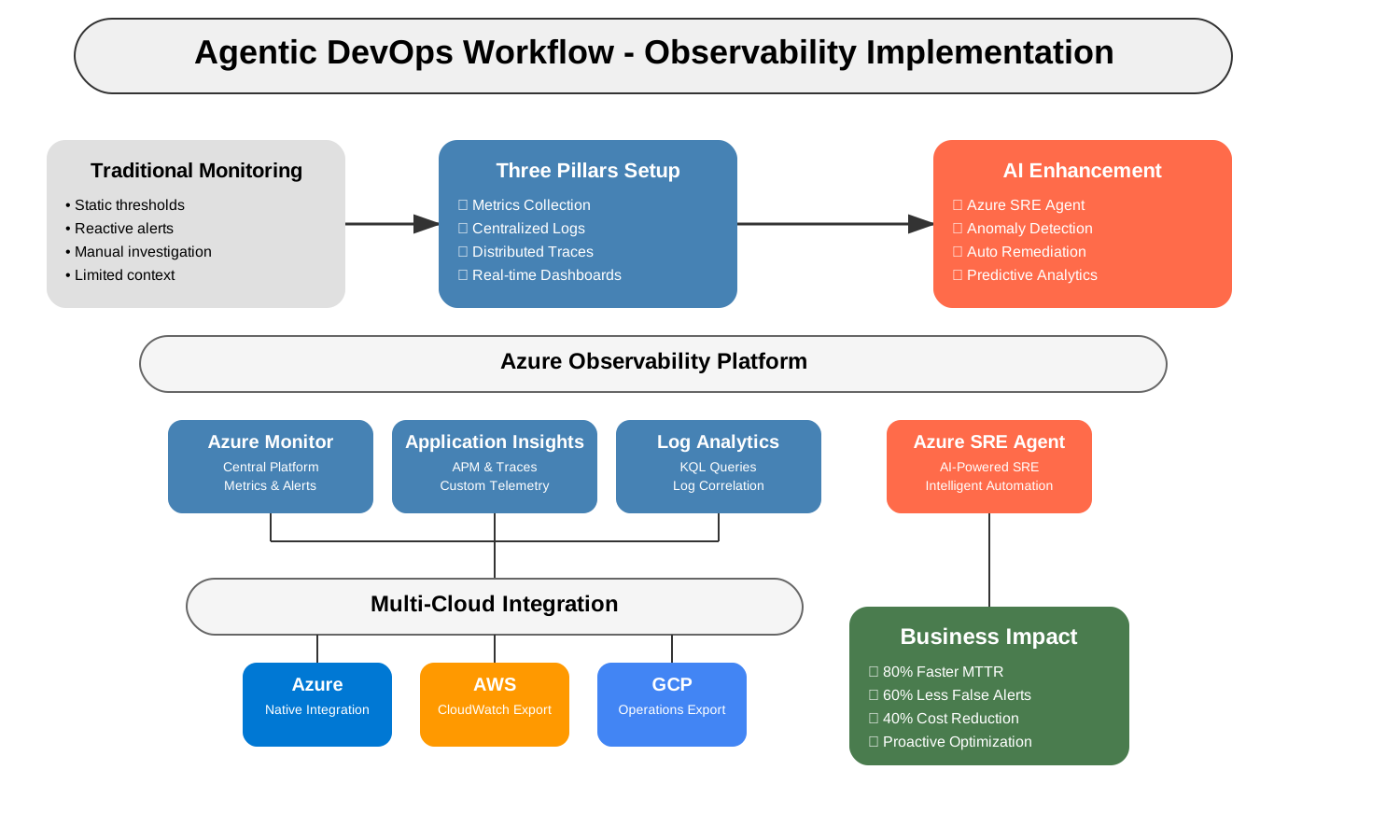
Agentic DevOps Workflow - Observability Implementation
🌐 Official Workshop Website: agentic-ops.dev
📖 The Journey to AI-Enhanced Observability
Welcome to the Azure AI Ops Observability Workshop! This repository takes you on a transformative journey from traditional monitoring to the world of AI-assisted observability and agentic DevOps.
As a cloud engineer in today's distributed systems environment, you face a critical challenge: traditional monitoring only shows you what's wrong, not why or how to fix it. According to the observability introduction:
- Traditional monitoring approaches only catch problems you anticipated
- High alert fatigue leads to missed critical issues (false positives)
- Difficult to correlate issues across distributed microservices
- Reactive troubleshooting instead of proactive optimization
This workshop provides hands-on guidance to implement modern observability using the three pillars approach - metrics, logs, and traces - enhanced with AI capabilities. We'll demonstrate how Azure SRE Agent and other advanced tools can transform your monitoring strategy.
"Observability is not about the data you collect, but about the questions you can answer with that data."
📋 Workshop Structure
The workshop is organized into progressive modules, allowing you to choose the depth of coverage based on your time and experience:
| Level | Duration | Focus | Best For |
|---|---|---|---|
| Essential | 2 hours | Core concepts and setup | Beginners, time-constrained sessions |
| Standard | 4 hours | Complete implementation | Intermediate users, standard workshops |
| Advanced | 8+ hours | Enterprise-scale solutions | Experienced practitioners, deep dives |
🗺️ Learning Path
Module 1: Introduction to Observability
- Foundation concepts and technologies
- The three pillars: Metrics, Logs, and Traces
- Azure observability ecosystem overview
Module 2: Beginning Your Observability Journey
- Workshop preparation and account setup
- Creating your first monitoring solution
- Exploring Azure Monitor fundamentals
Module 3: Building Dashboards and Alerts
- Creating custom dashboards
- Setting up intelligent alerts
- Using GitHub Copilot for monitoring queries
Module 4: Advanced Application Insights
- Distributed tracing across microservices
- Custom telemetry and business metrics
- Advanced performance monitoring
Module 5: Multi-Cloud Integration
- Monitoring across Azure, AWS, and GCP
- Centralized observability platform
- Cross-cloud correlation and insights
Module 6: AI-Enhanced Monitoring
- Azure SRE Agent implementation
- Intelligent incident detection and response
- Predictive analytics and anomaly detection
Module 7: Enterprise Implementation
- Scalable observability architecture
- Governance and compliance monitoring
- Cost optimization strategies
Module 8: Hands-On Challenge Labs
- Real-world troubleshooting scenarios
- End-to-end implementation exercises
- Performance optimization tasks
Troubleshooting Guide
- Common issues and solutions
- Advanced debugging techniques
- Performance optimization strategies
🔑 Prerequisites
Required Accounts
- Create Azure Free Account
- GitHub account with GitHub Copilot Free
- Access to Azure SRE Agent preview
- Download VS Code
Technical Requirements
- Development environment: VS Code, Azure CLI, Git
- Basic understanding of cloud services
- Familiarity with Azure fundamentals
🛠️ Getting Started
Want to start learning immediately? Use our complete automation:
1. **Fork and Clone this Repository**
git clone https://github.com/YourUsername/Agentic-Ops-Dev.git
cd Agentic-Ops-Dev

2. **Deploy Everything Automatically (10-15 minutes)**
cd resources
./quick-start.sh deploy YOUR_AZURE_SUBSCRIPTION_ID

3. **Start Learning with Full Environment**
./quick-start.sh start
🌟 Key Features
- Complete Automation: One-command deployment with
/resources/quick-start.sh - Infrastructure as Code: Production-ready Terraform configurations in
/resources/terraform/ - Ready-to-Use Applications: Sample apps with full telemetry in
/resources/applications/ - Pre-Built Dashboards: Grafana dashboards automatically deployed from
/resources/kubernetes/ - Helper Scripts: Port-forwarding, load generation, and utilities in
/resources/scripts/helpers/ - AI-Enhanced Monitoring: Learn to implement Azure SRE Agent for intelligent observability
- Multi-Cloud Coverage: Build unified monitoring across Azure, AWS, and GCP
- Real-World Scenarios: Practice with authentic production-like challenges
- Progressive Learning: Start from basics and advance to enterprise-scale solutions
- GitHub Copilot Integration: Use AI to write monitoring queries and troubleshoot issues
🔗 Related Repositories
AI Code Development
Complete workshop for leveraging AI tools like GitHub Copilot to optimize and improve code quality in enterprise environments. Learn advanced AI-assisted workflows, refactoring techniques, and best practices for integrating AI tools into development processes.
Secure Code AI Development
Comprehensive workshop for implementing secure coding practices using AI-powered tools, GitHub Advanced Security, and modern DevSecOps workflows. Learn to shift-left security, reduce vulnerabilities significantly, and achieve enterprise-grade security compliance with AI assistance.
Agentic Operations & Observability (This Workshop)
Hands-on workshop for implementing comprehensive observability solutions using Azure Monitor, Application Insights, and AI-powered tools. Learn to build modern monitoring systems, implement AI-enhanced observability, and create intelligent DevOps practices for cloud applications.
Design-to-Code Development
Comprehensive workshop for implementing design-to-code workflows using AI-powered tools, Figma integration, and modern development practices. Learn to bridge the gap between design and development, creating consistent and maintainable user interfaces with intelligent automation.
Figma-to-Code Development
Hands-on workshop for transforming Figma designs into production-ready code using GitHub Copilot Agent Mode and AI-powered tools. Learn to convert sophisticated designs into fully functional applications, achieving significant time reduction in development cycles with enterprise-grade features.
👤 Credits
This Azure AI Ops Observability Workshop was developed by Paula Silva, Developer Productivity Global Black Belt at Microsoft Americas. The workshop provides a comprehensive approach to implementing AI-enhanced observability solutions for modern cloud applications.


