


mcp-vision by 
A Model Context Protocol (MCP) server exposing HuggingFace computer vision models such as zero-shot object detection as tools, enhancing the vision capabilities of large language or vision-language models.
This repo is in active development. See below for details of currently available tools.
Installation
Clone the repo:
git clone git@github.com:groundlight/mcp-vision.git
Build a local docker image:
cd mcp-vision
make build-docker
Configuring Claude Desktop
Add this to your claude_desktop_config.json:
If your local environment has access to a NVIDIA GPU:
"mcpServers": {
  "mcp-vision": {
    "command": "docker",
    "args": ["run", "-i", "--rm", "--runtime=nvidia", "--gpus", "all", "mcp-vision"],
	"env": {}
  }
}
Or, CPU only:
"mcpServers": {
  "mcp-vision": {
    "command": "docker",
    "args": ["run", "-i", "--rm", "mcp-vision"],
	"env": {}
  }
}
When running on CPU, the default large-size object detection model make take a long time to laod and run inference. Consider using a smaller model as DEFAULT_OBJDET_MODEL (you can tell Claude directly to use a specific model too).
(Beta) It is possible to run the public docker image directly without building locally, however the download time may interfere with Claude's loading of the server.
"mcpServers": {
  "mcp-vision": {
    "command": "docker",
    "args": ["run", "-i", "--rm", "--runtime=nvidia", "--gpus", "all", "groundlight/mcp-vision:latest"],
	"env": {}
  }
}
Tools
The following tools are currently available through the mcp-vision server:
- locate_objects
- Description: Detect and locate objects in an image using one of the zero-shot object detection pipelines available through HuggingFace (list for reference [https://huggingface.co/models?pipeline_tag=zero-shot-object-detection&sort=trending]).
- Input:
image_path(string) URL or file path,candidate_labels(list of strings) list of possible objects to detect,hf_model(optional string), will use"google/owlvit-large-patch14"by default, which could be slow on a non-GPU machine - Returns: List of dicts in HF object-detection format
- zoom_to_object
- Description: Zoom into an object in the image, allowing you to analyze it more closely. Crop image to the object bounding box and return the cropped image. If many objects are present in the image, will return the 'best' one as represented by object score.
- Input:
image_path(string) URL or file path,label(string) object label to find and zoom and crop to,hf_model(optional), will use"google/owlvit-large-patch14"by default, which could be slow on a non-GPU machine - Returns: MCPImage or None
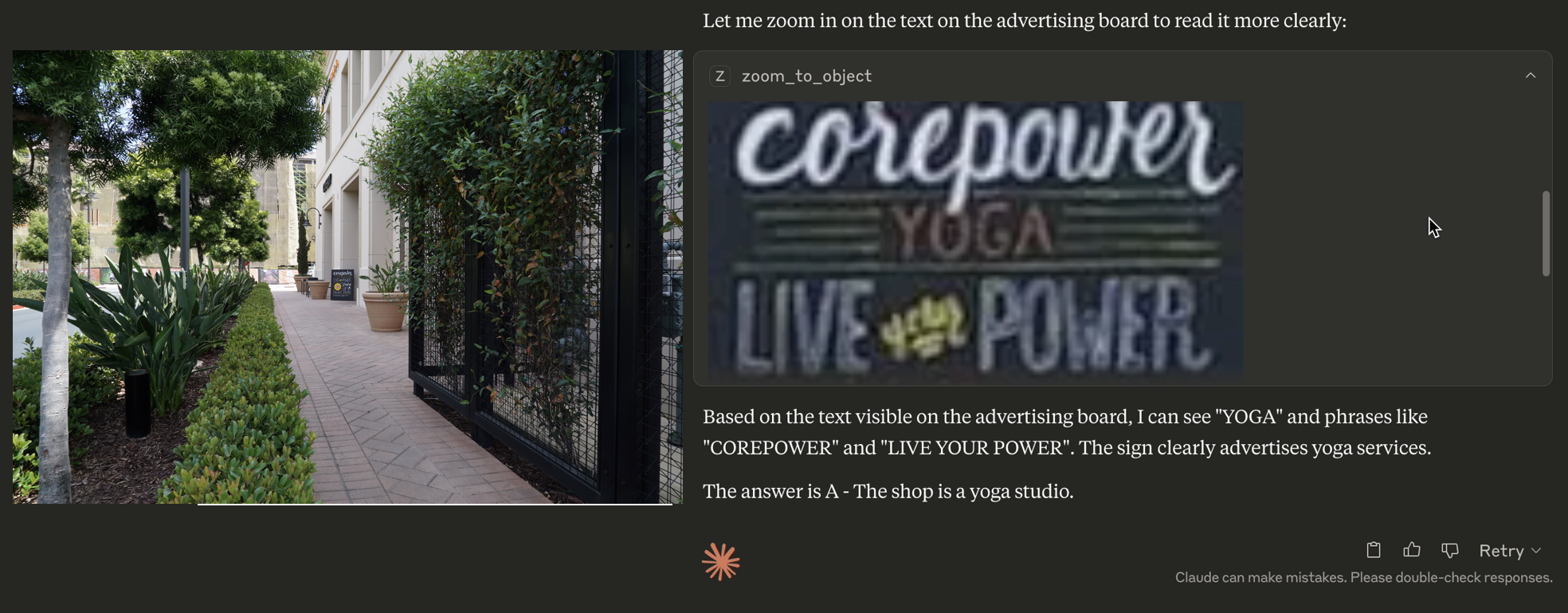
Example in blog post and video
Run Claude Desktop with Claude Sonnet 3.7 and mcp-vision configured as an MCP server in claude_desktop_config.json.
The prompt used in the example video and blog post was:
From the information on that advertising board, what is the type of this shop?
Options:
The shop is a yoga studio.
The shop is a cafe.
The shop is a seven-eleven.
The shop is a milk tea shop.
The image is the first image in the V*Bench/GPT4V-hard dataset and can be found here: https://huggingface.co/datasets/craigwu/vstar_bench/blob/main/GPT4V-hard/0.JPG (use the download link).
Note:
- If you upload the image directly into the conversation with Claude instead of providing a download link, it will not be able to call the tools and will attempt to answer directly.
- On accounts that have web search enabled, Claude will prefer to use web search over local MCP tools AFAIK. Disable web search for best results.
Development
Run locally using the uv package manager:
uv install
uv run python mcp_vision
Build the Docker image locally:
make build-docker
Run the Docker image locally:
make run-docker-cpu
or
make run-docker-gpu
[Groundlight Internal] Push the Docker image to Docker Hub (requires DockerHub credentials):
make push-docker
Troubleshooting
If Claude Desktop is failing to connect to mcp-vision:
- Check the configuration is correct (CPU vs GPU)
- Developer options may need to be enabled in Claude Desktop
- Depending on the size of the model(s) used, give it a few minutes to download them from HuggingFace on first opening Claude Desktop. Once downloaded, the server will respond and Claude will connect.
On accounts that have web search enabled, Claude will prefer to use web search over local MCP tools AFAIK. Disable web search for best results.
TODO
- Host best models online instead of requiring local download
- Add more tools


