
READMEmain
We couldn't render this README. Read it on GitHub
VS Code Web Search MCP Server
This MCP (Model Context Protocol) server provides web search capabilities using the OpenAI 4o search LLM.
It allows LLMs to access up-to-date information from the web through a standardized interface.
Features
- Native PowerShell MCP server
- Web search using OpenAI 4o search LLM
- Integration with VS Code for easy access
Prerequisites
- PSMCP module
- PSAiSuite module
- OpenAI API key
Installation & Setup
-
Clone the repository:
git clone https://github.com/yourusername/vscode-search-mcp.git -
Install dependencies:
Install-Module -Name PSMCP, PSAiSuite -
To use OpenAI Search you will need to create an account. After logging in, go to the API Keys section in your account settings and generate a new key. Once you have your key, add it to your environment as follows:
$env:OpenAIKey = "your-openai-api-key"
Running the MCP Server using VS Code
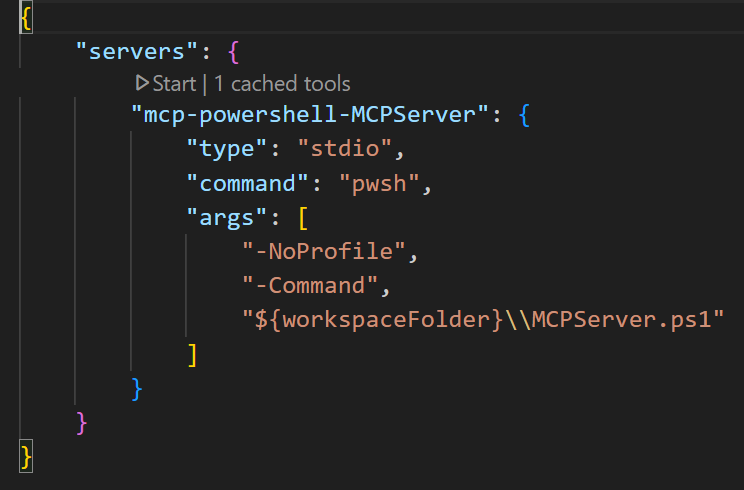
- The MCP server is configured using a JSON file
mcp.jsonfile in the.vscodedirectory. server configuration.
After opening the cloned repository in VS Code, you can start the MCP server by clicking Start at the top of the configuration file.
Launch Copilot:
- Start the server
- Click the
toggle chaticon in the top right corner of the window to open the copilot chat interface. - Set the Copilot
modetoAgentin the bottom right corner of the window.
VS Code Copilot should be able to find the search mcp server.


