
SAMSONAI
Get workout recommendations directly in your inbox
Logo

Arch Diagram
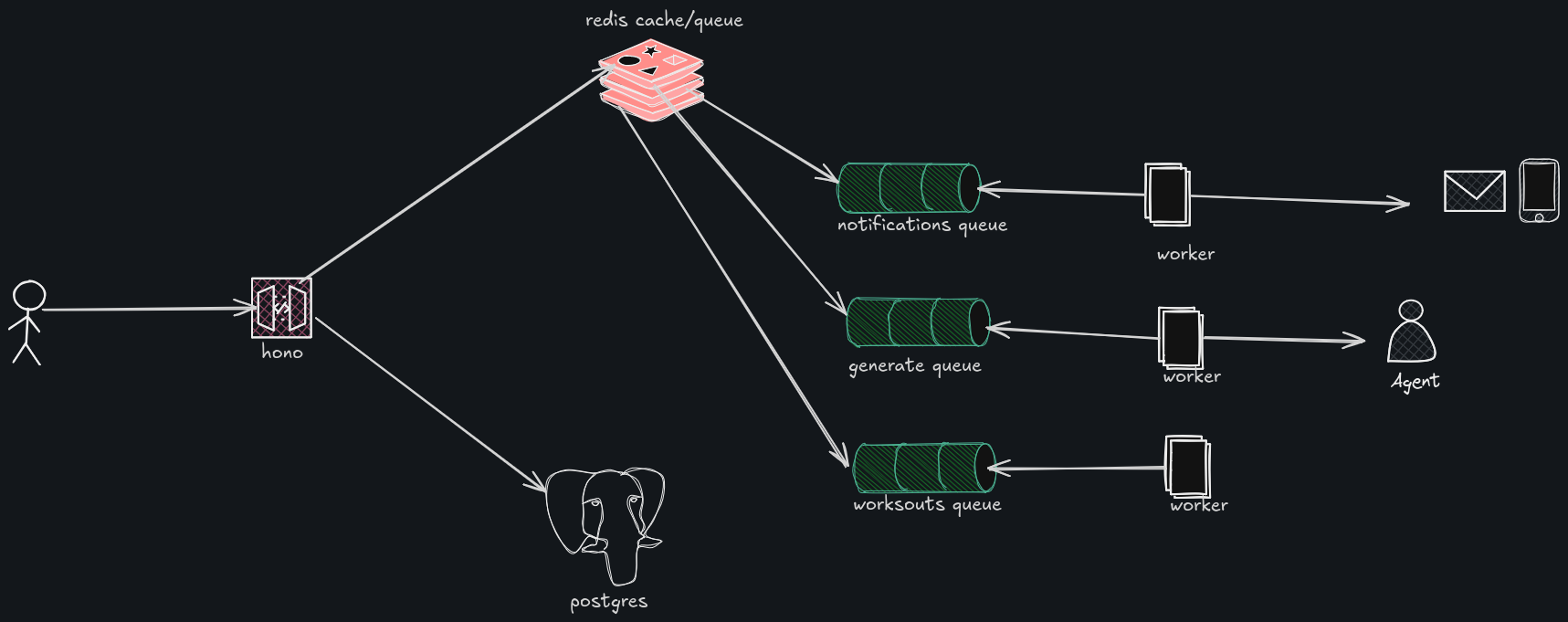
Set up
This project has Backend, Frontend, Shared, Email and AI monorepos set up using bun workspaces.
To get it started, from the main folder, run bun run backend:dev and bun run frontend:dev.
These commands are located in the package.json and start both the frontend and the backend. To start the AI agent run bun run ai:dev.
You can run tests with bun run test which will run both FE and BE tests.
Environment
You will need some environment variables to make sure everything works.
Find the env.example files in each of the monorepos.
Steps
Setting up the agent
cd into the ai folder and create a .env file and add a variable GOOGLE_GENERATIVE_AI_API_KEY=
Set it to your gemini api key. Feel free to change the model just change the default model in src/mastra/agents/samson.ts to another provider.
Check out Mastra's Documentation for more details.
Setting up the backend
cd into the backend folder and create a .env file. Copy the contents of the .env.example file into it and fill out the variables with your own.
e.g. below:
DATABASE_URL— your database url, e.g a supabase / planetscale url.BETTER_AUTH_SECRET— a secret used to encode tokens. This should be random and can be anything.BETTER_AUTH_URL— where your server is running + api/auth e.ghttp://localhost:3000/api/auth.GOOGLE_CLIENT_ID— for authentication, your google client id. See https://better-auth.com/docs/authentication/google.GOOGLE_CLIENT_SECRET— your google client secret.LOCALDOMAIN— where your FE is running e.ghttp://localhost:5173, used for CORS.REDIS_SECRET— set this up however you choose to. I am using upstash, and I have this in the coderediss://default:${Bun.env.REDIS_SECRET}@bursting-hagfish-32927.upstash.io:6379.SAMSON_URL— url where your agent is running e.ghttp://localhost:6666.RESEND_API_KEY— resend api key. We use resend to send emails. Check resend for how to set this up. See https://resend.com/.TEST_DOMAIN— resend email test domain.SAMSON_PROMPT— you can add prompts here.
Setting up the frontend
VITE_APP_URL— frontend url, i.e where Vite starts your dev server.VITE_API_URL— where your hono api is running e.ghttp://localhost:3000.VITE_WS_URL— websocket url e.ghttp://localhost:3000.VITE_SAMSON_URL— where your agent is running e.ghttp://localhost:4111.



