
READMEmain
We couldn't render this README. Read it on GitHub
Ghidra逆向
9月20日更新说明
- 新增了图形界面工具,提供更友好的用户交互体验
- 支持通过GUI配置API密钥、模型参数和处理选项
- 实现了任务进度可视化和实时日志显示
- 添加了配置文件管理功能,可以保存和切换多套配置
- 优化了批量处理逻辑,提高了重命名的稳定性和效率
UI工具使用说明
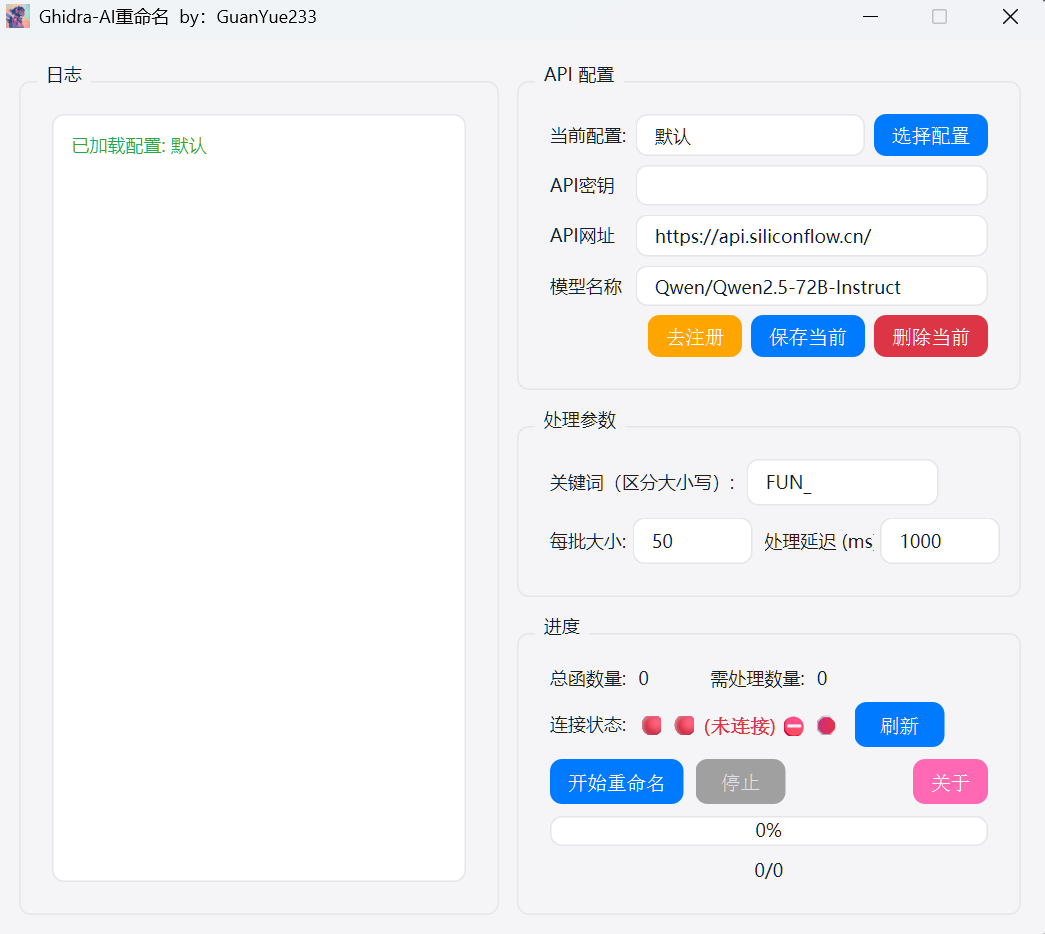
UI目录下提供了一个图形界面工具,可以更方便地配置和运行重命名任务。
打包方式
在UI目录下提供了PowerShell脚本 build.ps1用于打包GUI应用程序。该脚本会使用PyInstaller将Python代码打包成Windows可执行文件。
打包步骤:
确保已安装Python 3.10+和pip在UI目录下运行以下命令安装依赖:pip install -r requirements.txt- 运行打包脚本:
.\build.ps1 - 打包完成后,可执行文件将位于
dist/Ghidra-AI-Rename-GUI/目录下
使用方法
- 运行打包好的
Ghidra-AI-Rename-GUI.exe文件 - 在API配置区域填写以下信息:
- API密钥:硅基流动平台的API密钥(没有可以点击"去注册")
- API网址:默认为
https://api.siliconflow.cn/ - 模型名称:默认为
Qwen/Qwen2.5-72B-Instruct
- 在处理参数区域配置:
- 关键词:要重命名的函数名模式,默认为
FUN_ - 每批大小:每次处理的函数数量,默认为50
- 处理延迟:每次处理后的延迟时间(毫秒),默认为1000
- 关键词:要重命名的函数名模式,默认为
- 点击"刷新"按钮检查与Ghidra的连接状态
- 点击"开始重命名"按钮启动重命名任务
- 可随时点击"停止"按钮中断任务
基于GhidraMcp的快速逆向脚本(非GUI版本)
使用qwen7b的高速处理性,批量进行函数重命名。再导出文件便于ai解析。 逆向重写推荐cursor,记得给cursor配置MCP服务。
项目要求:python>3.10
在脚本目录下运行 pip install -r requirements.txt
Ghidra下载:https://github.com/NationalSecurityAgency/ghidra
JDK21+下载:https://www.oracle.com/java/technologies/javase/jdk21-archive-downloads.html
樱桃下载:https://www.cherry-ai.com/download
已知樱桃1.2.8-1.2.9的MCP服务器功能有bug,请下载1.2.10或更新的版本
Ghidra安装MCP插件:
https://github.com/user-attachments/assets/75f0c176-6da1-48dc-ad96-c182eb4648c3
使用说明
208行 SK-XXXXXX改为自己的硅基流动密钥,然后运行ai_先运行仅重命名.py 等待所有的FUN_xxxx函数重命名结束后,再运行ai_再运行文件保存.py 然后配置樱桃或者cursor的MCP进行分析即可。 MCP配置中用到的python路径填已经装了依赖的路径,另一个填bridge_mcp_ghidra.py 的路径。
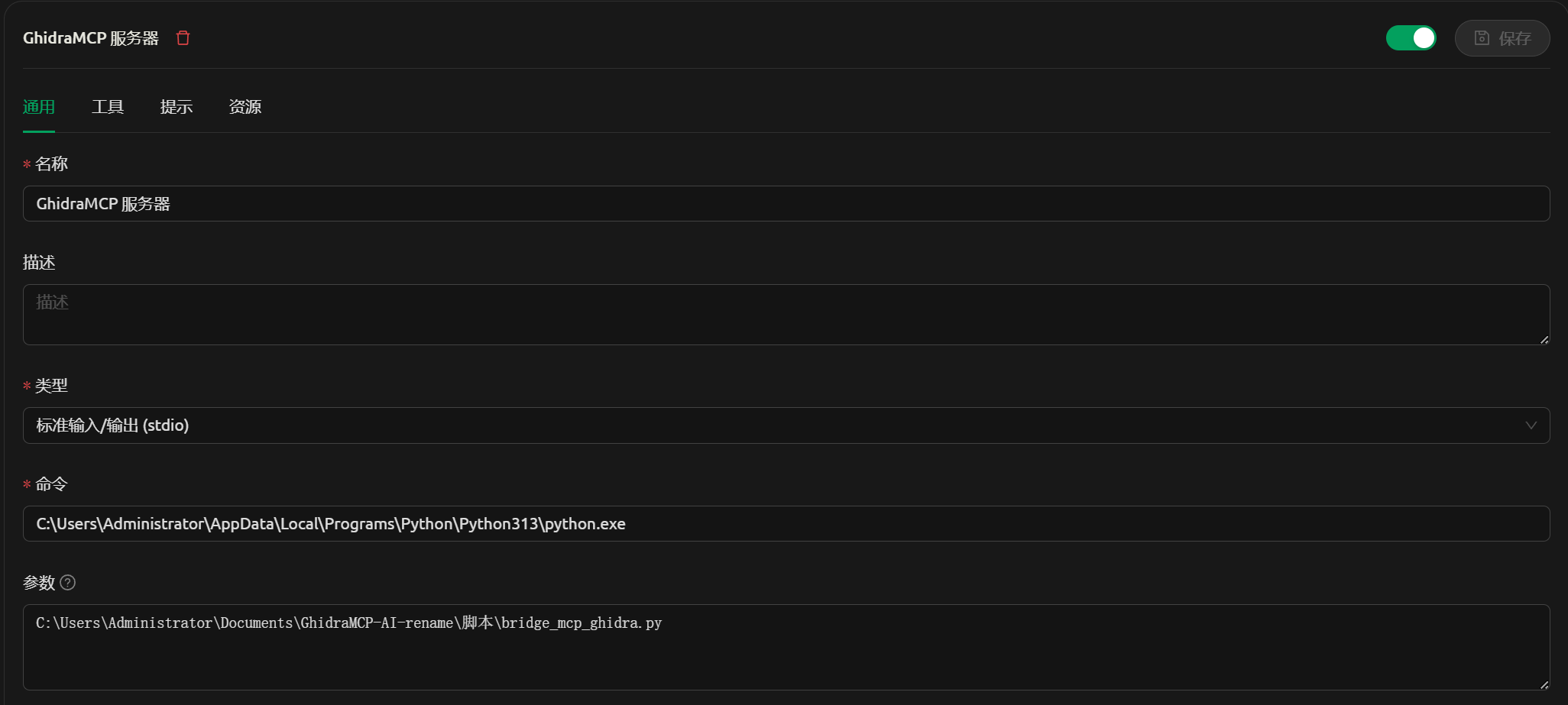
樱桃配置
command填写python路径,并使用双反斜杠,args填写bridge_mcp_ghidra.py的路径.
VS code 的cline配置
command填写python路径,并使用双反斜杠,args填写bridge_mcp_ghidra.py的路径.
{
  "mcpServers": {
    "GhidraMCP": {
      "name": "GhidraMcp",
      "type": "stdio",
      "description": "",
      "isActive": true,
      "command": "C:\\Users\\Administrator\\AppData\\Local\\Programs\\Python\\Python313\\python.exe",
      "args": [
        "C:\\Users\\Administrator\\Documents\\GhidraMCP-AI-rename\\脚本\\bridge_mcp_ghidra.py"
      ],
      "disabled": false,
      "autoApprove": [
        "list_imports"
      ]
    }
  }
}
Cursor配置:
command填写python路径,并使用双反斜杠,args填写bridge_mcp_ghidra.py的路径.
{
  "mcpServers": {
    "GhidraMcp": {
      "name": "GhidraMcp",
      "type": "stdio",
      "description": "",
      "isActive": true,
      "command": "C:\\Users\\Administrator\\AppData\\Local\\Programs\\Python\\Python313\\python.exe",
      "args": [
        "C:\\Users\\Administrator\\Downloads\\Compressed\\ghidra_11.3.1_PUBLIC_20250219\\bridge_mcp_ghidra.py"
      ]
    }
  }
}
小工具
需要远程协助配置请发送邮件到:
666888@guanyue.fun


