
READMEmain
We couldn't render this README. Read it on GitHub
News Agents
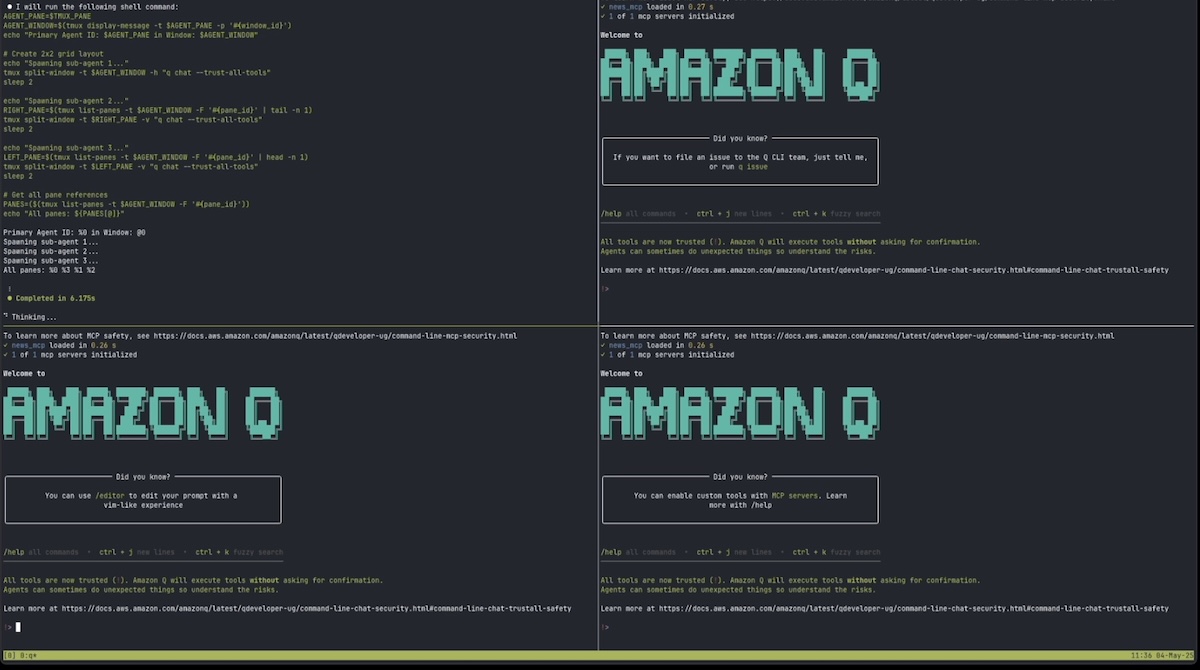
A little experiment with Amazon Q, Model Context Protocol (MCP), and tmux to create a news aggregation system that runs entirely in your terminal. It fetches and summarizes articles from various news sources using multiple agents working in parallel.
Also read the write-up here, and click the image below for 3-minute demo on YouTube.
What's This All About?
This project is me playing around with:
- Amazon Q CLI as agent harness
- MCP to parse RSS feeds as tools
- tmux for terminal splitting and monitoring
The system grabs news from several sources like Hacker News, TechCrunch, and WSJ, then summarizes everything into nice readable digests, all in your terminal window.
Getting Started
Setting Up Amazon Q
- Follow the official guide to install Amazon Q CLI
- Set up your AWS credentials
- Make sure it's working:
q --version
Clone repo and run it
git clone https://github.com/eugeneyan/news-agents.git

cd news-agents
uv sync  # Sync dependencies
uv tree  # Check httpx and mcp[cli] are installed

q chat --trust-all-tools  # Start Q

/context add --global context/agents.md  # Add system context for multi-agents

Q, read context/main-agent.md and spin up sub agents to execute it.  # Start main agent
The system will start doing its thing: Splitting into multiple agents and processing news feeds in parallel using tmux panes to keep everything visible.
How It Works
Main Agent
- Grabs feed URLs from
feeds.txt - Splits them into 3 equal chunks
- Spawns 3 sub agents in separate tmux panes
- Keeps an eye on everyone's progress
- Collects all the summaries at the end
Sub Agents
- Each gets assigned several feeds
- For each feed they:
- Pull down the content
- Parse out the articles
- Write up summaries
- Save them to
summaries/[feed-name].md
- When done, they report back to the main agent
The Whole Process Looks Like This
Main Agent (in the main tmux pane)
├── Read feeds.txt
├── Split feeds into 3 chunks
├── Create 3 Sub-Agents (in separate tmux panes)
│   ├── Sub-Agent #1
│   │   ├── Process feeds in chunk 1
│   │   └── Report back when done
│   ├── Sub-Agent #2
│   │   ├── Process feeds in chunk 2
│   │   └── Report back when done
│   └── Sub-Agent #3
│       ├── Process feeds in chunk 3
│       └── Report back when done
└── Combine everything into main-summary.md
What You Get
- Individual summaries in the
summaries/folder - One big summary in
main-summary.md - A cool demonstration of agents working together in your terminal
Debugging MCP
uv run mcp dev src/main.p
Project Files
.
├── context/           # Instructions for the agents
├── src/               # Code for processing each feed type
│   ├── ainews.py      # AI News stuff
│   ├── hackernews.py  # Hacker News stuff
│   ├── techcrunch.py  # TechCrunch stuff
│   ├── wired.py       # Wired stuff
│   └── wsj.py         # Wall Street Journal stuff
└── summaries/         # Where all the summaries end up


