








Website & documentation: mcpx.yktmr.jp — overview, API reference, and an MC protocol guide.
McpX is a library for communicating with Mitsubishi Electric PLCs using the MC protocol.
It features a simple and easy-to-use API, allowing you to communicate without worrying about MC protocol details.
It runs on various platforms, including Linux, Windows, and macOS.
Upgrading from 0.x? See the migration guide.
Installation
.NET CLI
dotnet add package McpX
Package Manager(Visual Studio)
PM> NuGet\Install-Package McpX
Example Usage
using McpXLib;
using McpXLib.Enums;

// Connect to the PLC (TCP / binary code / 3E frame / MELSEC-Q/L series by default)
using var mcpx = McpX.Connect("192.168.12.88", 10000);

// Read 7000 points starting from M0 (requests over the limit are split automatically)
bool[] mArr = mcpx.BatchRead<bool>(Prefix.M, "0", 7000);

// Read 7000 words starting from D1000
short[] dArr = mcpx.BatchRead<short>(Prefix.D, "1000", 7000);

// Write 1234 to D0-D1 and 5678 to D2-D3 as signed 32-bit integers
mcpx.BatchWrite<int>(Prefix.D, "0", [1234, 5678]);

// Read a range and single devices together (ranges: batch access, single: random access)
short[] block = [];
int total = 0;
mcpx.Read(b => b
    .Add<short>(Prefix.D, "400", 100, v => block = v)
    .Add<int>(Prefix.D, "2000", v => total = v));
Every method has an async version that takes a CancellationToken:
await using var mcpx = await McpX.ConnectAsync("192.168.12.88", 10000, cancellationToken);
short d0 = await mcpx.ReadAsync<short>(Prefix.D, "0", cancellationToken);
C# and Visual Basic samples are available here.
Connection Settings
Pass McpXOptions to McpX.Connect / McpX.ConnectAsync to match the PLC parameters.
using var mcpx = await McpX.ConnectAsync(new McpXOptions
{
    Host = "192.168.12.89",
    Port = 5007,
    ProcessorSeries = ProcessorSeries.iQR,  // MELSEC iQ-R series (extended device specification)
    RequestFrame = RequestFrame.E4,
    IsAscii = false,
    IsUdp = false,
    Timeout = TimeSpan.FromSeconds(3),
    Password = "1234",                      // remote password (unlocked on connect, locked on dispose)
});
| Property | Description | Default |
|---|---|---|
Host | IP address or host name of the PLC | (required) |
Port | Port number (1–65535) | (required) |
Password | Remote password. Unlocked on connect and locked on Dispose / DisposeAsync | null |
IsAscii | true for ASCII code, false for binary code | false |
IsUdp | true for UDP, false for TCP | false |
RequestFrame | RequestFrame.E3 (3E frame) / RequestFrame.E4 (4E frame) | E3 |
ProcessorSeries | ProcessorSeries.Q (MELSEC-Q/L device specification) / ProcessorSeries.iQR (MELSEC iQ-R extended device specification) | Q |
Timeout | Timeout for connecting and for each request. Timeout.InfiniteTimeSpan for no timeout | 5 s |
UseMultiBlockAccess | Use multiple block access (commands 0406 / 1406) for the ranges of the combined Read / Write | false |
Route | Access route to another station or CPU (see below) | own station |
Accessing Other Stations
Specify McpXRoute (network No., PC No., request destination module I/O No. and station No.) to access another station on the network or another CPU of a multiple CPU system.
// Station with network No. 1 / PC No. 2
var options = new McpXOptions { Host = "192.168.12.89", Port = 5007, Route = new McpXRoute(networkNo: 1, pcNo: 2) };

// CPU No. 2 of the multiple CPU system the connected module belongs to
options.Route = McpXRoute.ForCpu(2);
Connecting to GX Simulator3
McpXSimulator connects to GX Simulator3 (the simulation function of GX Works3) by system No. and CPU No.
The port is 5500 + system No. × 10 + CPU No. (e.g. system 1 / CPU 1 = 5511, system 2 / CPU 1 = 5521).
Connect once per simulator to connect to several simulators at the same time. The returned object is a regular McpX.
using var sim1 = McpXSimulator.Connect();                                   // 127.0.0.1:5511 (system 1 / CPU 1)
using var sim2 = McpXSimulator.Connect(systemNo: 2, host: "192.168.12.90"); // 192.168.12.90:5521
using var cpu2 = await McpXSimulator.ConnectAsync(systemNo: 1, cpuNo: 2);   // 127.0.0.1:5512 (CPU No.2 of a multiple CPU system)

// To change other settings, start from CreateOptions
var options = McpXSimulator.CreateOptions(systemNo: 1, cpuNo: 1);
options.Timeout = TimeSpan.FromSeconds(10);
using var sim3 = McpX.Connect(options);
GX Simulator3 listens on 127.0.0.1 only. To connect from another PC, forward each port to 127.0.0.1 on the simulator PC (e.g. netsh interface portproxy).
Communication is TCP / binary code only (GX Simulator3 does not respond to ASCII code).
Supported Commands
Every async method also takes an optional CancellationToken.
| Name | Description | Synchronous Method | Asynchronous Method |
|---|---|---|---|
| Single Read | Reads a single value from the specified device. | Read<T>(Prefix prefix, string address) | ReadAsync<T>(Prefix prefix, string address) |
| Single Write | Writes a single value to the specified device. | Write<T>(Prefix prefix, string address, T value) | WriteAsync<T>(Prefix prefix, string address, T value) |
| Batch Read | Reads multiple consecutive values starting from the specified address. | BatchRead<T>(Prefix prefix, string address, int length) | BatchReadAsync<T>(Prefix prefix, string address, int length) |
| Batch Write | Writes an array of values to consecutive device addresses. | BatchWrite<T>(Prefix prefix, string address, T[] values) | BatchWriteAsync<T>(Prefix prefix, string address, T[] values) |
| Random Read | Reads values from non-consecutive devices (bit / word / double-word). | RandomRead(Action<RandomReadBuilder> build) | RandomReadAsync(Action<RandomReadBuilder> build) |
| Random Write | Writes values to non-consecutive devices (bit / word / double-word). | RandomWrite(Action<RandomWriteBuilder> build) | RandomWriteAsync(Action<RandomWriteBuilder> build) |
| Monitor Registration | Registers devices to monitor and returns a MonitorSession. | MonitorRegister(Action<MonitorBuilder> build) | MonitorRegisterAsync(Action<MonitorBuilder> build) |
| Monitor Read | Reads the latest values of registered devices via the returned session. | MonitorSession.Read() | MonitorSession.ReadAsync() |
| Combined Read | Reads consecutive ranges (with a point count) and single devices together; ranges use batch access (multiple block read for several ranges when UseMultiBlockAccess is enabled), single devices use random access. | Read(Action<ReadBuilder> build) | ReadAsync(Action<ReadBuilder> build) |
| Combined Write | Writes consecutive ranges (arrays) and single devices together; arrays use batch access (multiple block write for several ranges when UseMultiBlockAccess is enabled), single values use random access. | Write(Action<WriteBuilder> build) | WriteAsync(Action<WriteBuilder> build) |
| Multiple Block Read | Reads multiple ranges (blocks) of consecutive devices in one request (command 0406). | BlockRead(Action<BlockReadBuilder> build) | BlockReadAsync(Action<BlockReadBuilder> build) |
| Multiple Block Write | Writes multiple ranges (blocks) of consecutive devices in one request (command 1406). | BlockWrite(Action<BlockWriteBuilder> build) | BlockWriteAsync(Action<BlockWriteBuilder> build) |
| String Read / Write | Reads / writes a Shift_JIS string. The read length is in words. | ReadString(Prefix prefix, string address, int wordLength) / WriteString(Prefix prefix, string address, string value) | ReadStringAsync(...) / WriteStringAsync(...) |
| Remote RUN / STOP / PAUSE | Changes the operating status of the CPU (commands 1001 / 1002 / 1003). | RemoteRun(bool force, RemoteRunClearMode clearMode) / RemoteStop() / RemotePause(bool force) | RemoteRunAsync(...) / RemoteStopAsync() / RemotePauseAsync(...) |
| Remote Latch Clear / RESET | Executes latch clear or reset (commands 1005 / 1006). Execute while the CPU is stopped. RemoteReset reconnects after the reset. | RemoteLatchClear() / RemoteReset(TimeSpan? reconnectTimeout) | RemoteLatchClearAsync() / RemoteResetAsync(...) |
| Remote Password Unlock / Lock | Unlocks the PLC with McpXOptions.Password when connecting and locks it when disposed (commands 1630 / 1631). | McpX.Connect(options) / Dispose() | McpX.ConnectAsync(options) / DisposeAsync() |
T can be bool, short, ushort, int, uint, float, long, ulong, double, byte and sbyte (byte / sbyte use one word each). Random access and monitoring support bool, short, ushort, int, uint and float.
Errors and Thread Safety
- A PLC error code throws
McProtocolException(ErrorCodehas the end code), an invalid address throwsDeviceAddressException, and a malformed response throwsReceivePacketException. They derive fromMcpXException. - A timeout throws
TimeoutException. After a timeout, communication error or cancellation over TCP, the connection is closed and later calls throwIOException; connect again. - Calling a method after
DisposethrowsObjectDisposedException. - A
McpXinstance can be called from several threads and tasks at the same time; requests are sent one at a time. An operation split into several requests (such as a large batch read) may be interleaved with other requests.
Supported PLCs and Protocols
| Item | Supported |
|---|---|
| PLC series | MELSEC iQ-R series (ProcessorSeries.iQR), MELSEC-Q/L series (ProcessorSeries.Q). Other models that support the 3E / 4E frame may also work but are not tested. |
| Transport | TCP, UDP |
| Frame | 3E frame, 4E frame |
| Code | Binary code, ASCII code |
| Simulator | GX Simulator3 |
PLC Parameter Settings
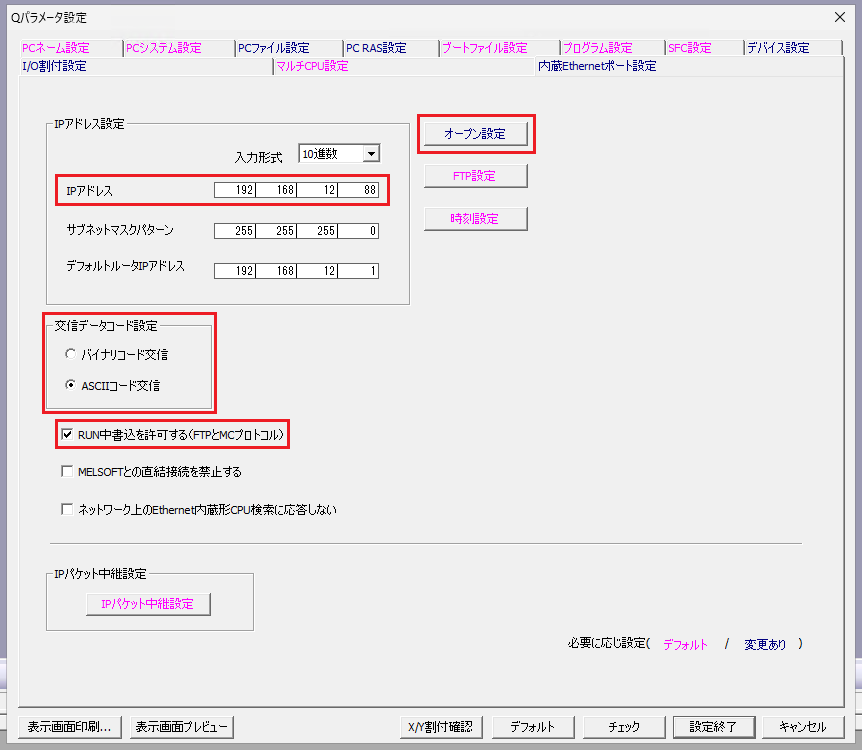
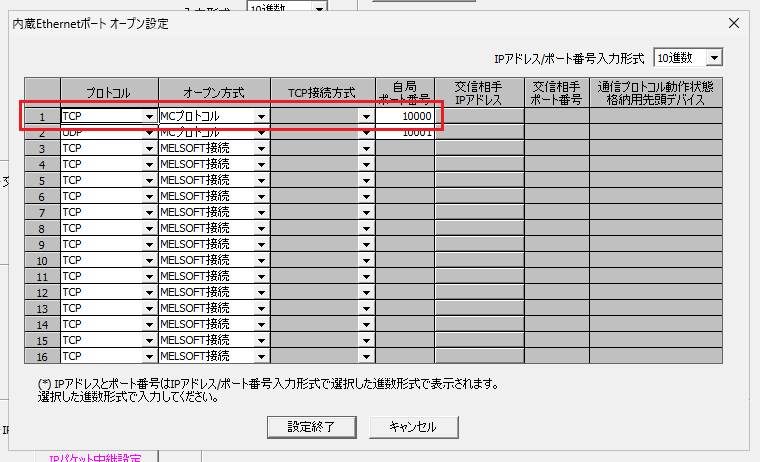
When using the built-in Ethernet port, set the parameters in GX Works3 as follows.
| Setting | Description | McpX connection setting (McpXOptions) |
|---|---|---|
| IP Address | The IP address of the PLC. | Set Host to the IP address of the PLC. |
| Communication Data Code | Binary or ASCII. | For ASCII, set IsAscii to true. |
| Enable online change (write during RUN) | Enable it to write to devices. | - |
| Protocol | TCP or UDP. | For UDP, set IsUdp to true. |
| Open System | MC Protocol. | - |
| Host Station Port No. | The port number to communicate on (1025 to 4999 or 5010 to 65534). | Set Port to the port number of the PLC. |
Versioning
McpX follows Semantic Versioning from 1.0.0. Breaking changes to the public API are made only in a major version.
Native Library (C ABI)
A native library (mcpx.dll / mcpx.so / mcpx.dylib) that exposes McpX as C functions. It does not require the .NET runtime and can be used from any language with an FFI, such as Python (ctypes) and Node.js (koffi). The native libraries are attached to each release.
The header is McpXInterop/include/mcpx.h. It supports single, batch, random and multiple block access, strings, monitoring and remote operations, and is built for Windows x64 / Linux x64 and arm64 / macOS arm64. Every function returns a status code (MCPX_OK = 0) and writes the details (including the PLC end code) to mcpx_error on failure.
#include "mcpx.h"

mcpx_connect_options options;
mcpx_connect_options_init(&options);
options.host = "192.168.12.88";
options.port = 10000;

mcpx_error err = { .struct_size = sizeof(mcpx_error) };
mcpx_client_t plc;
if (mcpx_connect(&options, &plc, &err) == MCPX_OK)
{
    int16_t values[10];
    if (mcpx_batch_read(plc, MCPX_PREFIX_D, "0", MCPX_TYPE_I16, 10, values, sizeof(values), &err) != MCPX_OK)
    {
        printf("%s\n", err.message);
    }
    mcpx_close(plc, &err);
}
Roadmap
-
3E frame (ASCII code) support -
4E frame (binary code) support -
4E frame (ASCII code) support -
UDP support -
GX Simulator support -
Access to other stations - Python / Node.js wrappers - In preparation
Changelog
Related
- mcpx-mcp-server An MCP(Model Context Protocol) server that enables real-time access to Mitsubishi Electric PLC devices from generative AI.


