
📓 cursor-notebook
A personal knowledge base and experimental playground for everything related to Cursor.
This includes custom rules, prompt engineering, MCP (Model Context Protocol), workflows, and productivity hacks.
A growing collection of insights, tools, snippets, and notes — part lab, part logbook.
✍️ Blog: How I Use MCP and Cursor Rules
Cursor has transformed the way I approach coding, and in this blog post, I want to share my personal workflow, the Model Context Protocol (MCP) servers I utilize, and how I've structured my Cursor rules to boost my productivity and coding efficiency.
⚙️ MCP Servers and Where to Get Them
One of Cursor's strengths lies in its extensibility through MCP servers. I found several incredibly useful MCP servers on Smithery.ai.
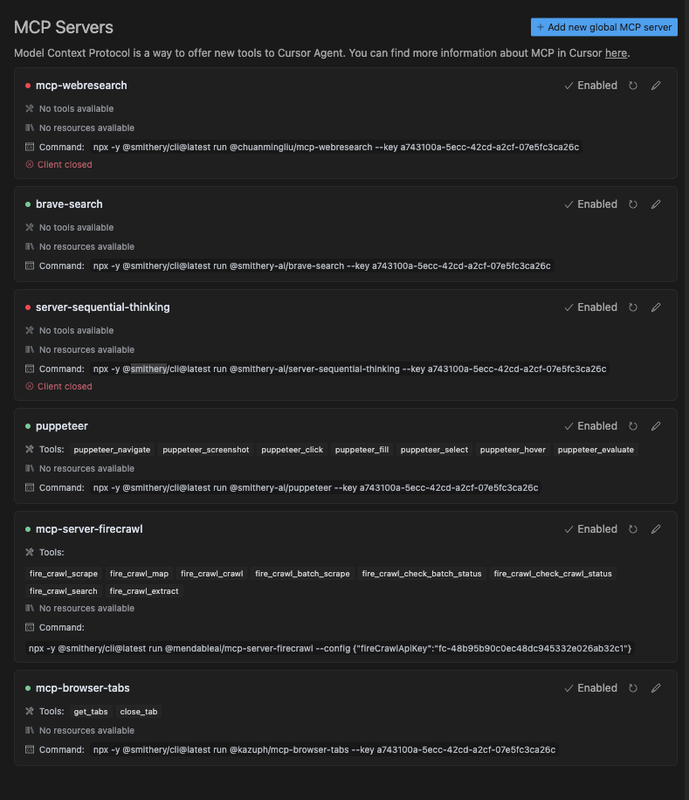
Here's a quick overview of the servers I rely on daily:
- 🔍 Brave Search – Powerful web search directly in Cursor.
- 🧠 Server Sequential Thinking – Great for structured logic and step-by-step workflows.
- 🤖 Puppeteer – Automates browser tasks, scraping, and web interaction.
- 🔥 Firecrawl – Excellent for scraping, mapping, and data extraction.
- 🗂️ Browser Tabs – Manage tabs programmatically for multitasking and flow.
📸 Here’s a snapshot of my current MCP server setup:
📚 Learning Resources for Cursor
Starting with Cursor can feel daunting, but these helped me tremendously:
- 📝 Nick Craux's blog post on Cursor tips – Packed with actionable insights.
- ⚙️ Trigger.dev’s guide to Cursor rules – A practical overview.
- 📘 Official Cursor documentation – The source of truth.
🧩 My Customized Cursor Rules Journey
I started by adopting the PRD-focused rule setup from
🎥 JeredBlu’s YouTube tutorial.
Then, I refined my rules further after reading
🧠 "AI Blindspots" by ezyang, which inspired me to address specific limitations in AI-assisted coding.
📄 Access My Complete Cursor Rules
All of my global rules are available in a single file:
➡️ coding-best-practices.mdc
Use it freely as a reference or starting point for your own rule set.
🛠️ Adding Project-Specific Rules
When starting a new project:
- I clarify the tech stack.
- I pull relevant Cursor rules from
🔗 awesome-cursorrules by PatrickJS.
This targeted method keeps my rules lean, relevant, and effective.
✅ Conclusion
Setting up Cursor effectively has:
- 🚀 Boosted my coding workflow
- 🧠 Increased clarity and efficiency
- 📈 Elevated the quality of AI-assisted output
I hope this helps you build your own powerful Cursor workflow!
Feel free to share your own tips — I’d love to learn from your journey too.


